SLAM



Overview#
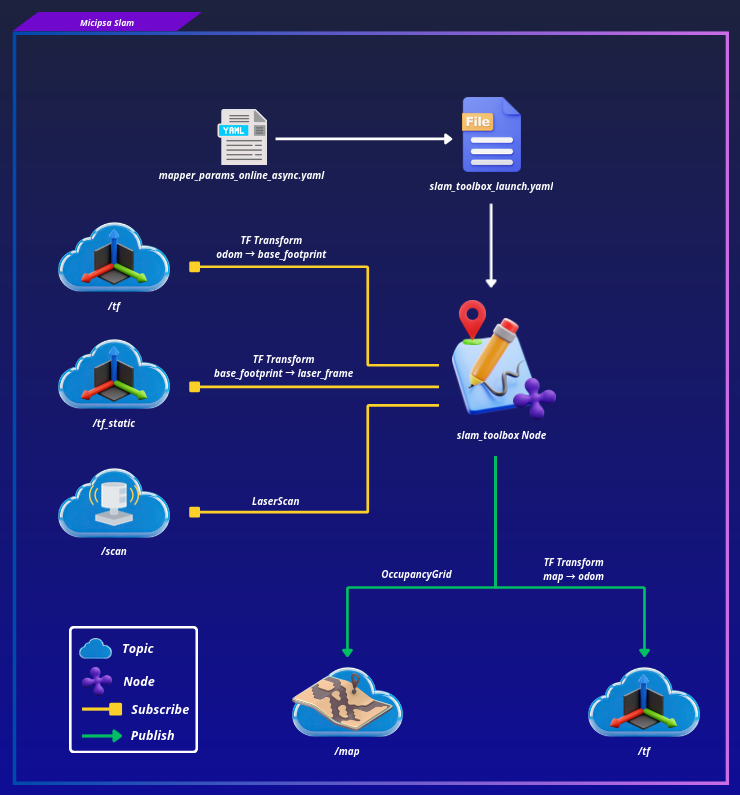
micipsa_slam is a ROS 2 package that configures and launches slam_toolbox in online asynchronous mode to perform 2D SLAM. It subscribes to 2D LiDAR scans on /scan and consumes the odom → base_footprint transform provided by micipsa_localization to build a live occupancy grid map published on /map and continuously estimate the map → odom transform.
In addition to mapping, the package also includes a map saving feature based on nav2_map_server’s map_saver_server. This node is responsible for exporting the currently generated occupancy grid map to disk when triggered.
Architecture#
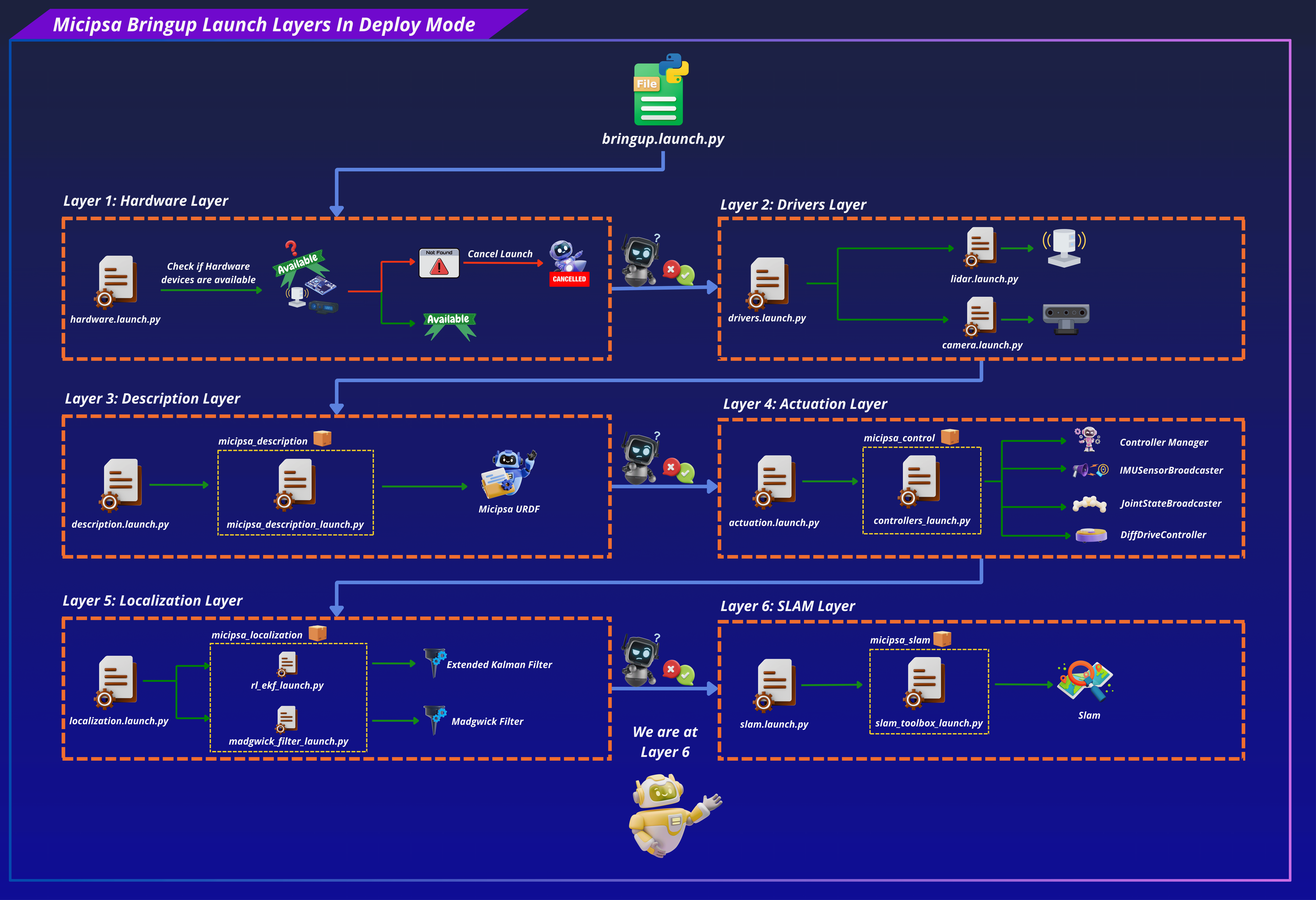
micipsa_slam sits between the localization stack and the navigation stack.
micipsa_slam is a pure configuration and launch package, it contains no custom nodes or C++ source. Its single responsibility is to configure and launch the upstream slam_toolbox with the correct parameters and frame conventions for Micipsa as well as the map_saver.
ROS 2 Interface#
Published Topics#
| Topic | Publisher | Type | QoS |
|---|---|---|---|
/map |
async_slam_toolbox_node |
nav_msgs/OccupancyGrid |
RELIABLE / TRANSIENT_LOCAL |
/tf |
async_slam_toolbox_node |
tf2_msgs/msg/TFMessage |
RELIABLE / VOLATILE |
TF Broadcast#
| Transform | Broadcaster | Rate |
|---|---|---|
map → odom |
async_slam_toolbox_node |
50 Hz |
Subscribed Topics#
| Topic | Subscriber | Type | QoS |
|---|---|---|---|
/scan |
async_slam_toolbox_node |
sensor_msgs/LaserScan |
RELIABLE / VOLATILE |
/tf |
async_slam_toolbox_node |
tf2_msgs/TFMessage |
RELIABLE / VOLATILE |
/tf_static |
async_slam_toolbox_node |
tf2_msgs/TFMessage |
RELIABLE / TRANSIENT_LOCAL |
TF Subscriptions#
| Transform | Consumer | Description |
|---|---|---|
odom → base_footprint |
async_slam_toolbox_node |
Local odometry from micipsa_localization EKF required before map generation starts |
base_footprint → laser_frame |
async_slam_toolbox_node |
Required to project scans into the robot frame |
Installation#
Important
Micipsa can be run in two ways: natively on a ROS 2 host, or via Docker using pre-built containerized images. Choose your approach before proceeding:
- Native build the package directly in a ROS 2 workspace. Follow requirements and the Native Install steps below.
- Docker use the Micipsa container stack, no manual workspace setup required. skip requirements section and follow Docker section.
Requirements#
First, make sure that the following packages are available in your workspace:
- micipsa_common
- micipsa_description (not required for building, needed in usage section)
- micipsa_control (not required for building, needed in usage section)
- micipsa_localization (not required for building, needed in usage section)
If simulation:
- micipsa_simulation (not required for building, needed in usage section)
Native Install#
Source the ROS 2 installation:
Install ROS dependencies:
Build the package:
Source the workspace:
Tip
Add source /opt/ros/jazzy/setup.bash and source ~/ros2_ws/install/setup.bash to your ~/.bashrc to avoid repeating these steps in every new terminal.
Docker#
Tip
Reading Micipsa Docker documentation (architecture, dockerfile, docker compose,...) is strongly recommended, it covers how the Dockerfiles are structured, how images are built, how containers are orchestrated, and much more.
To build and run Micipsa Slam Docker image, follow Micipsa Dockerfile README Build Section.
Configuration#
Usage#
Caution
Do not run AMCL simultaneously with SLAM Toolbox. Both nodes publish the map → odom transform, which causes TF conflicts and unpredictable localisation behaviour.
Important
SLAM Toolbox requires both /scan and a valid odom → base_footprint transform before it can produce a map.
Simulation#
Launch robot description:
Launch gazebo simulator:
Launch controllers:
Launch localization:
Launch slam:
To use a custom configuration file:
Deploy#
Validation#
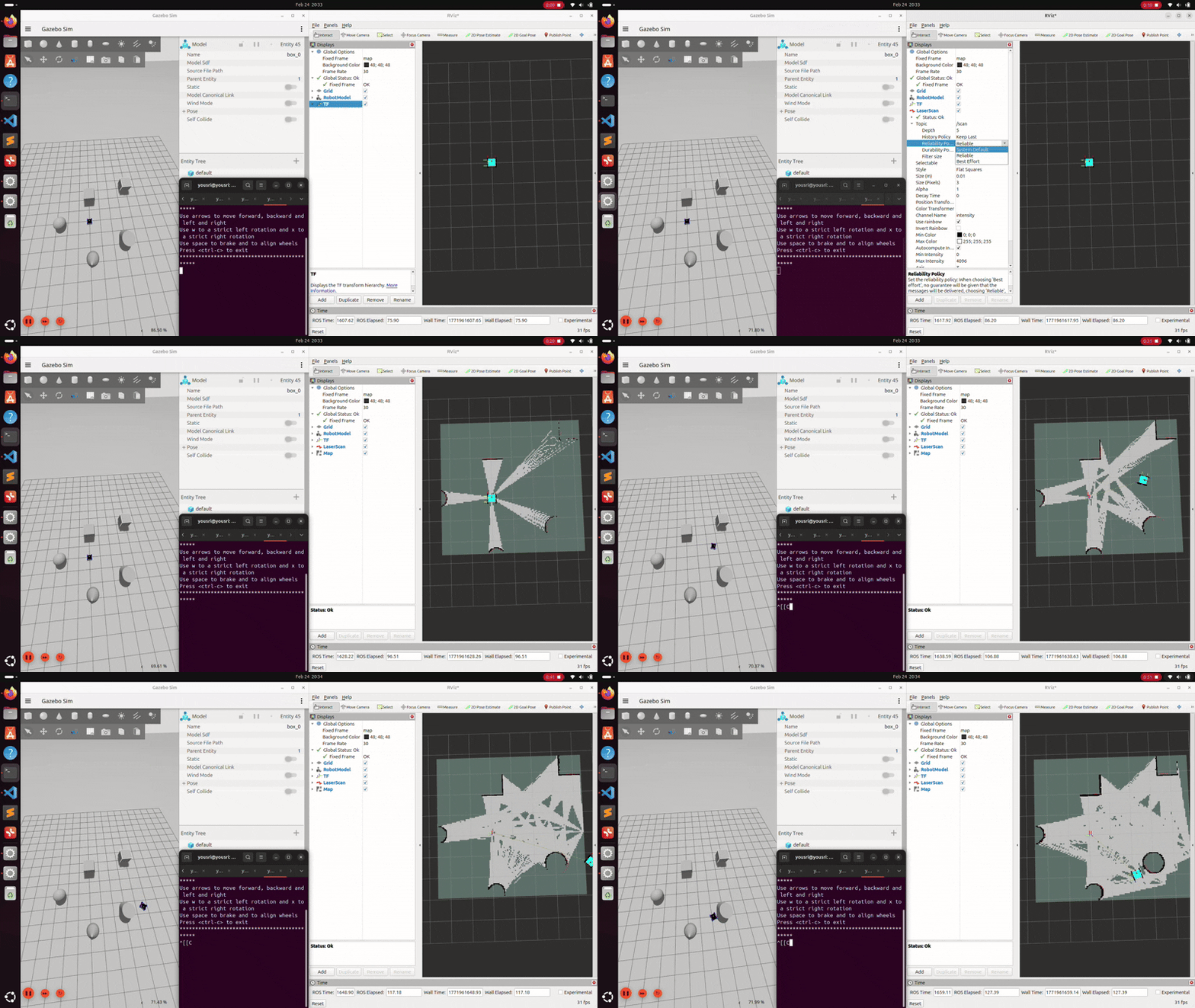
Rviz#
In RViz:
- Set Fixed Frame to map
- Add a Map display → topic /map
- Add a LaserScan display → topic /scan
- Add a TF display and verify the chain: map → odom → base_footprint → laser_frame
Important
As the robot moves, LaserScan points should align tightly with the black obstacle borders in the map. If the map blurs or smears, it typically indicates degraded wheel odometry or IMU data feeding the EKF.
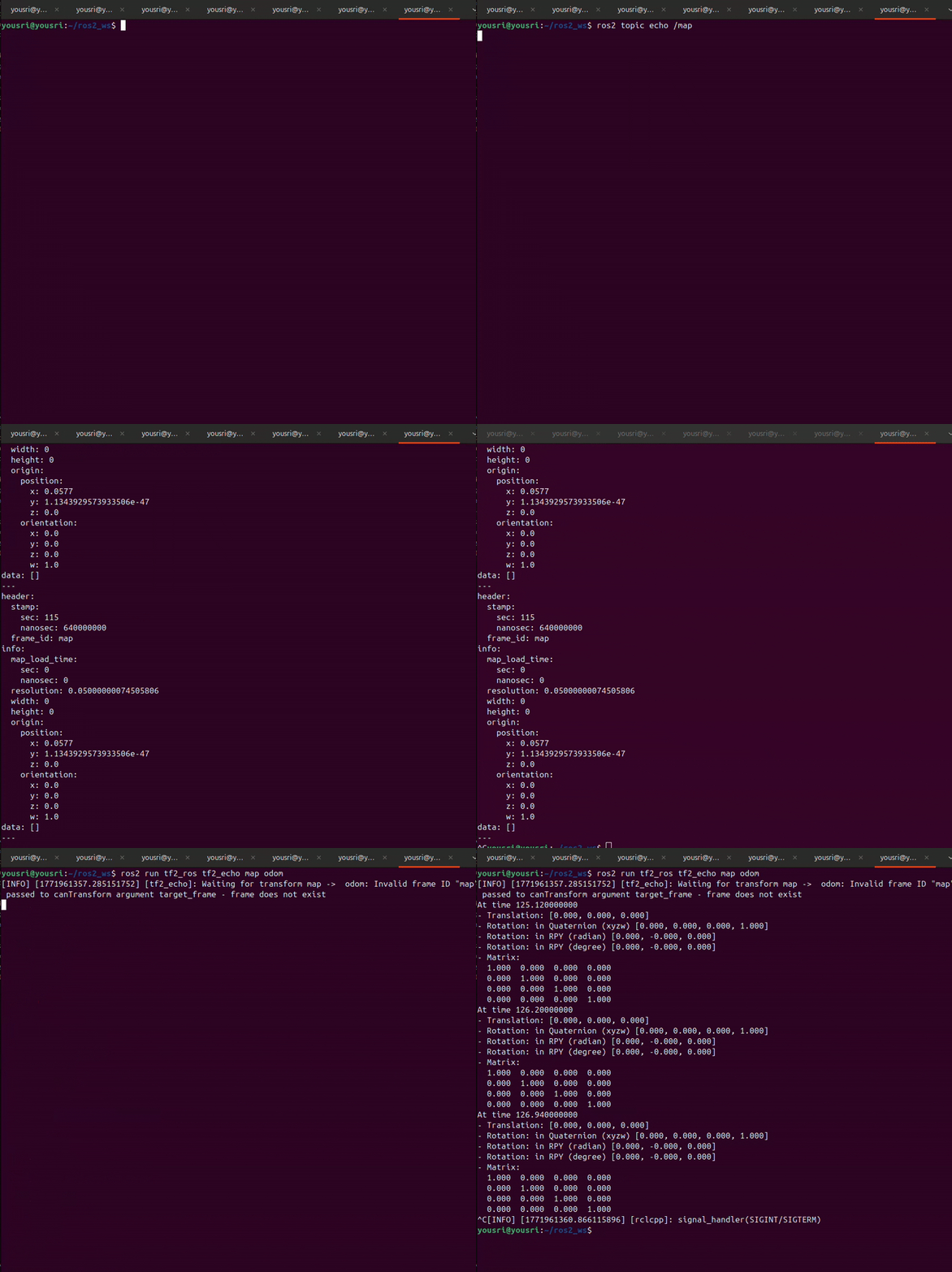
CLI#
Confirm the odom → base_footprint chain exists (SLAM input dependency):
Confirm the map → odom transform is being broadcast:
Confirm the map topic is being published:
Additional Information#
Dependencies#
Build Dependencies#
These dependencies are required when building the package.
| Package | Role |
|---|---|
ament_cmake |
Build system |
ament_cmake_python |
Python package installation support within a CMake package |
Runtime Dependencies#
These dependencies are not required to build the package but are required when running it.
| Package | Role |
|---|---|
slam_toolbox |
Provides the async_slam_toolbox_node executable |
nav2_map_server |
Provides map saving/loading (map_saver_cli, map_server) |
nav2_lifecycle_manager |
Manages the lifecycle (configure/activate) of SLAM Toolbox's lifecycle node |
Test Dependencies#
Used only when running the package test suite.
| Package | Role |
|---|---|
ament_lint_auto / ament_lint_common |
Code style and copyright linting |
ament_cmake_pytest |
Python test runner for colcon |
launch_testing_ament_cmake |
Launch test integration for colcon |
launch_testing |
Framework for launch-based integration tests |
launch |
Launch API used by test descriptions |
launch_ros |
ROS-specific launch actions used by tests |
ament_cmake_ros |
Provides run_test_isolated.py for isolated launch tests |
Micipsa Packages Dependencies#
The launch file and integration test require the following packages to be built and available at runtime:
| Package | Role |
|---|---|
micipsa_description |
Must be running so that the base_footprint → laser_frame static TF is published |
micipsa_control |
Must be running so that the robot's actuators and state interfaces are active |
micipsa_localization |
Must be running so that the odom → base_footprint transform is published |
micipsa_simulation or micipsa_hardware |
Must be running so that /scan is published |
micipsa_common |
Provides resolve_config_path and warn launch utilities |
Testing#
Note
All tests run headless and do not require simulation or physical hardware. They can be executed reliably in CI environments.
Launch Integration Tests#
test_slam_integration_launch.py validates the full SLAM pipeline by launching:
micipsa_descriptionrobot model and static TFmicipsa_simulationGazebo (headless)micipsa_controlros2_control controllersmicipsa_localizationrobot_localization EKFmicipsa_slamSLAM Toolbox
Success criteria:
| # | Criterion |
|---|---|
| 1 | /scan topic becomes available within 90 s |
| 2 | /tf topic becomes available within 90 s |
| 3 | /map topic becomes available within 120 s |
| 4 | TF base_footprint ← laser_frame resolves within 90 s |
| 5 | TF odom ← base_footprint resolves within 90 s |
| 6 | A nav_msgs/OccupancyGrid message is received on /map |
| 7 | msg.header.frame_id == "map" |
A failure indicates one of: missing scan publisher, broken TF chain, EKF not providing odometry, or SLAM Toolbox failing to initialise.
Running Tests#
Run only the integration tests:
colcon build --packages-select micipsa_slam
colcon test --packages-select micipsa_slam --ctest-args -L launch -V
colcon test-result --verbose
Run all tests:
colcon build --packages-select micipsa_slam
colcon test --packages-select micipsa_slam
colcon test-result --verbose
Clean test results between runs: