Perception




Overview#
micipsa_perception is a ROS 2 package that contains a collection of modular perception pipelines for processing data from various sensors.
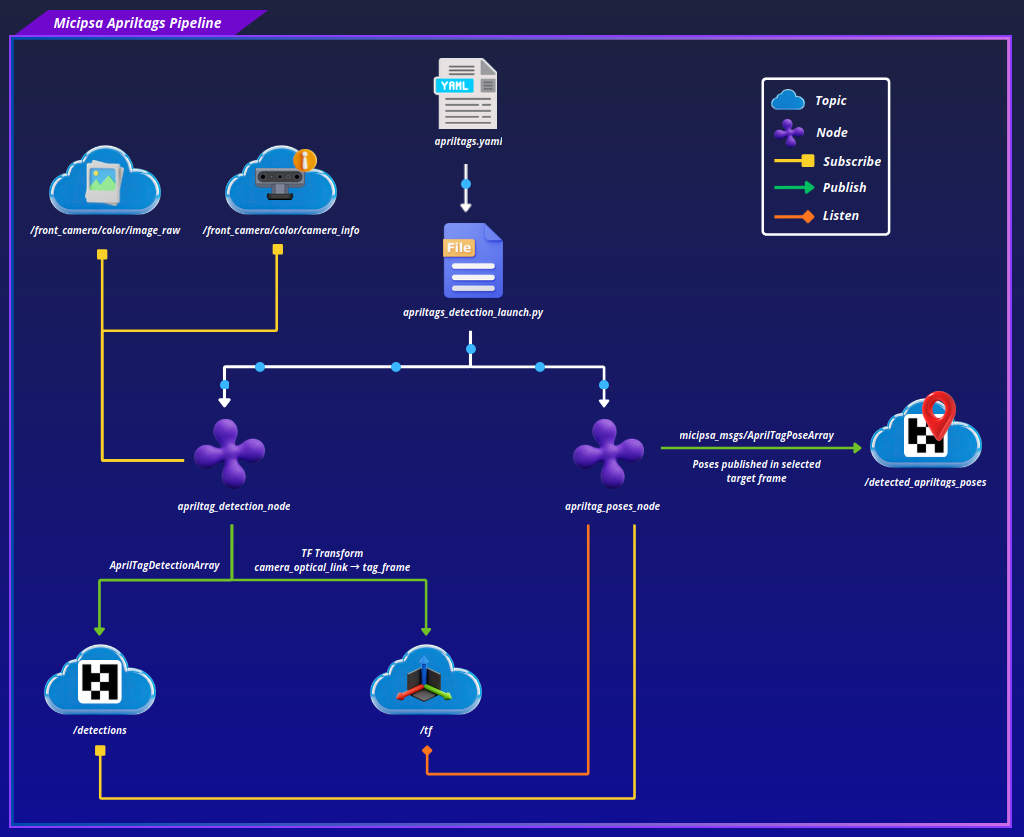
The AprilTags pipeline wraps the upstream apriltag_ros detector and adds a custom apriltag_poses.py node that transforms raw tag detections into a target frame and republishes them as micipsa_msgs/AprilTagPoseArray, used downstream for docking by micipsa_navigation.
The pointcloud pipeline is a custom C++ node (pointcloud_node) that filters the camera's depth pointcloud through a configurable crop box, voxel downsampling, statistical outlier removal, and optional ground plane segmentation, exposing each intermediate stage on its own topic.

Architecture#
micipsa_perception sits alongside micipsa_localization and micipsa_slam as a consumer of raw sensor data, and is itself a producer for micipsa_navigation (AprilTag dock poses) and any node interested in filtered, ground-segmented pointclouds.
AprilTags Pipeline#
apriltags_detection_launch.py starts two nodes in sequence:
apriltag_rosnode (remapped to consume/front_camera/color/image_rawand/front_camera/color/camera_info)apriltag_poses.pysubscribes to/detectionsand looks up, for each detected tag ID, a corresponding frame name from thetag.ids/tag.framesarrays inapriltags.yaml. If a detected tag ID has no entry in that mapping, the detection is logged and dropped. For each known tag, the node looks up the transform from the tag's frame to the configuredtarget_frame, builds anAprilTagPose, and publishes the batch as a singleAprilTagPoseArrayon/detected_apriltags_poses.
Pointcloud Pipeline#
pointcloud_process_launch.py starts a single node pointcloud_node, which subscribes to a configurable input pointcloud topic and applies a fixed-order filtering pipeline:
- Crop box removes points outside a configurable bounding box (
x_crop_min/max,y_crop_min/max,z_crop_min/max), applied in the sensor's own frame before any transform. - Voxel grid downsampling reduces point density using
voxel_leaf_size, applied immediately after cropping and before the frame transform to keep the transform step cheap. - Frame transform reprojects the downsampled cloud into
pointcloud_world_frame. - Statistical outlier removal (SOR) removes noise points based on
sor_mean_kneighbors andsor_stddev_multhresh. - Plane segmentation (only when
pointcloud_is_3d: true) uses PCL'sSACSegmentationto fit a plane along a configurable axis (plane_axis) and removes inlier points, leaving the non-ground obstacle cloud.
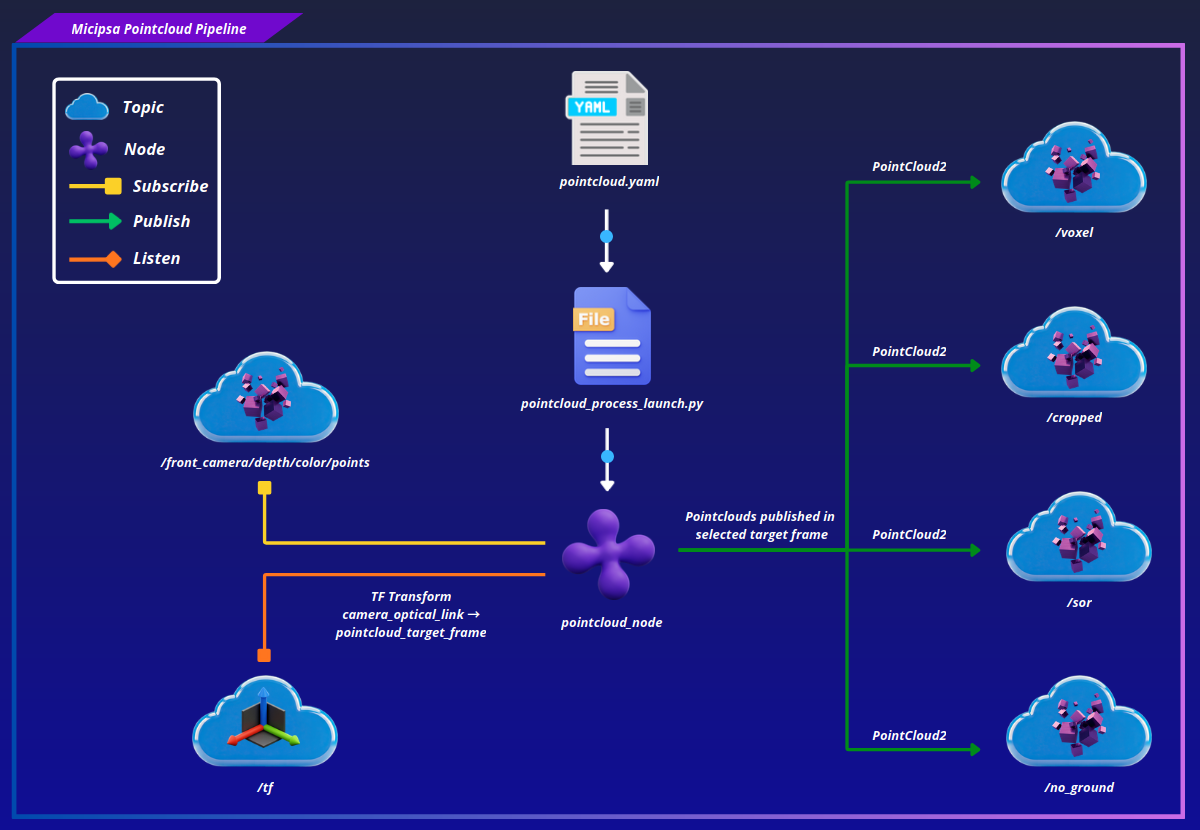
Each stage's output is only converted back to a ROS message and published if its corresponding topic currently has at least one subscriber, avoiding unnecessary pcl::toROSMsg conversions when nobody is listening to a given intermediate stage.
ROS 2 Interface#
Published Topics#
| Topic | Publisher | Type | QoS |
|---|---|---|---|
/detected_apriltags_poses |
apriltag_poses.py |
micipsa_msgs/msg/AprilTagPoseArray |
RELIABLE / VOLATILE |
<pointcloud_sensor_name>/pointcloud/cropped |
pointcloud_node |
sensor_msgs/msg/PointCloud2 |
BEST_EFFORT / VOLATILE |
<pointcloud_sensor_name>/pointcloud/voxel |
pointcloud_node |
sensor_msgs/msg/PointCloud2 |
BEST_EFFORT / VOLATILE |
<pointcloud_sensor_name>/pointcloud/sor |
pointcloud_node |
sensor_msgs/msg/PointCloud2 |
BEST_EFFORT / VOLATILE |
<pointcloud_sensor_name>/pointcloud/no_ground |
pointcloud_node |
sensor_msgs/msg/PointCloud2 |
BEST_EFFORT / VOLATILE |
Note
All four pointcloud output topics are prefixed with pointcloud_sensor_name (default front_camera), and each is only published while it has at least one active subscriber.
Subscribed Topics#
| Topic | Subscriber | Type | QoS |
|---|---|---|---|
/detections |
apriltag_poses.py |
apriltag_msgs/msg/AprilTagDetectionArray |
RELIABLE / VOLATILE |
/front_camera/color/image_raw |
apriltag_ros |
sensor_msgs/msg/Image |
RELIABLE / VOLATILE |
/front_camera/color/camera_info |
apriltag_ros |
sensor_msgs/msg/CameraInfo |
RELIABLE / VOLATILE |
pointcloud_input_topic |
pointcloud_node |
sensor_msgs/msg/PointCloud2 |
BEST_EFFORT / VOLATILE |
TF Subscriptions#
| Transform | Consumer | Description |
|---|---|---|
<tag_frame> → target_frame |
apriltag_poses.py |
Looked up per detected tag to express its pose in target_frame |
<sensor_frame> → pointcloud_world_frame |
pointcloud_node |
Looked up once per incoming pointcloud message |
Parameters#
apriltag_poses.py#
| Parameter | Type | Default | Description |
|---|---|---|---|
config_file |
string |
required | AprilTags YAML config |
target_frame |
string |
odom |
Frame to which detected tag poses are transformed into before publishing |
pointcloud_node#
| Parameter | Type | Default | Description |
|---|---|---|---|
pointcloud_sensor_name |
string |
unknown_pointcloud_sensor |
Prefix used to namespace all four output topics |
pointcloud_input_topic |
string |
/camera/depth/color/points |
Input pointcloud topic |
pointcloud_world_frame |
string |
map |
Target frame the cloud is transformed into |
pointcloud_is_3d |
bool |
true |
Enables plane segmentation (ground removal) as the final stage |
voxel_leaf_size |
double |
0.05 |
Voxel grid leaf size in meters, reconfigurable at runtime |
x_crop_min / x_crop_max |
double |
-2.0 / 2.0 |
Crop box bounds along X, reconfigurable at runtime |
y_crop_min / y_crop_max |
double |
-2.0 / 2.0 |
Crop box bounds along Y, reconfigurable at runtime |
z_crop_min / z_crop_max |
double |
-1.0 / 1.0 |
Crop box bounds along Z, reconfigurable at runtime |
sor_mean_k |
int |
50 |
Number of neighbors analyzed for SOR, reconfigurable at runtime |
sor_stddev_multhresh |
double |
1.0 |
SOR standard deviation multiplier threshold, reconfigurable at runtime |
plane_axis |
string |
UnitX |
Axis the segmented plane is expected to be perpendicular/parallel to (UnitX, UnitY, UnitZ) |
eps_angle |
double |
0.1745 (10°) |
Allowed angular tolerance for plane segmentation, in radians |
optimize_coefficients |
bool |
true |
Refines the plane model coefficients after the initial RANSAC fit |
model_type |
string |
SACMODEL_PARALLEL_PLANE |
PCL SAC model type (SACMODEL_PLANE, SACMODEL_PARALLEL_PLANE, SACMODEL_PERPENDICULAR_PLANE) |
method_type |
string |
SAC_RANSAC |
PCL SAC method (SAC_RANSAC, SAC_LMEDS, SAC_MSAC, SAC_RRANSAC) |
plane_max_iterations |
int |
100 |
Maximum RANSAC iterations for plane fitting |
plane_distance_threshold |
double |
0.02 |
Maximum distance from the plane model for a point to be considered an inlier |
Note
The defaults shown above are the C++ struct defaults in pointcloud_processor.h. The shipped pointcloud.yaml config overrides several of these (e.g. plane_axis: "UnitZ", model_type: "SACMODEL_PERPENDICULAR_PLANE") for Micipsa's actual sensor mounting.
Launch Arguments#
apriltags_detection_launch.py#
| Argument | Type | Default | Description |
|---|---|---|---|
use_sim_time |
bool |
false |
Use simulation clock if true |
log_level |
string |
info |
ROS 2 log level (info, warn, error) |
apriltags_config_file |
string |
apriltags.yaml |
Name or path of the AprilTags YAML config |
apriltags_pose_target_frame |
string |
odom |
Frame the detected tag poses are transformed into |
pointcloud_process_launch.py#
| Argument | Type | Default | Description |
|---|---|---|---|
use_sim_time |
bool |
false |
Use simulation clock if true |
log_level |
string |
info |
ROS 2 log level (info, warn, error) |
pointcloud_config_file |
string |
pointcloud.yaml |
Name or path of the pointcloud YAML config |
Installation#
Important
Micipsa can be run in two ways: natively on a ROS 2 host, or via Docker using pre-built containerized images. Choose your approach before proceeding:
- Native build the package directly in a ROS 2 workspace. Follow requirements and the Native Install steps below.
- Docker use the Micipsa container stack, no manual workspace setup required. skip requirements section and follow Docker section.
Requirements#
First, make sure that the following packages are available in your workspace:
- micipsa_common
- micipsa_msgs
- micipsa_description (not required for building, needed in usage section)
If deploy only (and if you are using the same realsense d435i camera):
If simulation only:
- micipsa_simulation (not required for building, needed in usage section)
Native Install#
Source the ROS 2 environment:
Install ROS 2 dependencies from the workspace root:
Build the package:
colcon build --packages-select micipsa_common
colcon build --packages-select micipsa_msgs
colcon build --packages-select micipsa_perception
Important
If you are running in deploy mode, ensure that the camera-related packages are also built and installed.
Source the install overlay:
Tip
Add source /opt/ros/jazzy/setup.bash and source ~/ros2_ws/install/setup.bash to your ~/.bashrc to avoid repeating these steps in every new terminal.
Docker#
Tip
Reading Micipsa Docker documentation (architecture, dockerfile, docker compose,...) is strongly recommended, it covers how the Dockerfiles are structured, how images are built, how containers are orchestrated, and much more.
To build and run Micipsa Perception Docker image, follow Micipsa Dockerfile README Build Section.
Configuration#
AprilTags (apriltags.yaml)#
The tag block defines the known tags as three parallel arrays, ids, frames, and sizes, indexed positionally. A tag ID with no corresponding entry is treated as unknown by apriltag_poses.py and its detections are dropped.
Warning
ids, frames, and sizes must stay the same length and in the same order. A mismatch between ids and frames is not validated by apriltag_poses.py at load time (only the detector itself reads sizes), so a misaligned entry will silently associate the wrong frame name with a tag ID.
The detector block controls the upstream apriltag_ros node directly: family, size, max_hamming, and the detector.* tuning parameters (threads, decimate, blur, refine, sharpening, debug).
Pointcloud (pointcloud.yaml)#
Pointcloud parameters are also reconfigurable at runtime through a single rclcpp parameter callback. Each parameter group (crop, voxel, SOR, plane) has its own validation function; an invalid value (e.g. x_crop_min >= x_crop_max, a negative voxel_leaf_size, or an unrecognized plane_axis) is rejected with a reason string, and the update is applied to PointCloudProcessor only if every changed parameter in the batch passes validation.
Usage#
AprilTags Detection#
To change the target frame detections are transformed into:
To use a custom AprilTags config file:
ros2 launch micipsa_perception apriltags_detection_launch.py \
  apriltags_config_file:=my_custom_apriltags.yaml
Pointcloud Processing#
To use a custom pointcloud config file:
ros2 launch micipsa_perception pointcloud_process_launch.py \
  pointcloud_config_file:=my_custom_pointcloud.yaml
Validation#
Confirm AprilTag poses are being published once a tag is visible to the camera:
Confirm raw detections are arriving from apriltag_ros (useful to isolate whether a missing pose is a detection issue or a frame-mapping issue):
Confirm pointcloud filtering stages are publishing (each only appears once it has a subscriber, so this requires a tool like RViz or ros2 topic echo actively subscribed):
For visual validation, open RViz and add a PointCloud2 display for each pipeline stage of interest, and a TF display to confirm the AprilTag-to-target_frame transform chain is intact.
Additional Information#
Dependencies#
Build Dependencies#
These dependencies are required when building the package.
| Package | Role |
|---|---|
ament_cmake |
Build system |
pcl_conversions |
Conversions between PCL point clouds and ROS PointCloud2 messages |
pcl_ros |
PCL/ROS integration utilities used by the pointcloud pipeline |
Runtime Dependencies#
These dependencies are not required to build the package but are required when running it.
| Package | Role |
|---|---|
rclcpp |
ROS 2 C++ client library, used by pointcloud_node |
sensor_msgs |
PointCloud2, Image, CameraInfo message types |
geometry_msgs |
Pose and related types |
visualization_msgs |
Marker message type, included by pointcloud_node.h |
tf2_ros |
TF lookups for both pipelines |
tf2_sensor_msgs |
TF-aware conversions for sensor messages, used by pointcloud_node |
apriltag_ros |
Provides the upstream apriltag_node executable |
apriltag_msgs |
AprilTagDetectionArray message type consumed by apriltag_poses.py |
Test Dependencies#
Used only when running the package test suite.
| Package | Role |
|---|---|
ament_lint_auto / ament_lint_common |
Code style and copyright linting |
Micipsa Packages Dependencies#
The launch files for both pipelines import shared launch utilities that are not currently declared as exec_depend in package.xml:
| Package | Role |
|---|---|
micipsa_common |
Provides resolve_config_path() (both launch files) and utils.console_utils.warn() |
micipsa_msgs |
Provides AprilTagPose / AprilTagPoseArray, used at both build and run time |
Troubleshooting#
AprilTag detected but no pose published#
Symptom: /detections shows tag detections, but /detected_apriltags_poses never publishes for that tag.
Cause: The detected tag's ID has no matching entry in tag.ids / tag.frames in the resolved AprilTags config, so apriltag_poses.py logs it as an unknown tag and drops it. This can also happen if the TF lookup from the tag's frame to target_frame fails (missing or stale transform).
Fix: Confirm the tag ID is listed in apriltags.yaml's tag.ids array with a matching frames entry at the same index. Confirm the transform chain is healthy:
Pointcloud output topics never appear#
Symptom: None of the pointcloud_node output topics show up in ros2 topic list, or they appear but never publish data.
Cause: Each output topic is only published while it has at least one active subscriber. If nothing is subscribed (e.g. RViz isn't open, or no downstream node is consuming it), the topic exists but produces no messages.
Fix: Subscribe to the topic to trigger publication:
Pointcloud is empty or heavily clipped#
Symptom: The filtered pointcloud topics publish messages, but they contain very few or no points.
Cause: The crop box bounds (x_crop_min/max, y_crop_min/max, z_crop_min/max) are too tight for the sensor's actual field of view, or the configured pointcloud_world_frame transform places the cloud outside the crop region after reprojection.
Fix: Temporarily widen the crop bounds via a runtime parameter update to confirm the issue:
If points reappear, narrow the bounds back down deliberately rather than leaving them wide.
Parameter update rejected at runtime#
Symptom: ros2 param set on a pointcloud parameter returns successful: False with a reason message.
Cause: The new value failed validation in one of the parameter callback's update functions, for example x_crop_min >= x_crop_max, a non-positive voxel_leaf_size or sor_mean_k, or a plane_axis / model_type / method_type value outside the accepted set.
Fix: Check the returned reason string and adjust the value accordingly; valid plane_axis values are UnitX, UnitY, UnitZ; valid model_type values are SACMODEL_PLANE, SACMODEL_PARALLEL_PLANE, SACMODEL_PERPENDICULAR_PLANE; valid method_type values are SAC_RANSAC, SAC_LMEDS, SAC_MSAC, SAC_RRANSAC.