Hardware



Overview#
micipsa_hardware is a ROS 2 package that implements the ros2_control hardware interface plugin for Micipsa. It provides a hardware_interface::SystemInterface class RobotBaseSystem.
It owns a RobotBase instance from micipsa_core, delegates all serial communication and sensor processing to it, and exposes the resulting wheel positions, wheel velocities, and IMU data as ros2_control state interfaces.
Velocity commands written by the DiffDriveController are forwarded back through RobotBase to the STM32 microcontroller. The package has no nodes, no topics, and no launch files of its own, it is loaded dynamically by the controller manager.
Architecture#
Important
It is highly recommended to read micipsa_core README to understand better how the micipsa_core and micipsa_hardware packages relate to each other and how data flows to and from the robot.
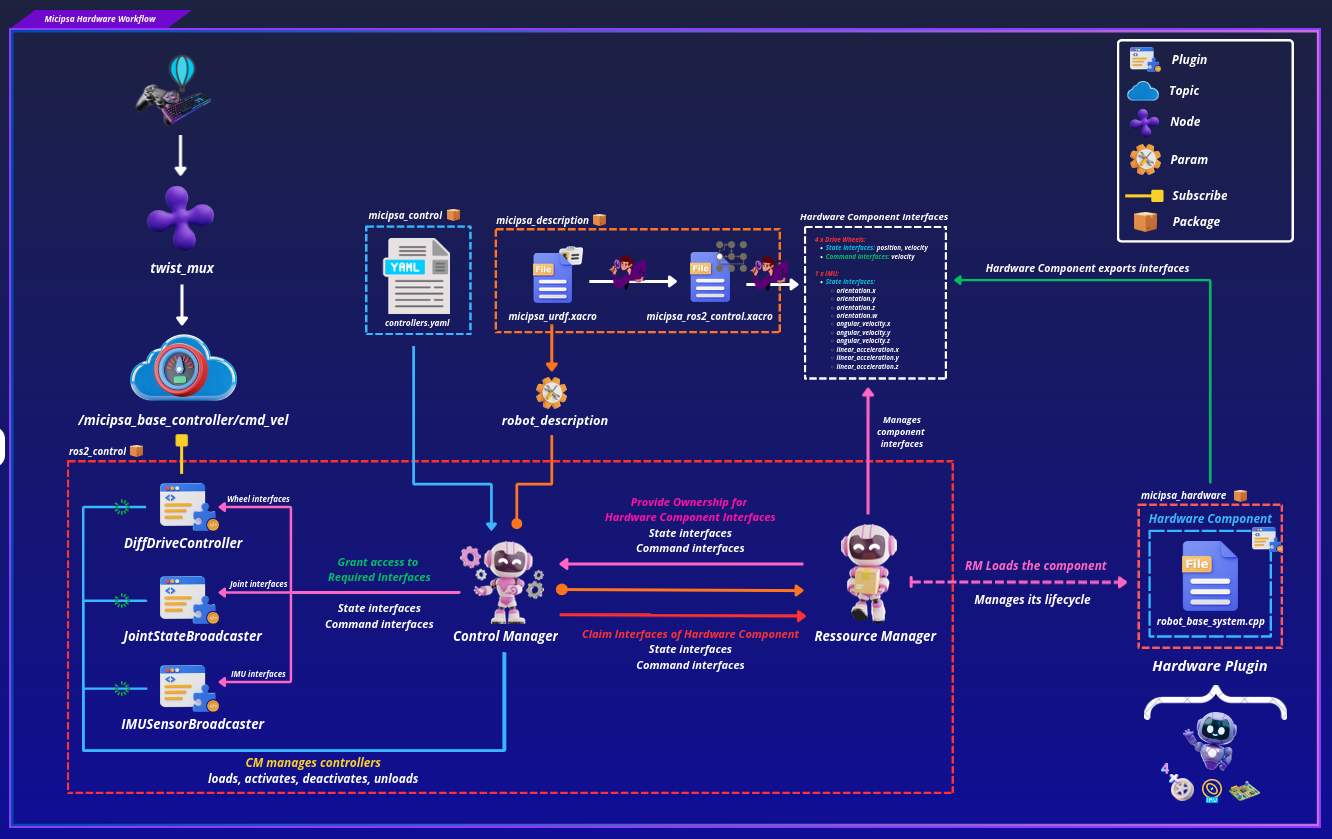
micipsa_hardware is part of Micipsa actuation stack. It is the layer between ros2_control and the hardware abstraction library, ros2_control architecture provides a standardized way to connect robot hardware with control software.
Lifecycle Flow#
sequenceDiagram
    participant CM as controller_manager
    participant HW as RobotBaseSystem
    participant RB as RobotBase / StmController

    CM->>HW: on_init() — load params, validate interfaces
    HW->>RB: init() all wheels + microcontroller
    CM->>HW: on_configure() — connect serial
    HW->>RB: microController().connect()
    CM->>HW: on_activate()
    HW->>HW: verify connection, enable control loop
    loop Every control period
        CM->>HW: read(time, period)
        HW->>RB: readCurrentState() + update()
        CM->>HW: write(time, period)
        HW->>RB: sendCommands()
    end
    CM->>HW: on_deactivate()
    CM->>HW: on_cleanup()
    HW->>RB: microController().disconnect()
State & Command Interface#
Every interface exported by export_state_interfaces() and export_command_interfaces() is a direct pointer into a micipsa_core data structure. There is no copy, the controller manager reads and writes the same memory that RobotBase updates.
Important
If you add, remove, or rename joints or sensors in the <ros2_control> URDF block, you must update both export_state_interfaces() and export_command_interfaces() in robot_base_system.cpp to match.
A mismatch between the URDF declaration and the exported interfaces will cause the controller manager to fail at startup with an interface claiming error.
ROS 2 Interfaces#
State Interfaces#
| Interface | Type | Source |
|---|---|---|
<wheel_joint_name>/position |
double |
DriveWheel::position() cumulative wheel angle in radians |
<wheel_joint_name>/velocity |
double |
DriveWheel::angularVelocity() rad/s |
imu_sensor/orientation.x |
double |
Imu::imuData().orientation.x |
imu_sensor/orientation.y |
double |
Imu::imuData().orientation.y |
imu_sensor/orientation.z |
double |
Imu::imuData().orientation.z |
imu_sensor/orientation.w |
double |
Imu::imuData().orientation.w |
imu_sensor/angular_velocity.x |
double |
Imu::imuData().angular_velocity.x rad/s |
imu_sensor/angular_velocity.y |
double |
Imu::imuData().angular_velocity.y rad/s |
imu_sensor/angular_velocity.z |
double |
Imu::imuData().angular_velocity.z rad/s |
imu_sensor/linear_acceleration.x |
double |
Imu::imuData().linear_acceleration.x m/s² |
imu_sensor/linear_acceleration.y |
double |
Imu::imuData().linear_acceleration.y m/s² |
imu_sensor/linear_acceleration.z |
double |
Imu::imuData().linear_acceleration.z m/s² |
Command Interfaces#
| Interface | Type | Consumer |
|---|---|---|
<wheel_joint_name>/velocity |
double |
Written by DiffDriveController, rad/s target for each wheel |
Hardware Parameters#
| Parameter | Type | Default | Description |
|---|---|---|---|
mcu_serial_device |
string |
/dev/micipsa/stm_mcu |
Serial device path for the STM32 MCU |
mcu_baudrate |
int |
115200 |
Serial baudrate |
mcu_timeout |
int |
2000 |
Serial communication timeout in milliseconds |
m1_joint_name |
string |
front_left_wheel_joint |
Joint name used for interface registration |
m2_joint_name |
string |
front_right_wheel_joint |
Joint name used for interface registration |
m3_joint_name |
string |
back_left_wheel_joint |
Joint name used for interface registration |
m4_joint_name |
string |
back_right_wheel_joint |
Joint name used for interface registration |
m1_encoder_cpr |
int |
2071 |
Encoder counts per revolution |
m2_encoder_cpr |
int |
2071 |
Encoder counts per revolution |
m3_encoder_cpr |
int |
2030 |
Encoder counts per revolution |
m4_encoder_cpr |
int |
2030 |
Encoder counts per revolution |
m1_invert |
bool |
true |
Invert encoder counts and command direction |
m2_invert |
bool |
false |
Invert encoder counts and command direction |
m3_invert |
bool |
true |
Invert encoder counts and command direction |
m4_invert |
bool |
false |
Invert encoder counts and command direction |
wheel_radius |
double |
0.065 m |
Wheel radius used for linear velocity computation |
max_wheel_angular_velocity |
double |
5.0 rad/s |
Maximum angular velocity used for PWM normalization |
Installation#
Important
Micipsa can be run in two ways: natively on a ROS 2 host, or via Docker using pre-built containerized images. Choose your approach before proceeding:
- Native build the package directly in a ROS 2 workspace. Follow requirements and the Native Install steps below.
- Docker use the Micipsa container stack, no manual workspace setup required. skip requirements section and follow Docker section.
Requirements#
Make sure that the following packages are available in your workspace:
Important
Read micipsa_core README requirements section before proceeding as you may need to patch the serial library.
Native Install#
Source the ROS2 environment:
Install ROS2 dependencies from the workspace root:
Build the package:
colcon build --packages-select micipsa_common
colcon build --packages-select micipsa_core
colcon build --packages-select micipsa_hardware
Source the install overlay:
Tip
Add source /opt/ros/jazzy/setup.bash and source ~/ros2_ws/install/setup.bash to your ~/.bashrc to avoid repeating these steps in every new terminal.
Docker#
micipsa_hardware package is part of Micipsa Actuation Docker image.
Tip
Reading Micipsa Docker documentation (architecture, dockerfile, docker compose,...) is strongly recommended, it covers how the Dockerfiles are structured, how images are built, how containers are orchestrated, and much more.
To build and run Micipsa Actuation Docker image, follow Micipsa Dockerfile README Build Section.
Configuration#
Hardware Interface Parameters#
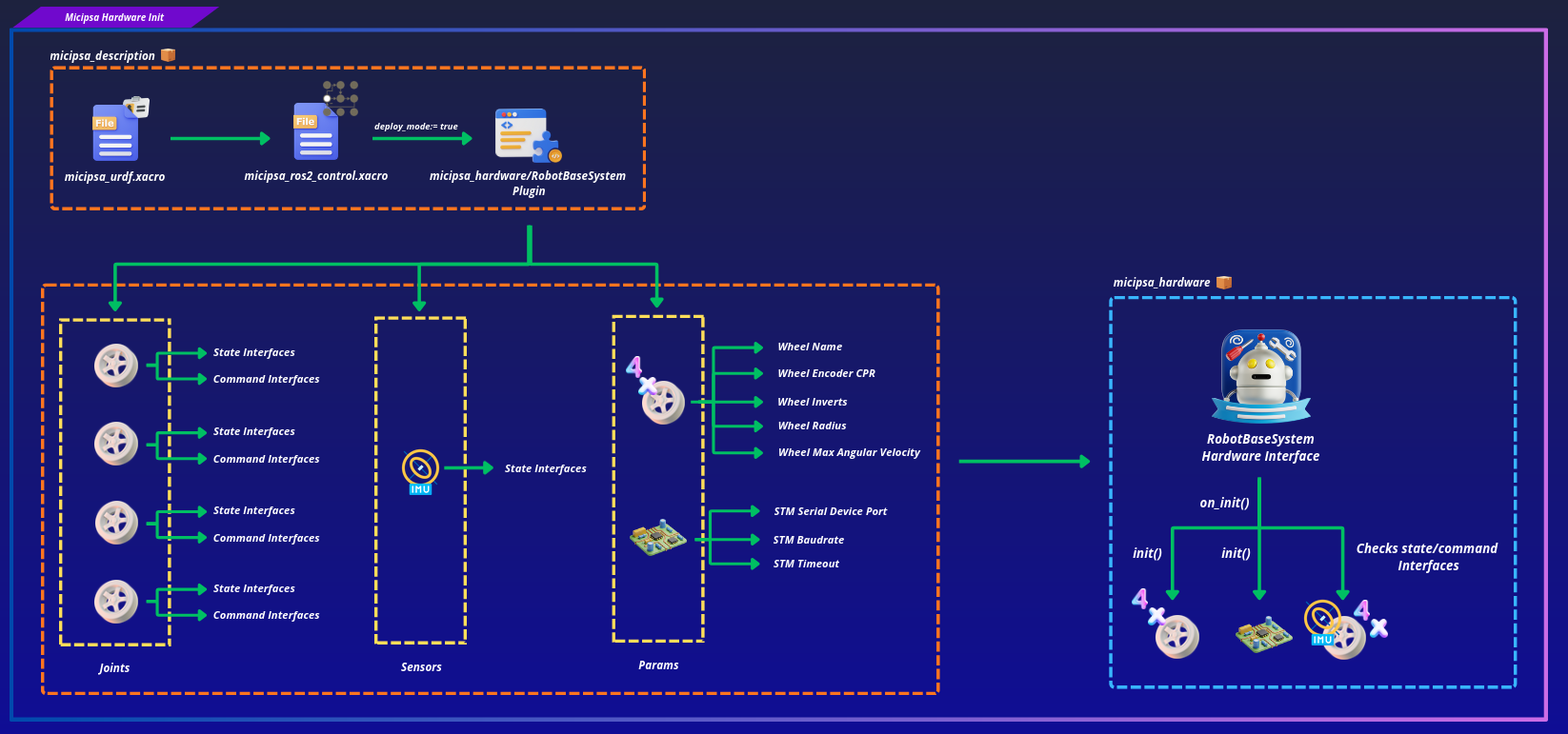
All hardware interface parameters are sourced from the ros2_control block in Micipsa URDF (micipsa_description). The plugin reads them once during on_init() and they remain fixed for the lifetime of the controller manager process.
Adding or Changing Hardware Components#
If you need to add a new joint, sensor, or hardware parameter to the plugin, three files must be updated together:
- The URDF hardware block in
micipsa_ros2_control.xacro(micipsa_descriptionpackage) must declare the new interface or parameter inside the<ros2_control>tag.
on_init()inrobot_base_system.cppmust read the new parameter frominfo_.hardware_parametersand pass it to the appropriatemicipsa_corecomponent or in case of a new joint verify its state and command interfaces.
export_state_interfaces()orexport_command_interfaces()must register the new interface pointer so the controller manager can grant it to a controller.
Caution
Never add a <joint> or <sensor> to the <ros2_control> URDF block without updating robot_base_system.cpp to match. The on_init() validation will reject any joint that does not expose exactly 1 velocity command interface and exactly 2 state interfaces (position, velocity), returning CallbackReturn::ERROR and preventing the hardware from loading.
Plugin Registration#
The plugin is registered via pluginlib. The micipsa_hardware.xml descriptor maps the plugin name to the C++ class:
<library path="micipsa_hardware">
  <class name="micipsa_hardware/RobotBaseSystem"
         type="micipsa_hardware::RobotBaseSystem"
         base_class_type="hardware_interface::SystemInterface">
    <description>Robot base hardware plugin for the Micipsa robot.</description>
  </class>
</library>
The CMakeLists.txt exports this descriptor so the controller manager can find it:
Note
The plugin name micipsa_hardware/RobotBaseSystem in the XML must exactly match the <plugin> tag in the URDF <ros2_control> block. A mismatch will cause the controller manager to fail to load the hardware interface with a pluginlib lookup error.
Usage#
micipsa_hardware is a plugin, it has no executable or launch file. It is loaded automatically by the controller manager when the robot description contains the matching <plugin> tag.
To use your hardware component plugin, refer to the Usage section in deploy mode of the micipsa_control README.
Validation#
To validate, refer to the Validation section of the micipsa_control README.
Additional Information#
Dependencies#
Build Dependencies#
These dependencies are required when building the package.
| Package | Role |
|---|---|
ament_cmake |
Build system |
ament_cmake_python |
Python package installation support within a CMake package |
hardware_interface |
SystemInterface base class and interface types |
pluginlib |
Plugin registration and dynamic loading |
rcpputils |
ROS C++ utilities |
rclcpp |
ROS 2 C++ client library |
rclcpp_lifecycle |
Lifecycle state machine |
Runtime Dependencies#
These dependencies are not required to build the package but are required when running it.
Test Dependencies#
Used only when running the package test suite.
| Package | Role |
|---|---|
ament_lint_auto |
Linting test runner |
ament_lint_common |
Standard linting rules |
Micipsa Packages Dependencies#
| Package | Role |
|---|---|
micipsa_core |
Hardware abstraction library RobotBase, DriveWheel, Imu, StmController |
micipsa_common |
Shared plain structs (TimeStamp) |
Troubleshooting#
Plugin not found by controller manager#
Symptom: The controller manager logs Could not load class micipsa_hardware/RobotBaseSystem or Failed to load hardware.
Cause: The pluginlib index has not been updated, or the package was not installed correctly.
Fix: Confirm the package is built and sourced, then verify the plugin is registered:
ros2 pkg list | grep micipsa_hardware
ros2 run pluginlib list_plugin_descriptions hardware_interface::SystemInterface
If micipsa_hardware/RobotBaseSystem does not appear in the output, rebuild and re-source:
on_configure fails serial port cannot be opened#
Symptom: The controller manager logs Failed to open serial port /dev/micipsa/stm_mcu and the hardware component stays in the unconfigured state.
Cause: The STM32 serial device is not present at the configured path, the udev rule has not been applied, or another process is holding the port open.
Fix: Verify the device exists:
If the symlink is missing, re-apply the udev rules, refer to the Micipsa Udev README.
If the device exists but cannot be opened, check for processes holding the port:
on_init fails interface count mismatch#
Symptom: The controller manager logs a FATAL message such as Joint 'front_left_wheel_joint' has N command interfaces found. 1 expected.
Cause: The <ros2_control> block in the URDF does not match what on_init() expects. A joint is missing a command or state interface declaration, or an extra one has been added.
Fix: Compare the joint interface declarations in micipsa_ros2_control.xacro against the validation logic in on_init(). Each joint must declare exactly one velocity command interface and exactly two state interfaces: position then velocity, in that order.
Wheels move but odometry is wrong#
Symptom: /joint_states shows non-zero velocities and positions but the reported odometry does not match the physical motion.
Cause: A hardware parameter mismatch, most likely wheel_radius, encoder CPR, or an incorrect invert flag is causing the kinematics computation in DriveWheel to produce incorrect values.
Fix: Cross-check all hardcoded parameters in micipsa_ros2_control.xacro against the physical robot. Pay particular attention to wheel_radius (must match the value in micipsa_core.xacro) and the per-wheel encoder_cpr values.
IMU data is zero or not updating#
Symptom: shows all-zero values or does not update after the robot is moving.
Cause: The STM32 is not sending FUNC_REPORT_ICM_RAW frames, or the serial read is consistently returning encoder frames instead. The RobotBase::update() dispatch is frame-type driven, if no IMU frame arrives, the IMU state is never updated.
Fix: Verify that the STM32 firmware is configured to emit IMU reports. Check the raw serial traffic by temporarily logging receivedData().type inside read(). If only FUNC_REPORT_ENCODER frames are arriving, the issue is in the STM32 firmware configuration, not in this package.