Workflow


Robot Setup Script Steps#
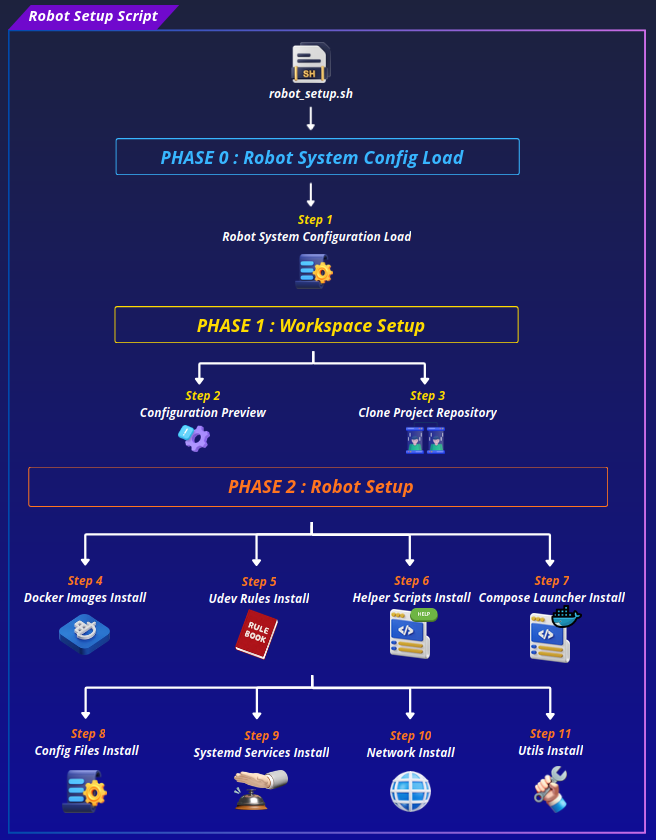
Phase 0: Config Load#
Step 1: Robot System Config File Load#
Sources robot_system.conf, which defines every path, repository reference, and tunable value used by the rest of the script.
Every subsequent step, and every sub-installer script it calls, relies on these being set correctly.
Phase 1: Repo Setup#
Step 2: Setup Configuration Preview#
Before anything is written to disk, the script prints a full preview of the resolved configuration and asks for confirmation before proceeding.
Step 3: Repository Clone#
Prepares the ROS 2 workspace (mkdir -p "${ROS2_WS}/src", ownership fixed to the invoking user) and then clones or updates the repository at REPO_ROOT:
| Situation | Behaviour |
|---|---|
REPO_ROOT/.git does not exist |
Fresh git clone --branch ${REPO_BRANCH} |
REPO_ROOT/.git exists |
git fetch --all --prune --tags, then git checkout ${REPO_BRANCH} |
All git operations run as the invoking user via run_as_user, not root, so SSH keys resolve correctly. After cloning or updating, ownership of the entire workspace is fixed with chown -R "${CURRENT_USER}:${CURRENT_USER}" "${ROS2_WS}".
Phase 2: Robot Setup#
Step 4: Docker Setup#
Runs install_docker_images.sh. This step has two parts: installing Docker if needed, then building the container images.
Installation
Checks for Docker via command -v docker. If missing, removes conflicting packages (docker.io, docker-compose, podman-docker, containerd, runc, etc.), then installs docker-ce, docker-ce-cli, containerd.io, docker-buildx-plugin, and docker-compose-plugin from the official Docker apt repository.
Regardless of whether Docker was just installed or already present, the script always:
- creates the docker group and adds the current user to it if not already a member
- enables docker.service and containerd.service on boot
Important
If the user was just added to the docker group, a re-login is required before Docker can be used without sudo. The script warns about this at the time it happens, and robot_setup.sh's final summary repeats the reminder.
Image build
All service Dockerfiles are built FROM micipsa/base:jazzy, so the base image must exist before any service image can be built.
Base image platform is detected (detect_platform) and mapped to the correct build argument:
| Platform | Base image variable | Value |
|---|---|---|
x86_64 |
DOCKER_OS_BASE_IMAGE_X86 |
ubuntu:24.04 |
aarch64 (Jetson) |
DOCKER_OS_BASE_IMAGE_ARM |
docker.io/arm64v8/ubuntu:24.04 |
docker build \
  --build-arg BASE_IMAGE=<platform base> \
  -t micipsa/base:jazzy \
  -f "${FOUNDATION_DOCKERFILE}" \
  "${REPO_ROOT}"
Service images built via Compose, merging the base and deploy overlay files, run from DOCKER_DIR so file-relative paths resolve correctly. The script first extracts the list of Compose profiles (docker compose ... config --profiles) so every profile gets built in one pass:
docker compose \
  -f "${DOCKER_COMPOSE_FILE}" \
  -f "${DOCKER_COMPOSE_DEPLOY}" \
  --profile <profile1> --profile <profile2> ... \
  build
Docker's layer cache means that if nothing has changed since the last build, this step completes in seconds.
Step 5: Udev Rules Install#
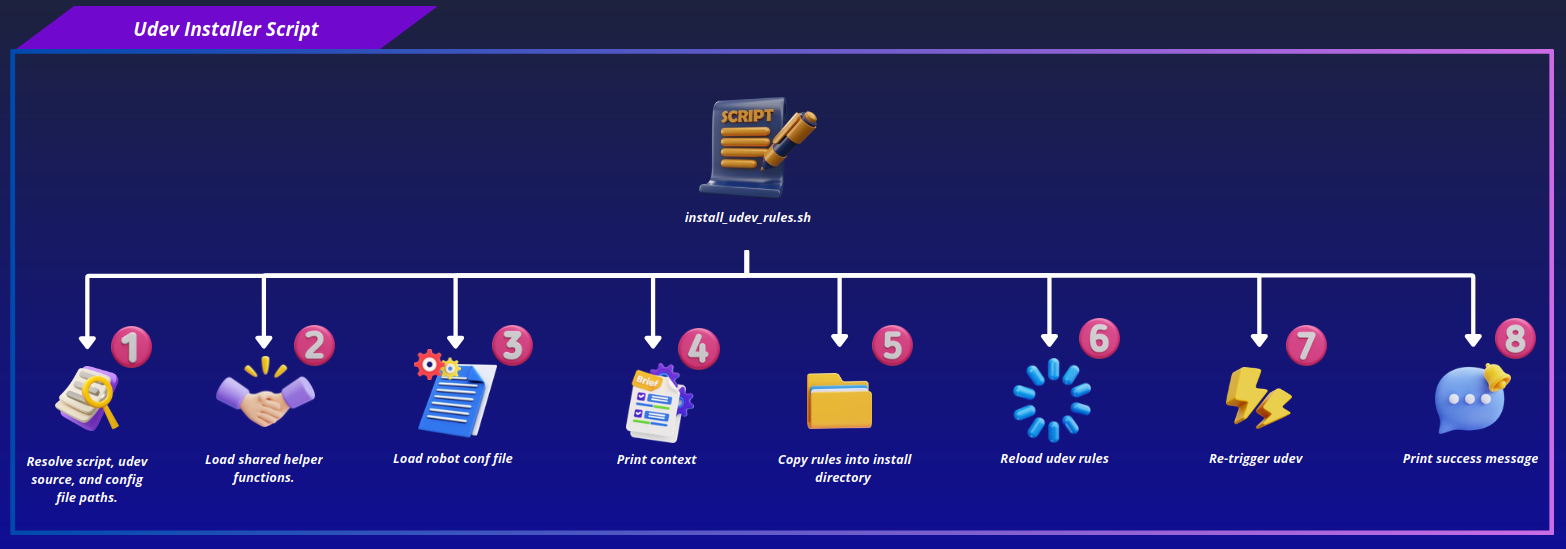
Runs install_udev_rules.sh. Discovers every *.rules file in UDEV_RULES_DIR, installs each with install -m 644 into UDEV_RULES_DIR_INSTALL_LOCATION, then reloads and triggers udev (udevadm control --reload-rules, udevadm trigger). These rules grant user-space processes direct access to hardware devices, serial ports, and USB peripherals without requiring root at runtime.
Step 6: Helper Scripts Install#
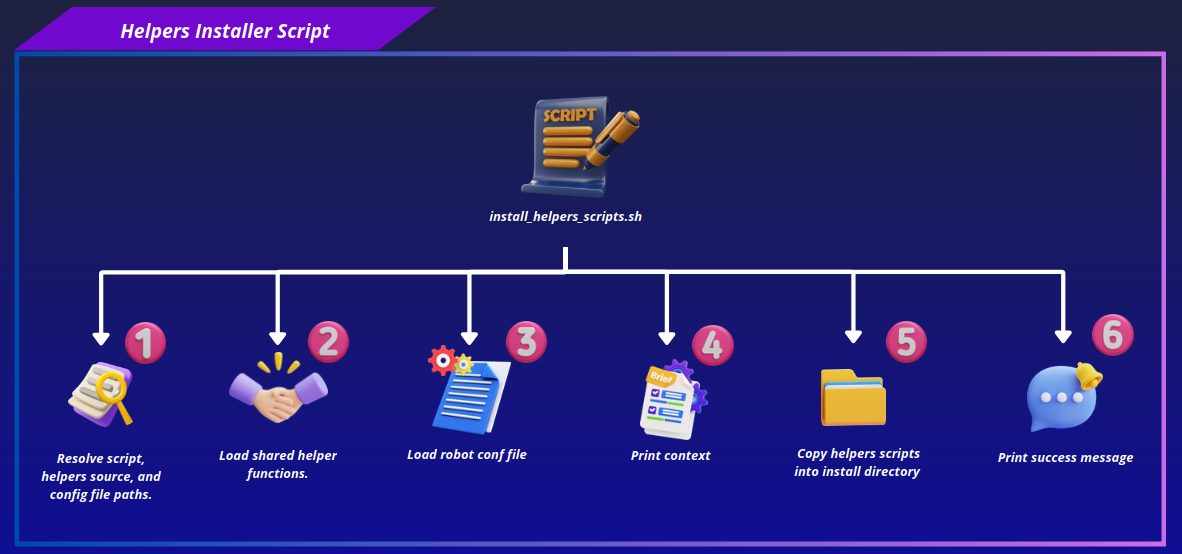
Runs install_helpers_scripts.sh. Discovers every *.sh file in HELPERS_SCRIPTS_DIR, copies each into HELPERS_SCRIPTS_DIR_INSTALL_LOCATION with executable permissions (755). These scripts become available system-wide on PATH.
Step 7: Docker Compose Launcher Install#
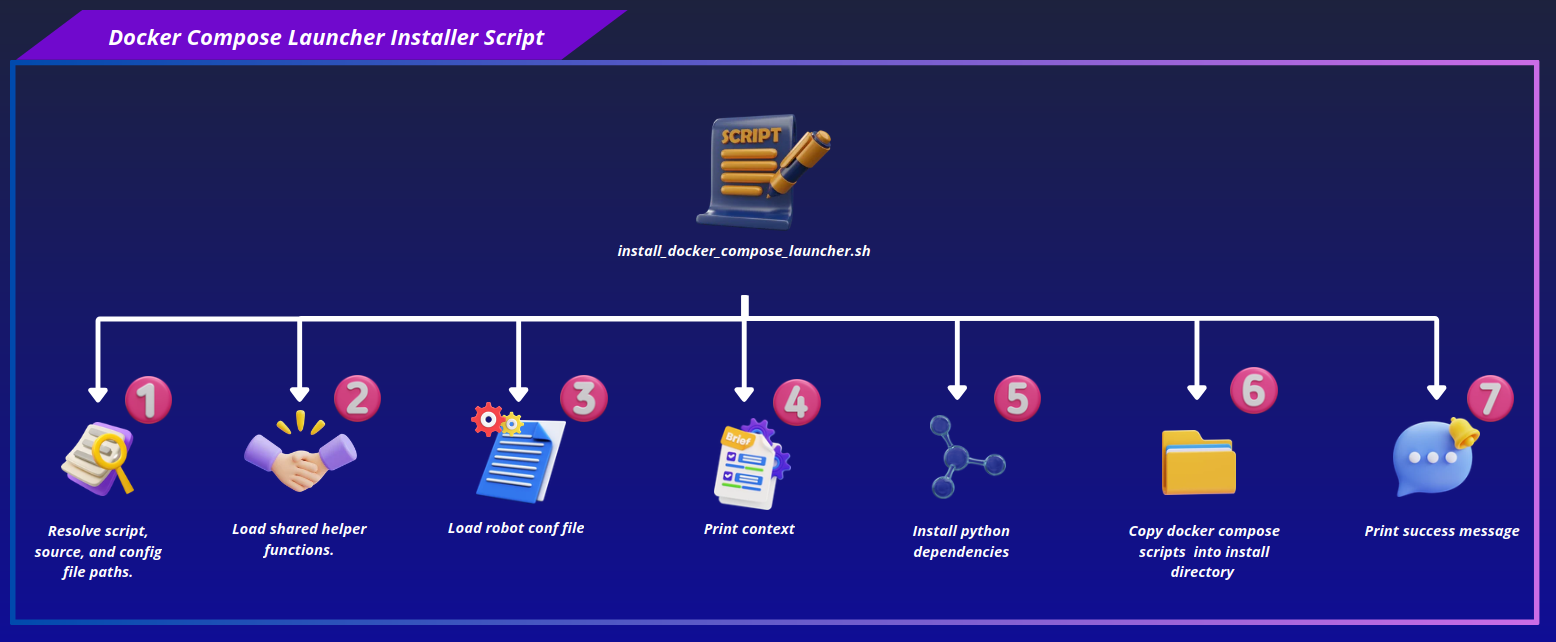
Runs install_docker_compose_launcher.sh. Installs Python's pyyaml dependency, verifies compose_launcher.py exists in DOCKER_COMPOSE_LAUNCHER_DIR, then installs the full modular launcher as a package:
Each module is installed with mode 644 into DOCKER_COMPOSE_LAUNCHER_INSTALL_DIR (${UTILS_DIR_INSTALL_LOCATION}/compose_launcher), keeping the launcher's files grouped together rather than scattered across /usr/local/bin. A thin wrapper script is then generated at DOCKER_COMPOSE_LAUNCHER_WRAPPER_FILE (/usr/local/bin/compose_launcher):
The script finishes by checking that compose_launcher resolves on PATH, confirming the wrapper is reachable system-wide.
Step 8: Config Files Install#
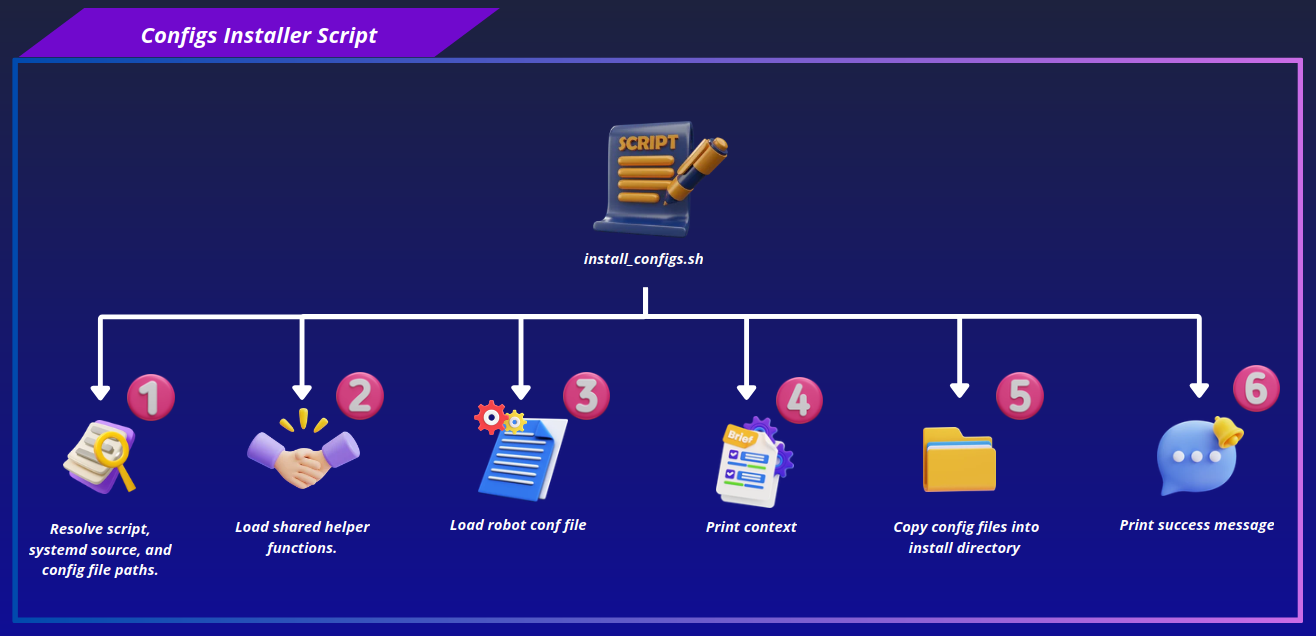
Runs install_configs.sh. For each entry in CONFIG_ITEMS the script first checks whether ${REPO_ROOT}/<item> actually exists, sorting items into an available list and a missing list rather than failing outright on a single missing path. It only aborts if none of the configured items are found, individual missing items are logged as warnings and simply skipped.
Available items are then copied into CONFIG_DIR_INSTALL_LOCATION, mirroring each source path's relative structure (mkdir -p on the destination's parent directory, existing destination entries removed and replaced with cp -a). If /etc/micipsa already exists and contains files, the script prompts for confirmation before overwriting anything inside it.
Step 9: Systemd Services Install#
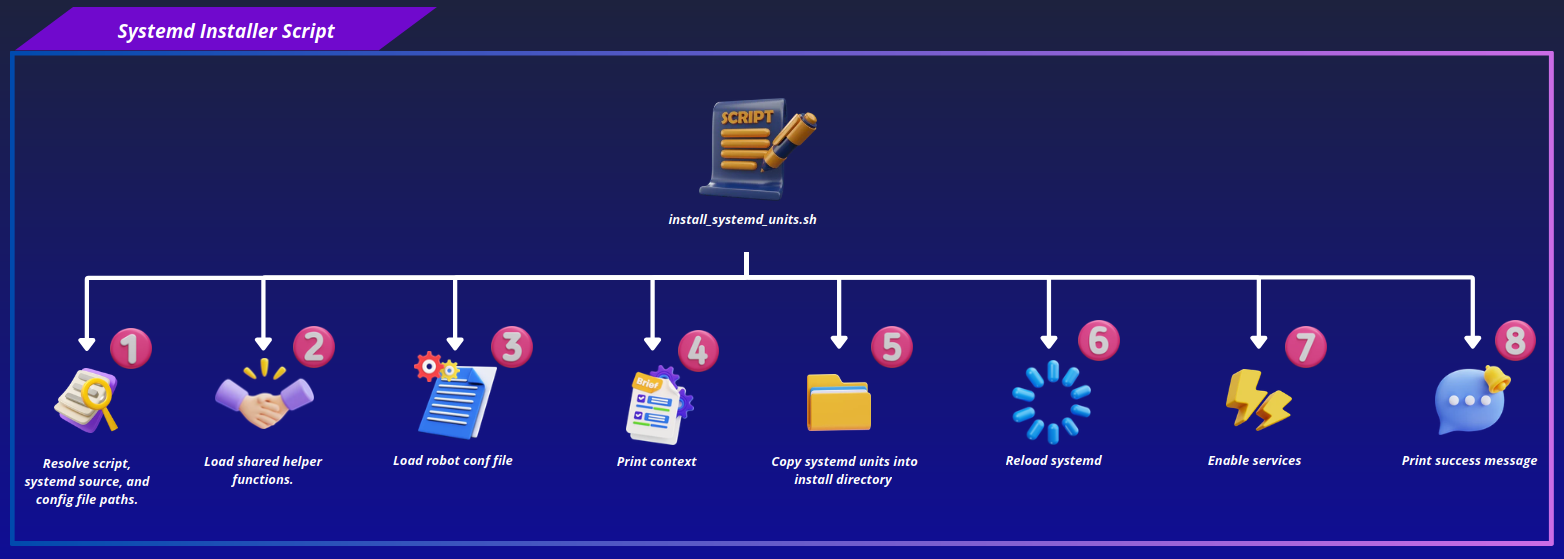
Runs install_systemd_units.sh. Discovers every *.service and *.target file in SYSTEMD_SERVICES_DIR, installs each into SYSTEMD_SERVICES_DIR_INSTALL_LOCATION with mode 644, reloads the systemd daemon, and enables every installed .service unit so the stack starts on boot and can be managed with standard systemctl commands.
Step 10: Network Install#
Runs install_network.sh. Writes SYSCTL_CONF_FILE with the tuned rmem_max/rmem_default/wmem_max/wmem_default values from robot_system.conf, then applies them immediately with sysctl -p.
Note
On aarch64 platforms, the script additionally overwrites /etc/rc.local with a block that re-applies the same sysctl values at early boot. This works around a Jetson/L4T-specific issue where values set purely via /etc/sysctl.d don't reliably persist across boot.
Step 11: Utils Files Install#
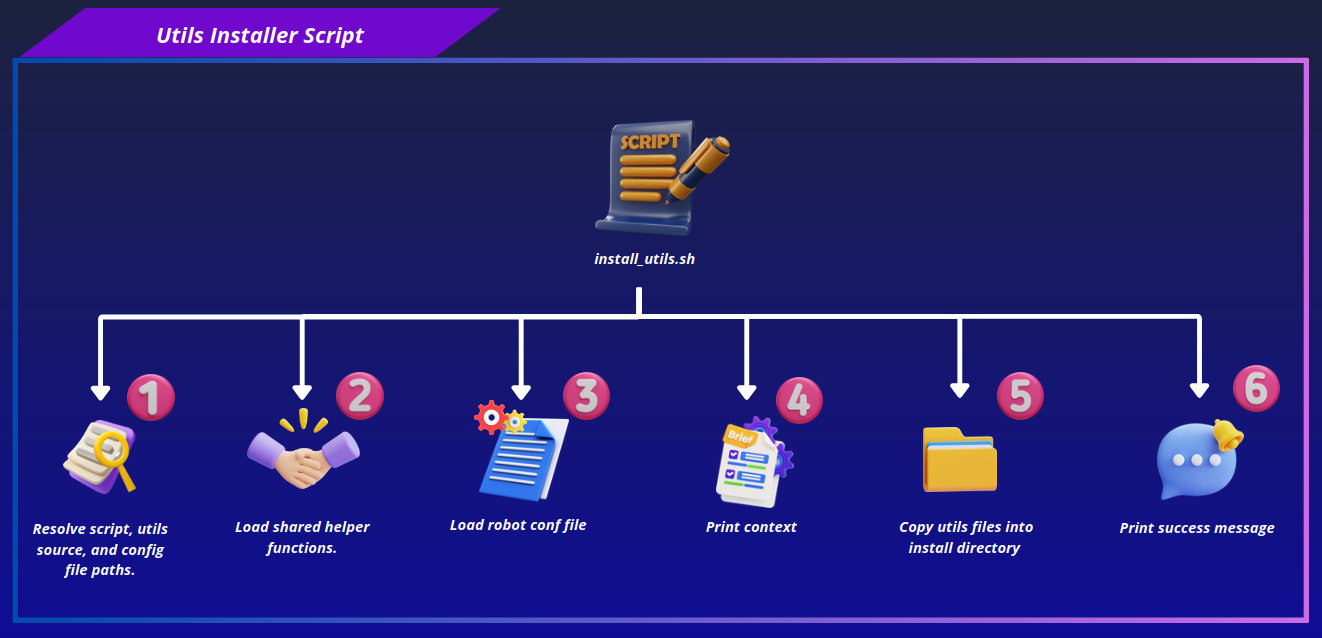
Runs install_utils.sh. Recursively discovers every file under UTILS_DIR, and if the destination (${UTILS_DIR_INSTALL_LOCATION}/utils) already exists and is non-empty, prompts for confirmation before overwriting it. Once confirmed (or if the destination is empty), copies the entire UTILS_DIR tree into place with cp -a, preserving structure and permissions.