Behavior




Overview#
micipsa_behavior is a ROS 2 package that runs Micipsa's top-level mission logic as a BehaviorTree.CPP v4 tree. It defines a single behavior_node executable that loads a behavior tree from an XML file, ticks it at a fixed rate, and drives the robot's high-level actions.
Architecture#
micipsa_behavior sits at the top of the Micipsa autonomy stack, it is an orchestration layer that sequences calls into actions nodes to perform a specific mission/task
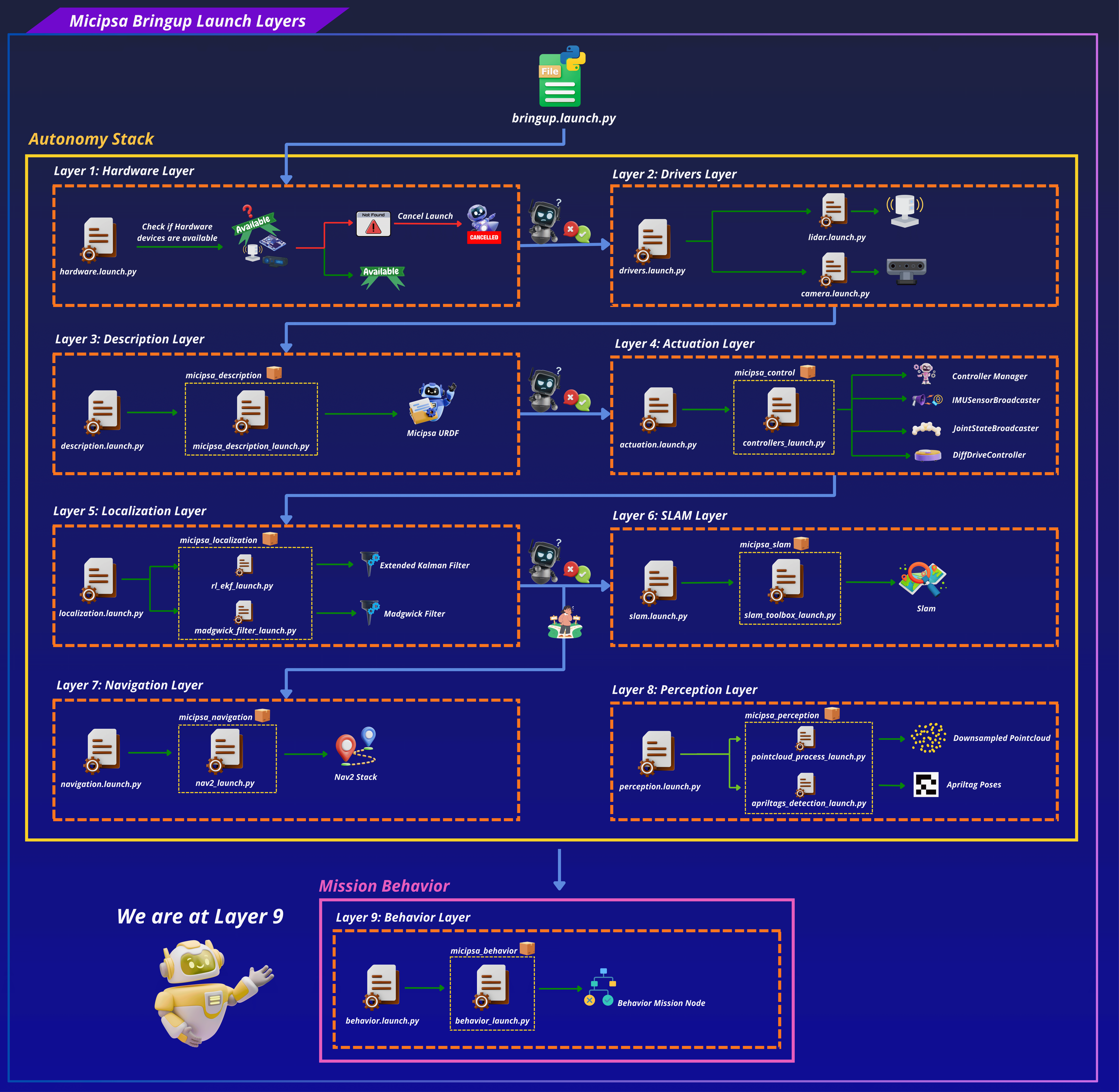
DefaultMission owns the entire lifecycle: it constructs a single rclcpp::Node (behavior_node), reads the behavior_tree_xml parameter, registers the four custom BT node types with a BT::BehaviorTreeFactory, places the shared node on a BT::Blackboard, and builds the tree with factory_.createTreeFromFile(). If the XML fails to parse or references an unregistered node type, the constructor logs a fatal error and rethrows, the executable will not start with a broken tree.
run() then spins a MultiThreadedExecutor on a background thread (so action client callbacks are serviced) while the main thread ticks the tree once per loop at 10 Hz via tickOnce(). A BT::NodeStatus::FAILURE result from the tree root is logged but does not stop the loop, the tree keeps ticking and may recover on a subsequent tick depending on how it's structured.
BT Node Reference#
Spin (micipsa_behavior::Spin)#
Wraps the Nav2 nav2_msgs/action/Spin action. Input port angle (float, radians) is read in onStart(); if missing, the node fails immediately without attempting to contact the action server. Calls action_server_is_ready() (non-blocking) before sending the goal; if the server isn't up, fails immediately rather than blocking the tick. Reports progress via RCLCPP_DEBUG_THROTTLE on angular_distance_traveled.
Dock (micipsa_behavior::Dock)#
Wraps the Nav2 nav2_msgs/action/DockRobot action. Has no input ports of its own, instead it reads selected_dock from the blackboard, which must have been set by a prior SelectDock tick in the same tree execution. If selected_dock is absent, the node fails without contacting the action server.
UnDock (micipsa_behavior::UnDock)#
Wraps the Nav2 nav2_msgs/action/UndockRobot action. Reads selected_dock_type from the blackboard (also set by SelectDock). Note that feedbackCallback is implemented but intentionally empty, undocking feedback is not currently logged.
SelectDock (micipsa_behavior::SelectDock)#
The only synchronous (BT::SyncActionNode) node in the package, it returns SUCCESS/FAILURE in a single tick rather than running asynchronously. Input ports dock and dock_type (both string) are required. On tick, it pushes dock to the dock_frame parameter on the /dock_pose_publisher node via an AsyncParametersClient, then, only if that parameter set succeeds, writes selected_dock and selected_dock_type onto the blackboard for Dock/UnDock to pick up later in the tree.
Warning
SelectDock's parameter client targets a node literally named dock_pose_publisher. If the AprilTag docking node in micipsa_perception / micipsa_navigation is launched under a different node name, wait_for_service will time out after 2 seconds and the node will fail. Confirm the actual remapped node name matches this hardcoded target before relying on SelectDock in a custom tree.
ROS 2 Interface#
micipsa_behavior has no topics of its own. All communication happens through action clients and a parameter client, both targeting nodes provided by other packages.
Action Clients#
| Action | Type | BT Node | Target Server |
|---|---|---|---|
/spin |
nav2_msgs/action/Spin |
Spin |
Nav2 behavior server (micipsa_navigation) |
/dock_robot |
nav2_msgs/action/DockRobot |
Dock |
Nav2 docking server (micipsa_navigation, opennav_docking) |
/undock_robot |
nav2_msgs/action/UndockRobot |
UnDock |
Nav2 docking server (micipsa_navigation, opennav_docking) |
Parameter Clients#
| Target Node | Parameter | BT Node | Description |
|---|---|---|---|
/dock_pose_publisher |
dock_frame |
SelectDock |
Sets which AprilTag-mapped frame the docking pipeline should target |
Parameters#
| Parameter | Type | Default | Description |
|---|---|---|---|
behavior_tree_xml |
string |
none.xml |
Absolute path to the resolved behavior tree XML, passed by the launch file. The literal default none.xml is never used in practice, the launch file always resolves and passes a real path. |
Launch Arguments#
| Argument | Type | Default | Description |
|---|---|---|---|
use_sim_time |
bool |
false |
Use simulation clock if true |
log_level |
string |
info |
ROS 2 log level (info, warn, error) |
behavior_config_file |
string |
behavior.xml |
Name or path of the behavior tree XML, resolved via resolve_config_path() |
Blackboard Contract#
These keys are not ROS interfaces, but form the contract between BT nodes within a single tree execution. Any custom tree mixing these nodes must respect this contract.
| Key | Written by | Read by | Type |
|---|---|---|---|
node |
DefaultMission constructor |
Every BT node's constructor | rclcpp::Node::SharedPtr |
selected_dock |
SelectDock |
Dock |
std::string |
selected_dock_type |
SelectDock |
UnDock |
std::string |
Installation#
Important
Micipsa can be run in two ways: natively on a ROS 2 host, or via Docker using pre-built containerized images. Choose your approach before proceeding:
- Native build the package directly in a ROS 2 workspace. Follow requirements and the Native Install steps below.
- Docker use the Micipsa container stack, no manual workspace setup required. skip requirements section and follow Docker section.
Requirements#
First, make sure that the following packages are available in your workspace:
Native Install#
Source the ROS 2 environment:
Install ROS 2 dependencies from the workspace root:
Build the package:
Source the install overlay:
Tip
Add source /opt/ros/jazzy/setup.bash and source ~/ros2_ws/install/setup.bash to your ~/.bashrc to avoid repeating these steps in every new terminal.
Docker#
Tip
Reading Micipsa Docker documentation (architecture, dockerfile, docker compose,...) is strongly recommended, it covers how the Dockerfiles are structured, how images are built, how containers are orchestrated, and much more.
To build and run Micipsa Behavior Docker image, follow Micipsa Dockerfile README Build Section.
Configuration#
Behavior Tree XML (behavior.xml)#
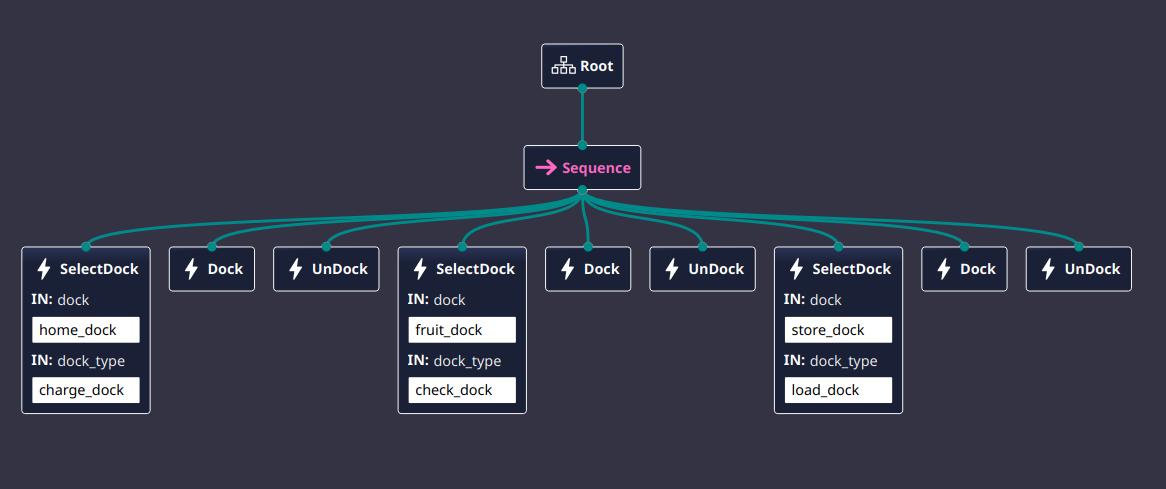
The behavior tree is defined as plain BehaviorTree.CPP v4 XML (BTCPP_format="4"). The shipped tree, DockUndockTest, is a single Sequence that exercises all three custom action nodes against every known dock, one full select → dock → undock cycle per dock, in order:
<?xml version="1.0" encoding="UTF-8"?>
<root BTCPP_format="4">
    <BehaviorTree ID="DockUndockTest">
        <Sequence>
            <SelectDock
        dock="home_dock"
        dock_type="charge_dock"/>
            <Dock/>
            <UnDock/>
            <SelectDock
        dock="fruit_dock"
        dock_type="check_dock"/>
            <Dock/>
            <UnDock/>
            <SelectDock
        dock="store_dock"
        dock_type="load_dock"/>
            <Dock/>
            <UnDock/>
        </Sequence>
    </BehaviorTree>
    <TreeNodesModel>
        <Action ID="SelectDock">
            <input_port name="dock"/>
            <input_port name="dock_type"/>
        </Action>
        <Action ID="Dock"/>
        <Action ID="UnDock"/>
    </TreeNodesModel>
</root>
Dock and UnDock take no input ports directly, each SelectDock call ahead of them sets selected_dock / selected_dock_type on the blackboard, which the following Dock/UnDock pair reads. Because this is a plain Sequence with no repeat or retry decorator, the tree runs through all three dock cycles once and stops: if any single action (e.g. Dock at fruit_dock) returns FAILURE, the entire sequence fails immediately and the two remaining dock cycles never execute. The dock names (home_dock, fruit_dock, store_dock) match the tag.frames entries configured in micipsa_perception's apriltags.yaml, so SelectDock only succeeds in pushing a known frame to dock_pose_publisher if both configs stay in sync.
Usage#
To use a custom behavior tree XML file:
Validation#
Confirm behavior_node is running and the tree loaded without a fatal error:
Confirm the action clients can see their target servers (required before any Spin, Dock, or UnDock tick can succeed):
Watch the node's log output for tick-level state transitions (Spin Goal Accepted, Spin succeeded, etc.) at info level, or pass log_level:=debug for per-tick feedback throttled to once every 1-2 seconds.
Additional Information#
Dependencies#
Build Dependencies#
These dependencies are required to build the package.
| Package | Role |
|---|---|
ament_cmake |
Build system |
behaviortree_cpp |
BehaviorTree.CPP framework used to implement the mission behavior tree |
nav2_behavior_tree |
Navigation 2 Behavior Tree nodes and integration |
rclcpp |
ROS 2 C++ client library |
rclcpp_action |
ROS 2 C++ action client support |
nav2_msgs |
Navigation 2 action and message definitions |
geometry_msgs |
Standard geometry message definitions |
micipsa_common |
Shared Micipsa utilities, types, and common functionality |
Runtime Dependencies#
These packages are required when running the behavior tree.
| Package | Role |
|---|---|
behaviortree_cpp |
Executes the behavior tree |
nav2_behavior_tree |
Provides Navigation 2 BT plugins |
rclcpp |
ROS 2 runtime support |
rclcpp_action |
Action client communication |
nav2_msgs |
Navigation actions and messages |
geometry_msgs |
Geometry message types |
micipsa_common |
Common utilities used by the behavior package |
Test Dependencies#
Used only when running the package test suite.
| Package | Role |
|---|---|
ament_lint_auto |
Runs the standard suite of linters configured for the workspace |
ament_lint_common |
Provides the common lint configurations used by ament_lint_auto |
Micipsa Package Dependencies#
The behavior package depends on the following Micipsa package:
| Package | Role |
|---|---|
micipsa_common |
Provides shared utilities, configuration helpers, and common interfaces used by the behavior tree |
Testing#
Note
The integration test runs in Gazebo headless mode and does not require physical hardware. It requires micipsa_description and micipsa_simulation to be built in the same workspace.
Launch Integration Tests#
test/test_controllers_integration_launch.py launches the full simulation control stack, micipsa_description, micipsa_simulation (headless), and micipsa_control and validates that:
- The
/controller_manager/list_controllersservice becomes available within 90 seconds joint_state_broadcasterreaches theactivestatemicipsa_base_controllerreaches theactivestate/micipsa_base_controller/cmd_veland/micipsa_base_controller/odomtopics are exposed
The test uses a polling loop with a 90-second timeout per controller to avoid flakiness from Gazebo and ros2_control startup timing.
Running Tests#
Run the integration tests:
colcon build --packages-select micipsa_control
colcon test --packages-select micipsa_control --ctest-args -L launch -V
colcon test-result --verbose
Run all tests:
colcon build --packages-select micipsa_control
colcon test --packages-select micipsa_control
colcon test-result --verbose
Clean test results between runs:
Troubleshooting#
behavior_node fails to start with a fatal Behavior Tree error#
Symptom: The node logs Failed to load Behavior Tree: ... and exits immediately.
Cause: The resolved behavior_tree_xml file is malformed XML, or it references a BT node ID that was not registered in registerBehaviorTreeNodes() (only Spin, Dock, UnDock, SelectDock are registered).
Fix: Validate the XML is well-formed and only references the four registered node IDs (case-sensitive). Confirm the resolved path is the file you expect by checking the launch output for the resolve_config_path() log line.
Spin/Dock/UnDock fails immediately every tick#
Symptom: The tree ticks but the relevant action node returns FAILURE on the very first tick, with a log line like Spin action server unavailable.
Cause: The corresponding Nav2 action server is not running. action_server_is_ready() is a non-blocking check, the node fails fast rather than waiting for the server to come up.
Fix: Confirm micipsa_navigation is running and the relevant action appears in ros2 action list. Launch micipsa_navigation before micipsa_behavior if it isn't already running.
Dock or UnDock fails with "No dock selected" / "No dock type selected"#
Symptom: Dock or UnDock returns FAILURE immediately with a missing-blackboard-key error, even though the action server is available.
Cause: selected_dock / selected_dock_type were never written to the blackboard, because no SelectDock node ran earlier in the same tree execution, or SelectDock itself failed before reaching the point where it writes those keys.
Fix: Ensure the tree places a SelectDock node before Dock/UnDock in execution order, and check SelectDock's own log output for a parameter-set failure.
SelectDock fails with "dock_pose_publisher parameter service unavailable"#
Symptom: SelectDock times out after 2 seconds waiting for the parameter service.
Cause: No node named exactly dock_pose_publisher is currently running, or it is running under a remapped name. SelectDock's target node name is hardcoded in select_dock.cpp.
Fix: Confirm the AprilTag docking node is launched and check its actual node name:
If the name differs from dock_pose_publisher, either rename the node at launch or update the hardcoded target in select_dock.cpp and rebuild.