Simulation



Overview#
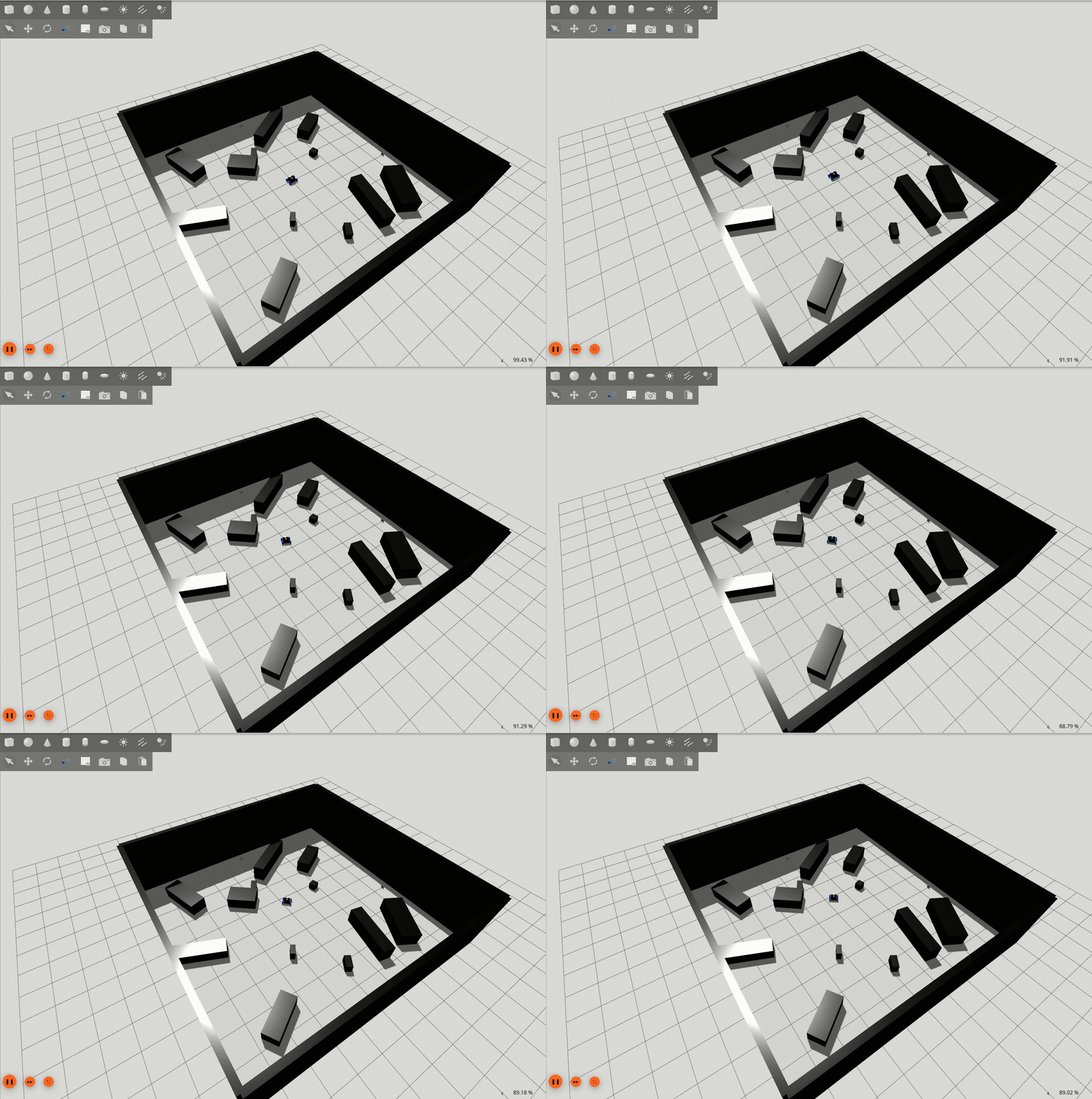
micipsa_simulation is a ROS 2 package that provides the Gazebo simulation environment for Micipsa. It launches Gazebo Harmonic, spawns the robot model from the /robot_description topic published by micipsa_description, and starts the ros_gz_bridge node that forwards sensor data and simulation clock from Gazebo to ROS 2. This package is the simulation counterpart to the physical hardware stack, it replaces micipsa_hardware with Gazebo physics and virtual sensors.
Architecture#
micipsa_simulation replaces the physical hardware layer for development and testing.
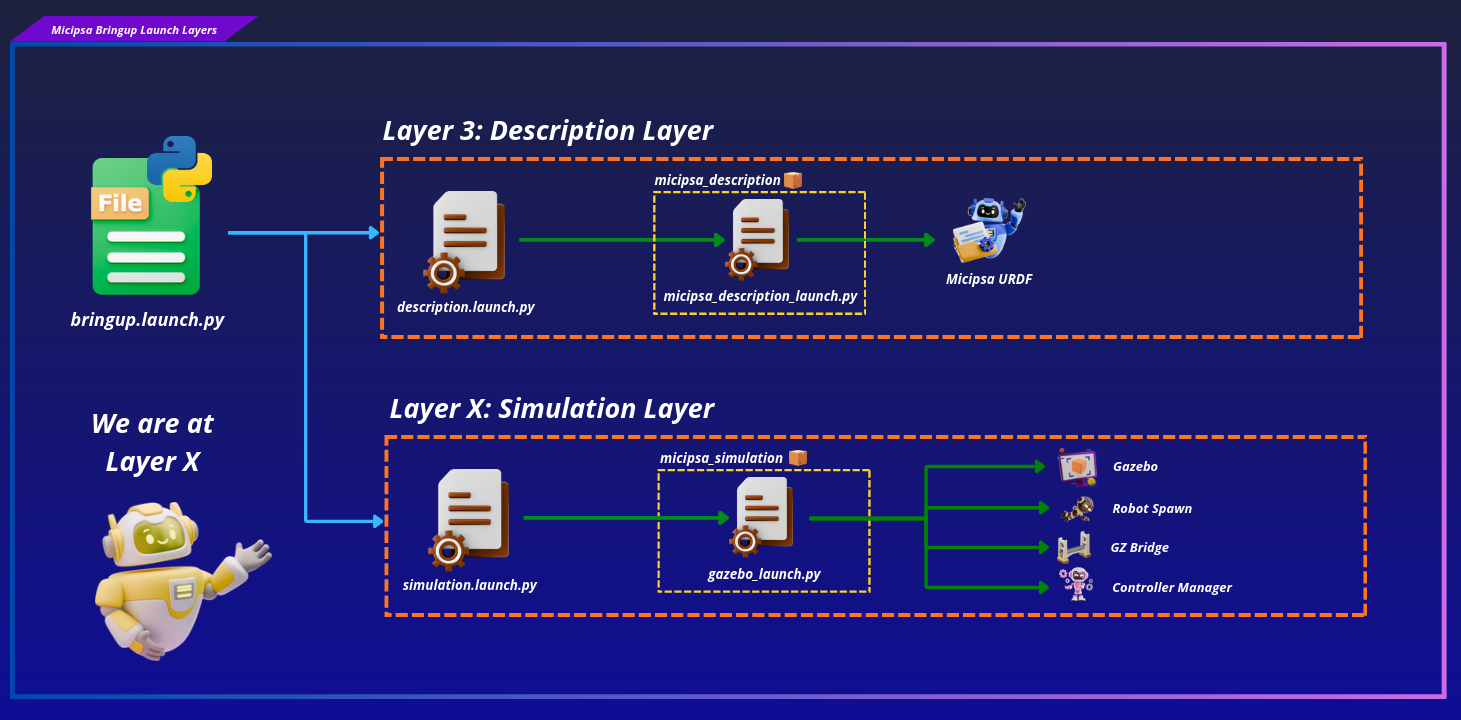
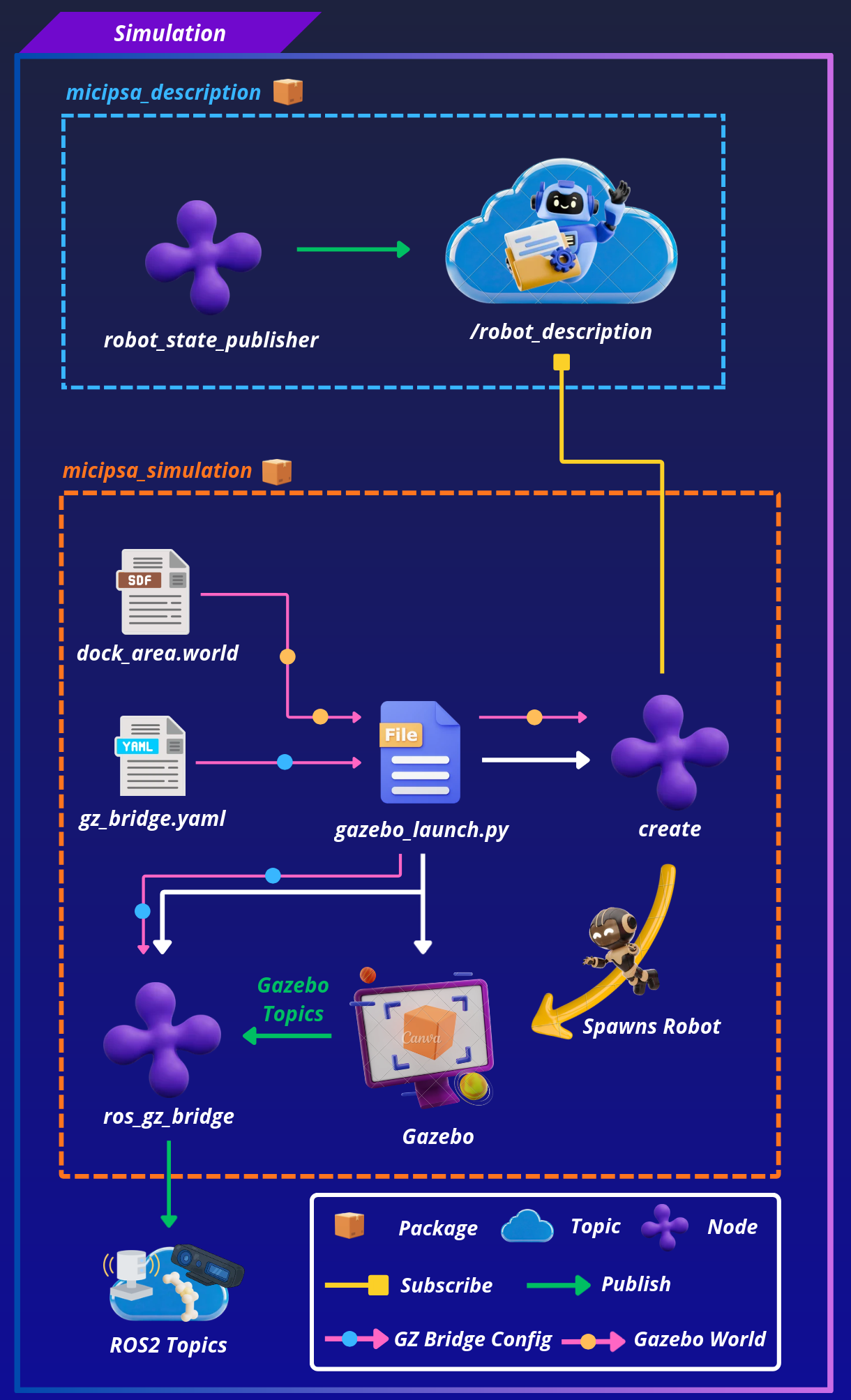
gazebo_launch.py is responsible for three things:
- Starting Gazebo
- Spawning the robot
- Starting gz bridge.
The controller manager is started internally by the gz_ros2_control plugin loaded from the robot description (URDF).
Note
Controllers such as DiffDriveController, JointStateBroadcaster,IMUSensorBroadcaster are managed and launched by micipsa_control, to control and move the robot the controllers must be launched separately after the robot is loaded in gazebo.
Bridge Architecture#
All sensor data flows from Gazebo to ROS 2 through ros_gz_bridge. The bridge configuration in gz_bridge.yaml is the authoritative mapping between Gazebo topic names and ROS 2 topic names:
graph LR
    subgraph Gazebo
        GC["clock"]
        GS["scan"]
        GI["imu"]
        GTF["tf"]
        GRGB["/front_camera/color/image"]
        GCI["/front_camera/color/camera_info"]
        GD["/front_camera/color/depth_image"]
        GP["/front_camera/color/points"]
    end

    subgraph ROS 2
        RC["clock"]
        RS["scan"]
        RI["/micipsa_base/imu/data"]
        RTF["tf"]
        RRGB["/front_camera/color/image_raw"]
        RCI["/front_camera/color/camera_info"]
        RD["/front_camera/depth/image_rect_raw"]
        RP["/front_camera/depth/color/points"]
    end

    GC -->|GZ_TO_ROS| RC
    GS -->|GZ_TO_ROS| RS
    GI -->|GZ_TO_ROS| RI
    GTF -->|GZ_TO_ROS| RTF
    GRGB -->|GZ_TO_ROS| RRGB
    GCI -->|GZ_TO_ROS| RCI
    GD -->|GZ_TO_ROS| RD
    GP -->|GZ_TO_ROS| RP
ROS 2 Interface#
Published Topics#
All topics below are published by ros_gz_bridge after being bridged from Gazebo. All bridges are GZ_TO_ROS direction.
| Topic | Publisher | Type | QoS |
|---|---|---|---|
/clock |
ros_gz_bridge |
rosgraph_msgs/Clock |
RELIABLE / TRANSIENT_LOCAL |
/scan |
ros_gz_bridge |
sensor_msgs/LaserScan |
BEST_EFFORT / VOLATILE |
/front_camera/color/image_raw |
ros_gz_bridge |
sensor_msgs/Image |
RELIABLE / VOLATILE |
/front_camera/color/camera_info |
ros_gz_bridge |
sensor_msgs/CameraInfo |
RELIABLE / VOLATILE |
/front_camera/depth/image_rect_raw |
ros_gz_bridge |
sensor_msgs/Image |
RELIABLE / VOLATILE |
/front_camera/depth/color/points |
ros_gz_bridge |
sensor_msgs/PointCloud2 |
RELIABLE / VOLATILE |
/micipsa_base/imu/data |
ros_gz_bridge |
sensor_msgs/Imu |
RELIABLE / VOLATILE |
/tf |
ros_gz_bridge |
tf2_msgs/TFMessage |
RELIABLE / VOLATILE |
Launch Arguments#
| Argument | Type | Default | Description |
|---|---|---|---|
log_level |
string |
info |
Log verbosity for robot_state_publisher (debug, info, warn, error) |
headless |
bool |
false |
true gazebo runs without a gui |
simulation_world_file |
string |
dock_area.world |
Name of the simulation world |
Installation#
Important
Micipsa can be run in two ways: natively on a ROS 2 host, or via Docker using pre-built containerized images. Choose your approach before proceeding:
- Native build the package directly in a ROS 2 workspace. Follow requirements and the Native Install steps below.
- Docker use the Micipsa container stack, no manual workspace setup required. skip requirements section and follow Docker section.
Requirements#
First, make sure that the following packages are available in your workspace:
- micipsa_common
- micipsa_description (not required for building, needed in usage section)
Optional System Dependencies#
If Gazebo fails to render (black screen or EGL errors):
Native Install#
Source the ROS 2 environment:
Install ROS2 dependencies from the workspace root:
Build the package:
Source the install overlay:
Tip
Add source /opt/ros/jazzy/setup.bash and source ~/ros2_ws/install/setup.bash to your ~/.bashrc to avoid repeating these steps in every new terminal.
Docker#
Tip
Reading Micipsa Docker documentation (architecture, dockerfile, docker compose,...) is strongly recommended, it covers how the Dockerfiles are structured, how images are built, how containers are orchestrated, and much more.
To build and run Micipsa Simulation Docker image, follow Micipsa Dockerfile README Build Section.
Configuration#
World File#
Note
World file resolution in this package does not follow the standard resolve_config_path() pattern used elsewhere in the Micipsa workspace. simulation_world_file is resolved via find_file(), which looks only inside this package's own resources/worlds/ directory , there is no micipsa_bringup lookup or fallback chain.
Custom worlds must be placed directly in resources/worlds/ or referenced by absolute path.
The default world is resources/worlds/dock_area.world, to add a new world permanently place the .world file in resources/worlds/.
To use the new created world pass its path or name to the simulation_world_file launch argument when running the simulation launch file, see Usage section for more details.
Note
The GZ_SIM_RESOURCE_PATH environment variable is extended at launch time to include the package's resources/ directory. Gazebo will find models and worlds placed there automatically without any manual environment configuration.
Topic Bridge#
config/gz_bridge.yaml is the single file that controls which Gazebo topics are forwarded to ROS 2. Each entry specifies the ROS 2 topic name, the Gazebo topic name, the message types on both sides, and the bridge direction. All current bridges are GZ_TO_ROS (Gazebo → ROS 2).
To add a new sensor or topic bridge, add an entry to gz_bridge.yaml following the existing pattern and rebuild:
Warning
/scanand/front_camera/depth/color/pointstopicss QoS are overridden ingazebo_launch.pytoBEST_EFFORTreliability as at the current moment this can not be set from within thegz_bridgefile.- Downstream nodes subscribing to
/scanor/front_camera/depth/color/pointsmust use a compatible QoS profile
Robot Spawn Pose#
The default spawn pose is defined in gazebo_launch.py as x=0.0, y=0.0, z=0.2 with zero rotation.
All six pose components can be overridden at launch time without modifying the file.
Usage#
Note
This package does not start Micipsa controllers. In order to teleoperate the robot you have to launch micipsa_control once the simulation is running to spawn the DiffDriveController.
Refer to the micipsa_control README for instructions.
This package requires micipsa_description to be running first so that /robot_description is available for the robot spawner.
Launch the robot description:
Launch Gazebo simulation:
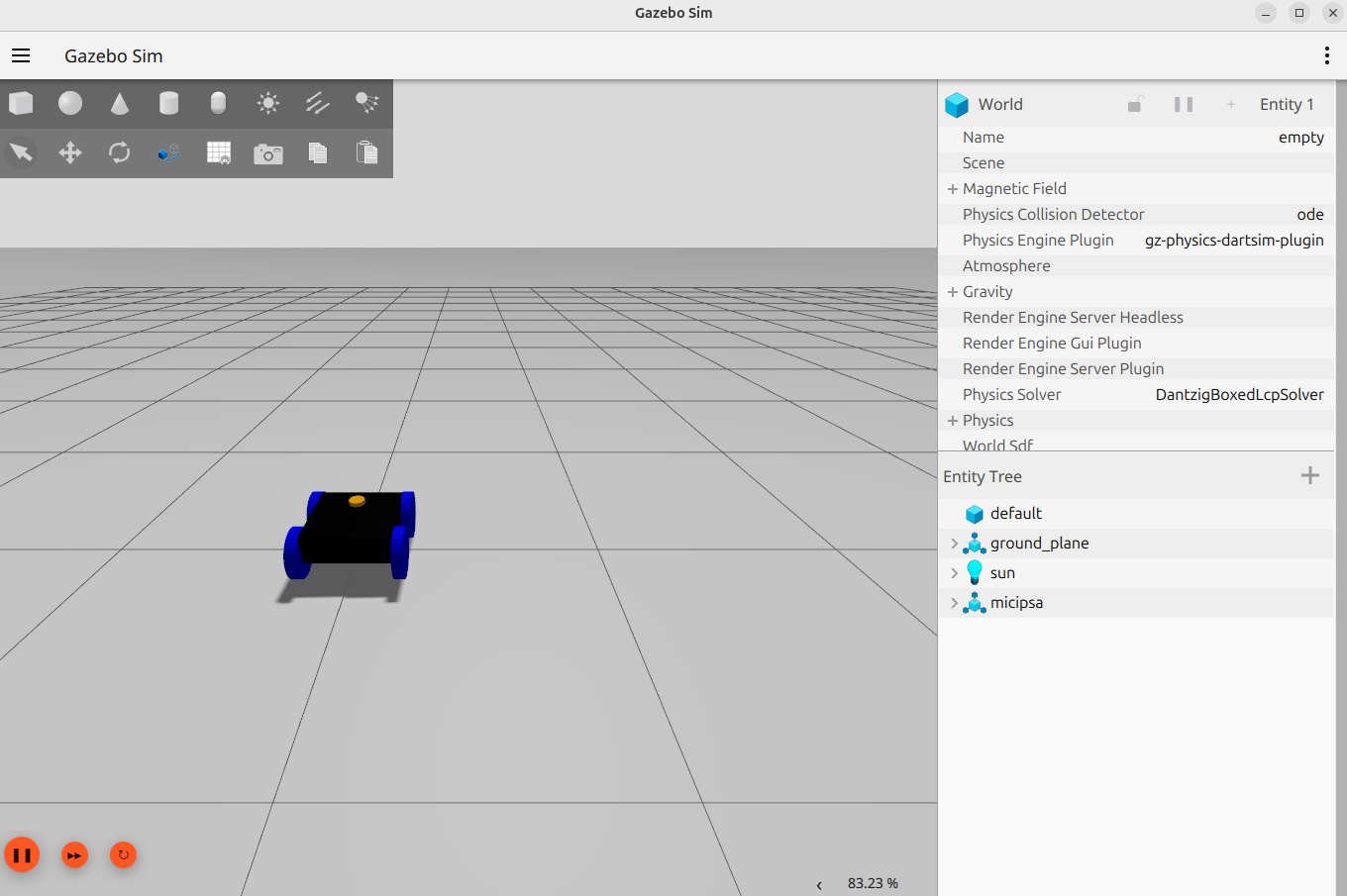
To use a custom world:
To run headlessly (no GUI, for CI or remote servers):
To spawn the robot at a custom pose:
Validation#
Confirm all bridged topics are being published:
Check that the LiDAR scan is arriving:
Check that the simulation clock is running:
Confirm the robot is visible in Gazebo and that the model loaded without errors in the Gazebo terminal output.
Additional Information#
Dependencies#
Build Dependencies#
These dependencies are required when building the package.
| Package | Role |
|---|---|
ament_cmake |
Build system |
Runtime Dependencies#
These dependencies are not required to build the package but are required when running it.
| Package | Role |
|---|---|
ros_gz_sim |
Provides gz_sim.launch.py and the ros_gz_sim create node for robot spawning |
gz_ros2_control |
Gazebo plugin that starts the ros2_control controller manager inside Gazebo |
ros_gz_bridge |
ROS 2 ↔ Gazebo topic bridge node |
Test Dependencies#
Used only when running the package test suite.
| Package | Role |
|---|---|
ament_lint_auto |
Runs the standard suite of linters configured for the workspace |
ament_lint_common |
Provides the common lint configurations (copyright, cpplint, etc.) used by ament_lint_auto |
Micipsa Packages Dependencies#
The launch file and integration test require the following packages to be built and available at runtime:
| Package | Role |
|---|---|
micipsa_common |
Provides resolve_config_path() and utils.console_utils.warn(), imported directly by behavior_launch.py |
micipsa_description |
Provides the URDF with the <ros2_control> hardware block |