Camera Udev Rules



Camera Devices#
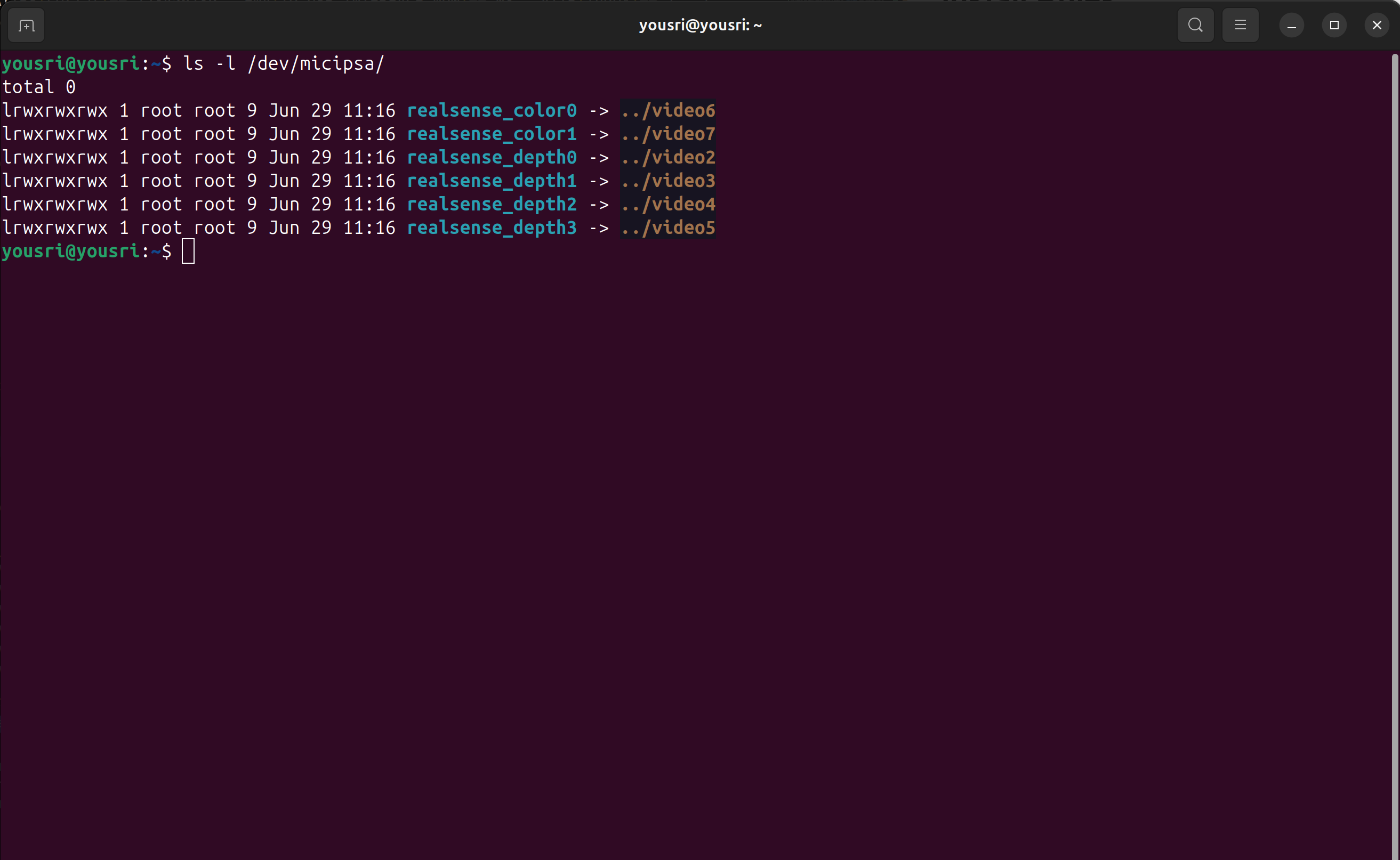
USB cameras and depth cameras typically appear as /dev/video* when connected. Similar to USB serial devices, the numeric suffix is assigned by the kernel according to the device enumeration order, making it non-deterministic. As a result, the device name can change after a reboot or whenever cameras are unplugged and reconnected.
This is particularly problematic in robotics, where multiple cameras—such as RGB cameras, stereo cameras, and depth sensors are often connected simultaneously. If a camera is assigned a different /dev/video* name after a reboot or reconnection, software may access the wrong video stream or fail to initialize the intended sensor. This is especially critical in systems that rely on multiple synchronized cameras for perception, localization, or navigation. Stable device names are therefore essential to ensure that each software component consistently connects to the correct camera.
Most USB depth cameras expose multiple video interfaces, so a single physical camera often creates several /dev/video* devices.
Configure Camera Device Rules#
Step 1 - Enumerate Video Nodes#
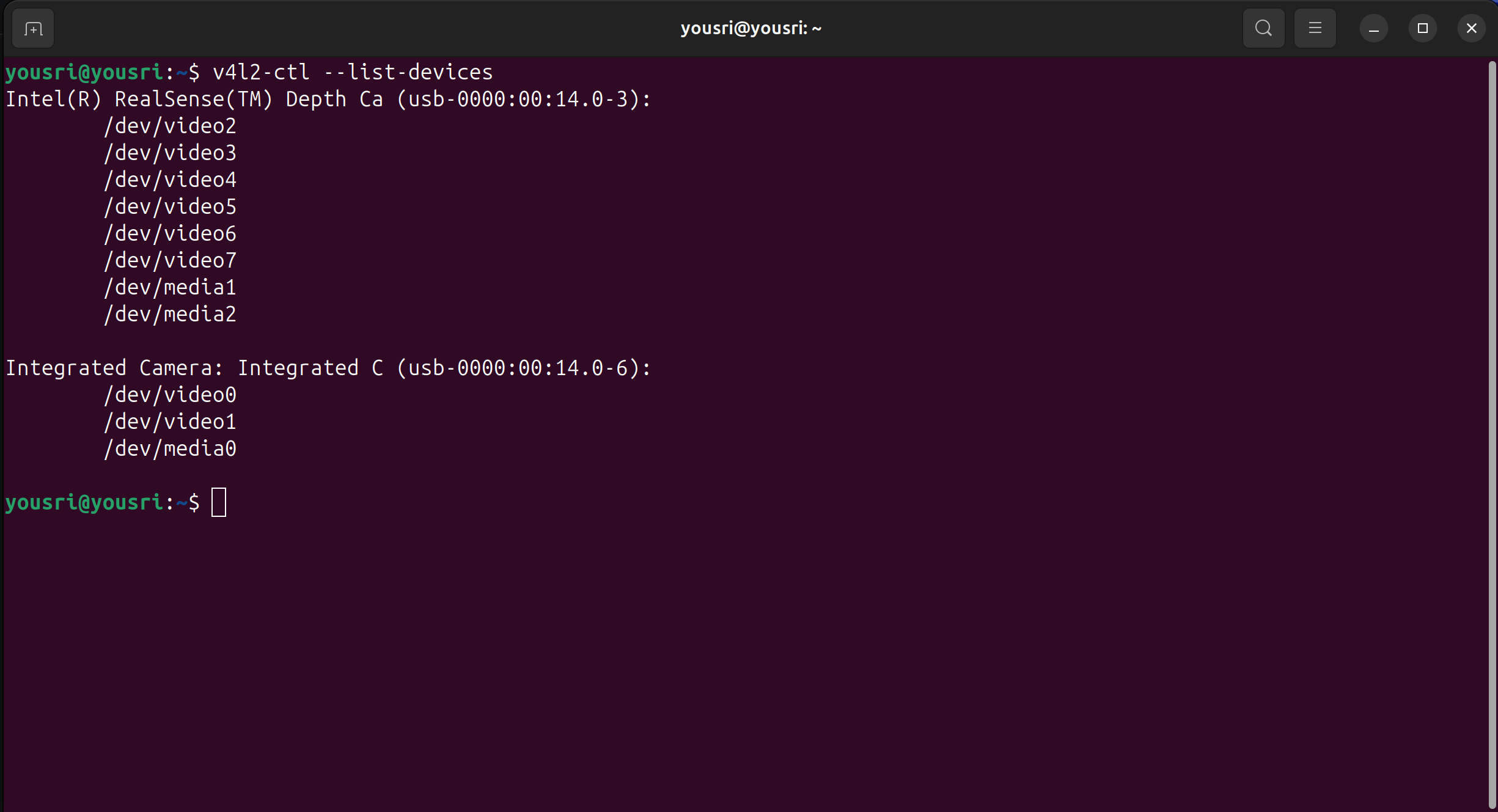
Depth cameras expose multiple /dev/videoN nodes simultaneously, one per stream (depth, infrared, RGB, metadata, etc.). The first step is to determine which nodes belong to the target camera.
Step 2 - Identify Primary Stream Node Per Interface#
Each /dev/videoN node exposes a stable index attribute that describes its role within the device. Index 0 is the primary capture node, the one targeted in udev rules.
Reading the index for each node reveals which nodes are primary and whether the device uses multiple USB interfaces.
Note
Update the for loop to match the node numbers listed for your device in Step 1.
for dev in 2 3 4 5 6 7; do
  echo -n "video$dev -> index: "
  cat /sys/class/video4linux/video$dev/index
done
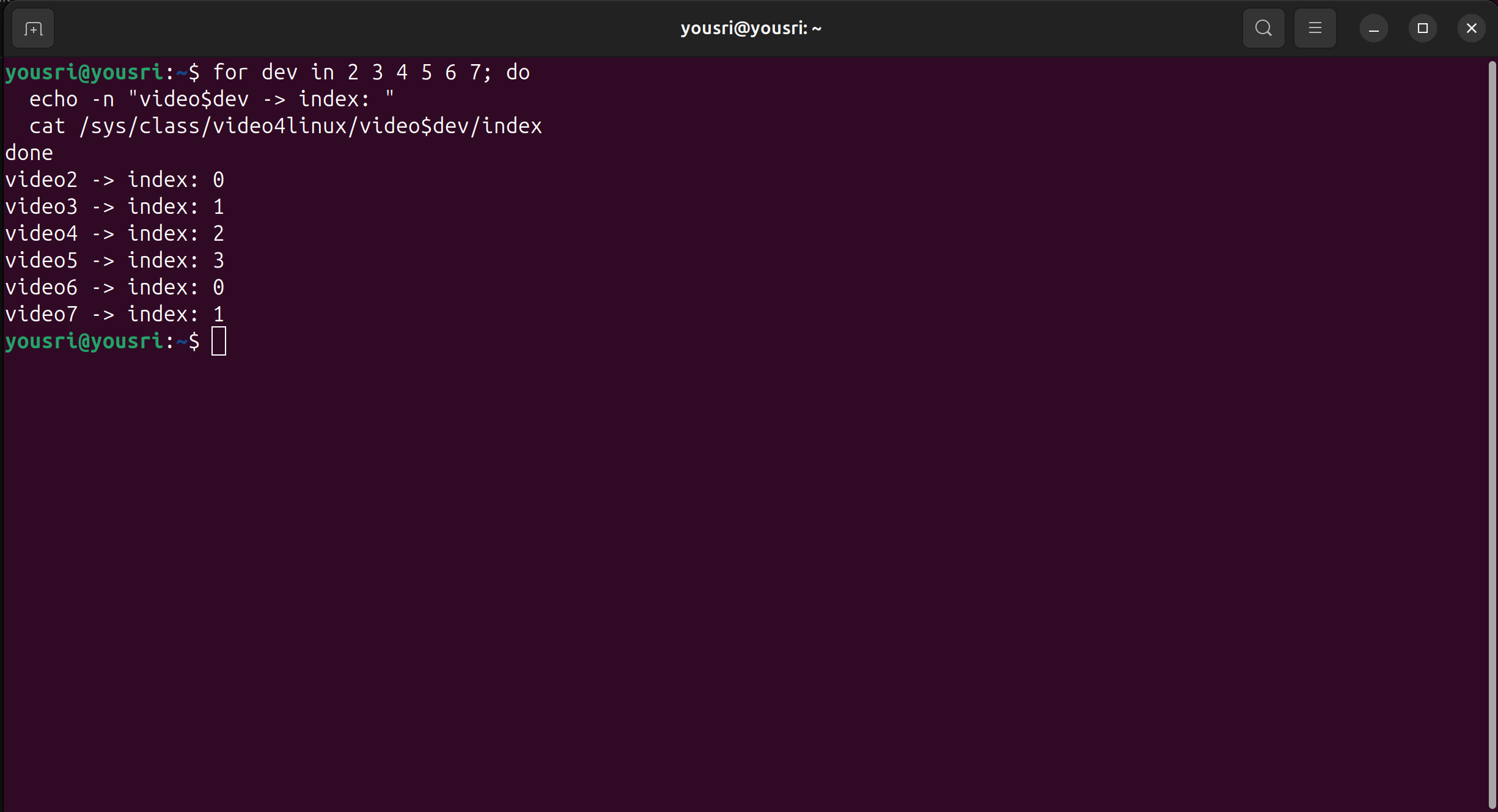
Index 0 appears on both video2 and video6, which indicates the device exposes two separate USB interfaces, each managing its own stream group. At this stage, the stream type associated with each interface is still unknown, proceed to Step 3 to resolve it.
Step 3 - Resolve Stream Types By USB Interface#
When the same index value appears across multiple nodes, those nodes belong to different USB interfaces. The ID_USB_INTERFACE_NUM attribute identifies which interface each node belongs to, allowing stream groups to be distinguished.
for dev in 2 3 4 5 6 7; do
  echo "=== video$dev ==="
  udevadm info /dev/video$dev | grep -E "ID_USB_INTERFACE_NUM|ID_PATH"
done
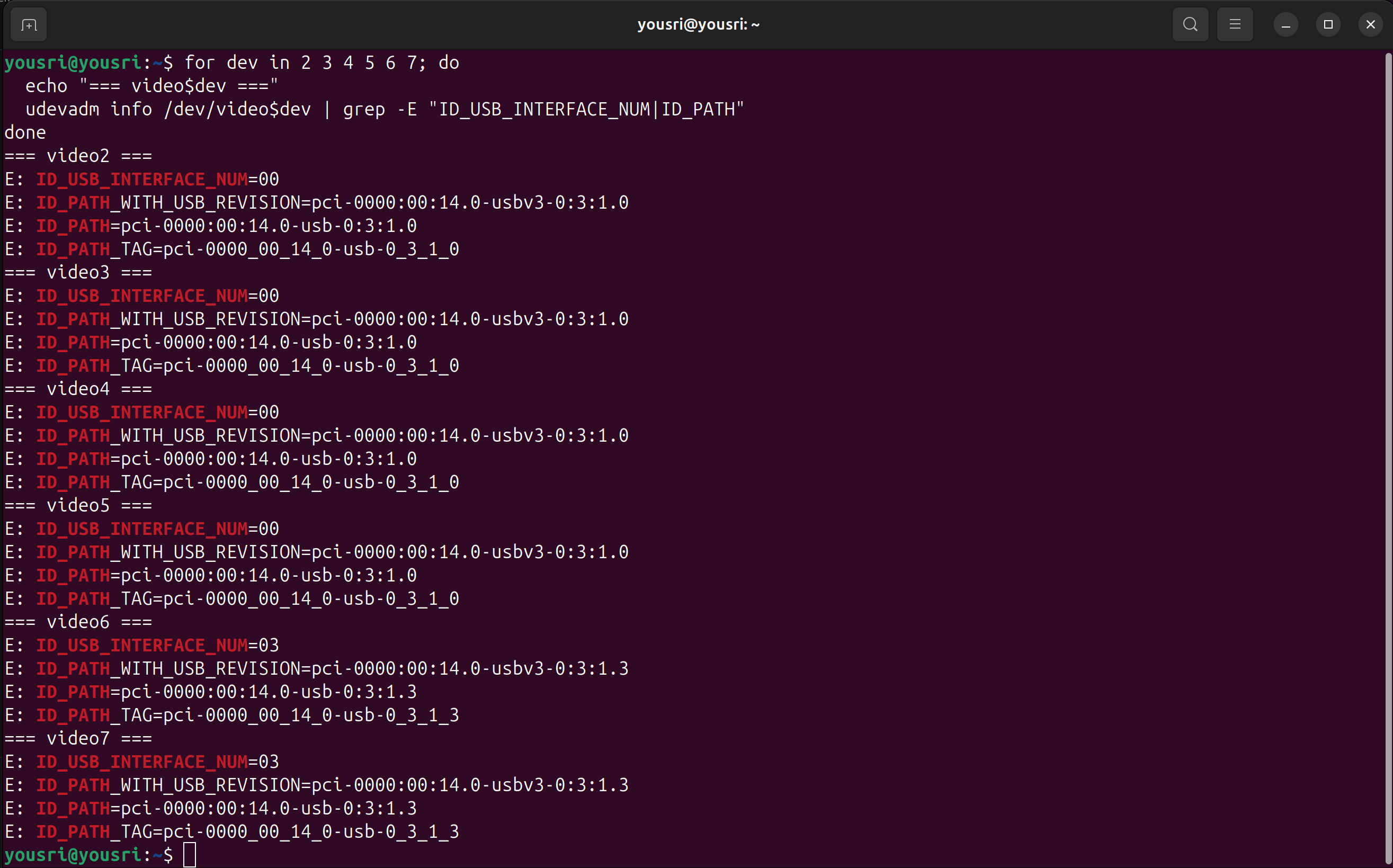
| Interface | Primary node (index 0) | Secondary nodes | Stream type |
|---|---|---|---|
00 |
video2 | video3, 4, 5 | Depth / Infrared |
03 |
video6 | video7 | RGB Color |
video2 and video6 are the nodes to target in the udev rules, they are the primary capture nodes (index 0) for their respective interfaces.
Step 4 - Extract Hardware Identifiers#
With the target nodes identified, retrieve the hardware identifiers needed to uniquely address the device in a udev rule. Run the command below on any node belonging to the device, all nodes on the same physical camera share the same identifiers.
Refer to Reading udevadm Output for guidance on interpreting the output and selecting the correct attribute block.
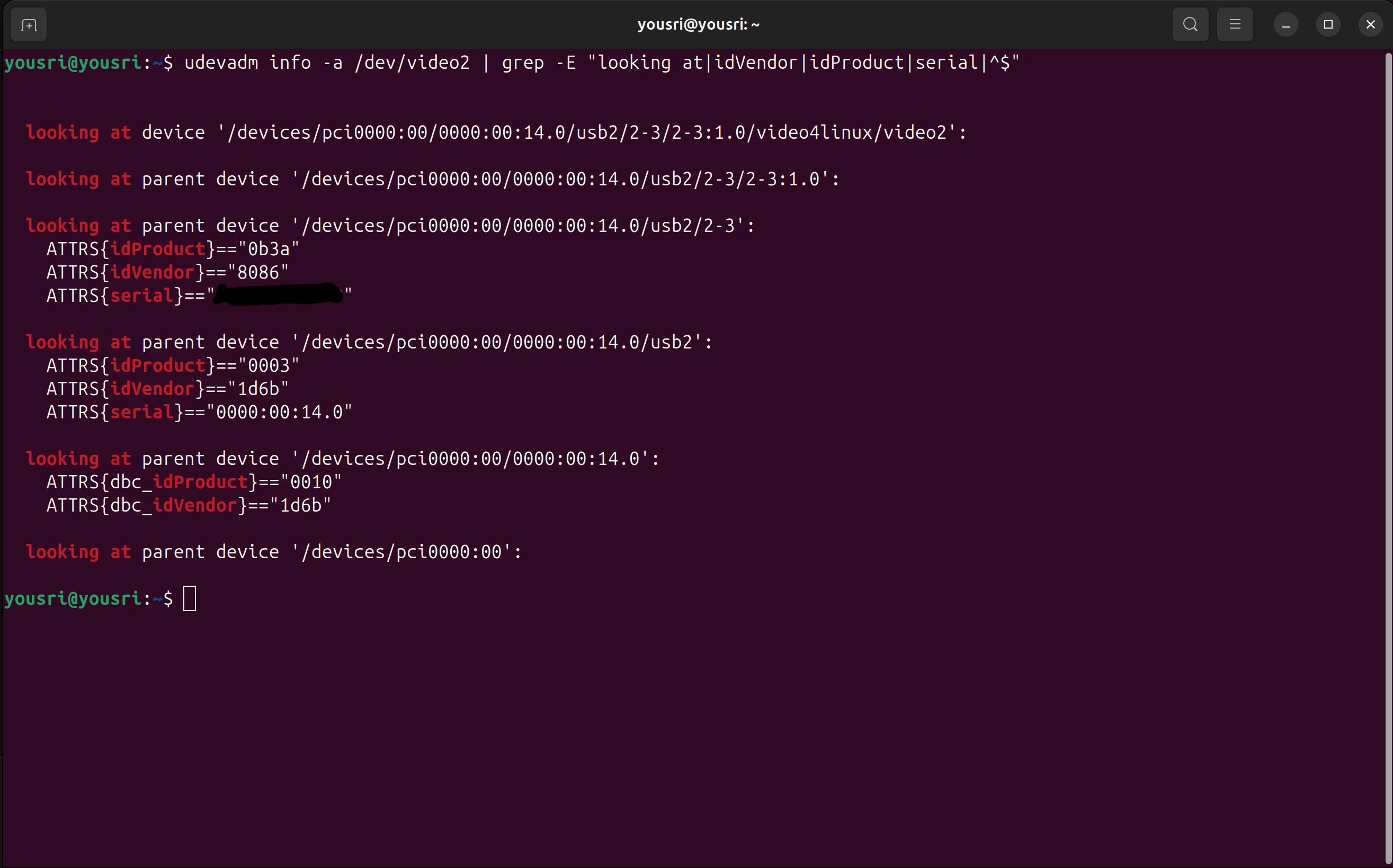
in the image above this is:
looking at parent device '.../usb2/2-3':
    ATTRS{idVendor}=="0b3a"
    ATTRS{idProduct}=="8086"
    ATTRS{serial}=="XXXXXXXXXX"
Step 5 - Write the Camera udev Rules#
Using the attributes collected in the previous steps, write one rule per node. Each rule uses ATTR{index} and ENV{ID_USB_INTERFACE_NUM} together to uniquely address a specific stream node, and ATTRS{idVendor}, ATTRS{idProduct}, and ATTRS{serial} to match the physical device.
# /etc/udev/rules.d/99-micipsa-cameras.rules

# RealSense D435i Interface 00 (Depth / Infrared)
SUBSYSTEM=="video4linux", ATTRS{idVendor}=="8086", ATTRS{idProduct}=="0b3a", \
  ATTRS{serial}=="123456789", ENV{ID_USB_INTERFACE_NUM}=="00", ATTR{index}=="0", \
  SYMLINK+="micipsa/realsense_depth0", MODE="0666", GROUP="plugdev"

SUBSYSTEM=="video4linux", ATTRS{idVendor}=="8086", ATTRS{idProduct}=="0b3a", \
  ATTRS{serial}=="123456789", ENV{ID_USB_INTERFACE_NUM}=="00", ATTR{index}=="1", \
  SYMLINK+="micipsa/realsense_depth1", MODE="0666", GROUP="plugdev"

SUBSYSTEM=="video4linux", ATTRS{idVendor}=="8086", ATTRS{idProduct}=="0b3a", \
  ATTRS{serial}=="123456789", ENV{ID_USB_INTERFACE_NUM}=="00", ATTR{index}=="2", \
  SYMLINK+="micipsa/realsense_depth2", MODE="0666", GROUP="plugdev"

SUBSYSTEM=="video4linux", ATTRS{idVendor}=="8086", ATTRS{idProduct}=="0b3a", \
  ATTRS{serial}=="123456789", ENV{ID_USB_INTERFACE_NUM}=="00", ATTR{index}=="3", \
  SYMLINK+="micipsa/realsense_depth3", MODE="0666", GROUP="plugdev"

# RealSense D435i Interface 03 (RGB Color)
SUBSYSTEM=="video4linux", ATTRS{idVendor}=="8086", ATTRS{idProduct}=="0b3a", \
  ATTRS{serial}=="123456789", ENV{ID_USB_INTERFACE_NUM}=="03", ATTR{index}=="0", \
  SYMLINK+="micipsa/realsense_color0", MODE="0666", GROUP="plugdev"

SUBSYSTEM=="video4linux", ATTRS{idVendor}=="8086", ATTRS{idProduct}=="0b3a", \
  ATTRS{serial}=="123456789", ENV{ID_USB_INTERFACE_NUM}=="03", ATTR{index}=="1", \
  SYMLINK+="micipsa/realsense_color1", MODE="0666", GROUP="plugdev"
Install Rules#
Copy the rule files to the udev directory and reload the daemon to apply them immediately:
sudo cp 99-micipsa-cameras.rules /etc/udev/rules.d/
sudo udevadm control --reload-rules && sudo udevadm trigger
Verify Device Symlinks#
Once the rules are installed, confirm that the symlinks were created correctly: