Control



Overview#
micipsa_control is a ROS 2 package that configures and launches the ros2_control controllers for Micipsa and a Twist multiplexer which multiplex several velocity commands (topics) and allows to priorize or disable them.
The controllers configuration file declares the three controllers that make up the Micipsa actuation stack, DiffDriveController, JointStateBroadcaster, and IMUSensorBroadcaster along with their parameters.
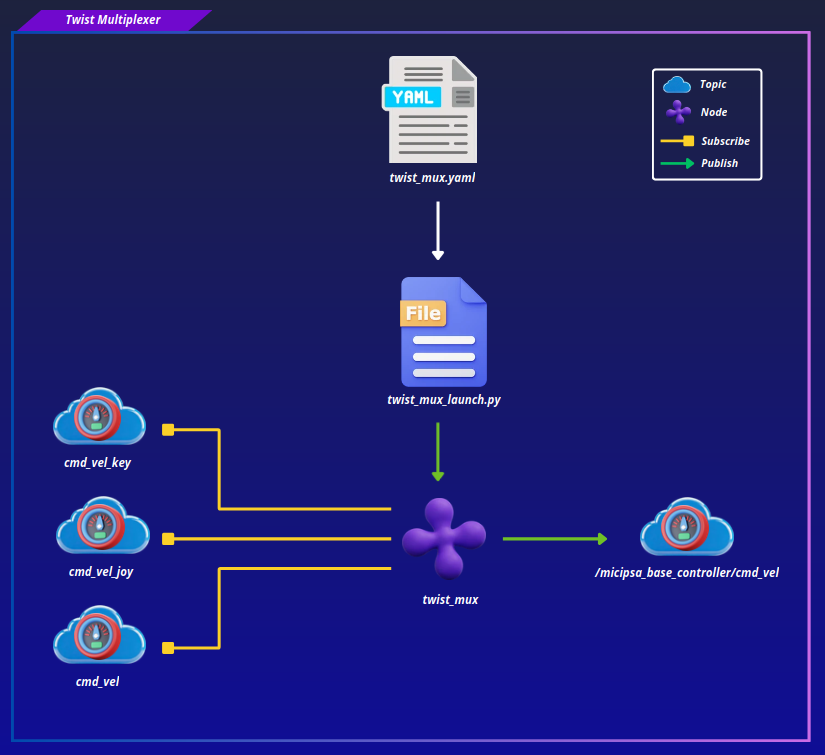
The Twist multiplexer configuration file defines velocity command topics and their priorities.
The controllers_launch.py launch file starts the controller manager when running on real hardware, and in simulation it only spawns the controllers as the controller manager is already started internally by the gz_ros2_control Gazebo plugin (defined in the robot description), and twist_mux_launch.py launches the twist multiplexer node in both modes.
Architecture#
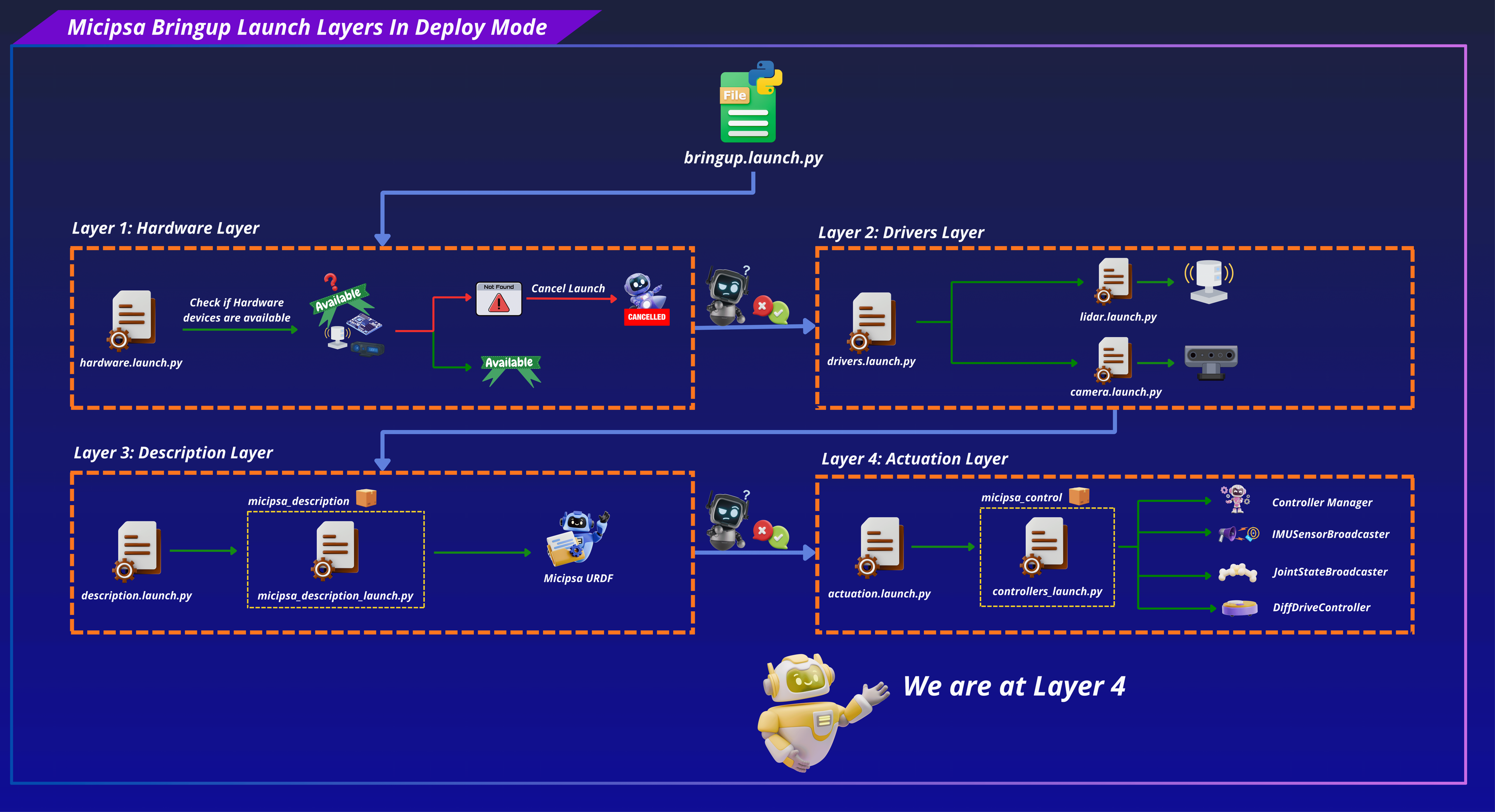
micipsa_control runs on top of micipsa_description layer, and is brought up by invoking its own launch file which will start the actuation stack.
Controllers#
The controllers_launch.py launch file launches the controller manager with the controllers.yaml configuration file and spawns the controllers specified within it.
Important
In simulation, the controller manager is started internally by the gz_ros2_control/GazeboSimROS2ControlPlugin, which is declared in micipsa_ros2_control.xacro
In simulation, IMUSensorBroadcaster controllers is not started as Gazebo already provides full IMU Data including orientation.
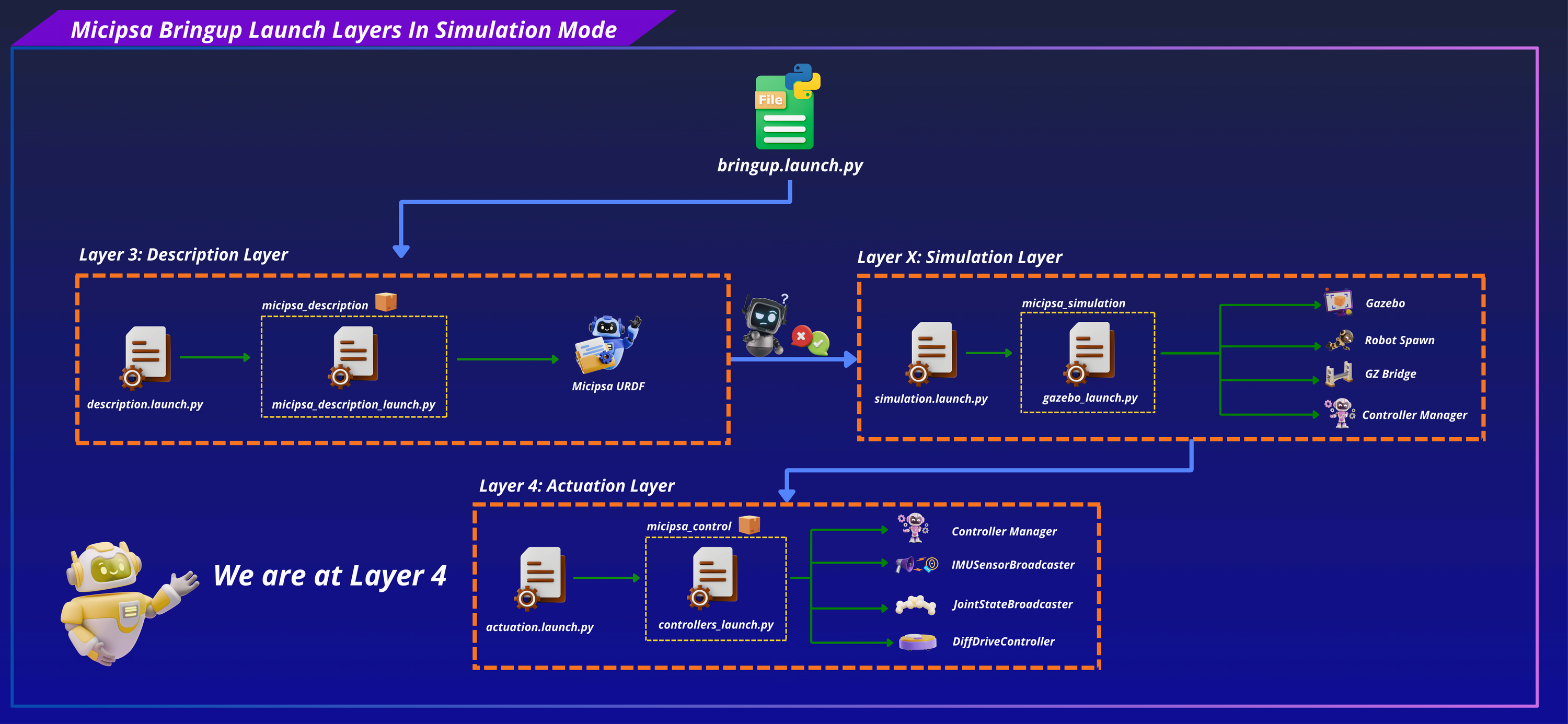
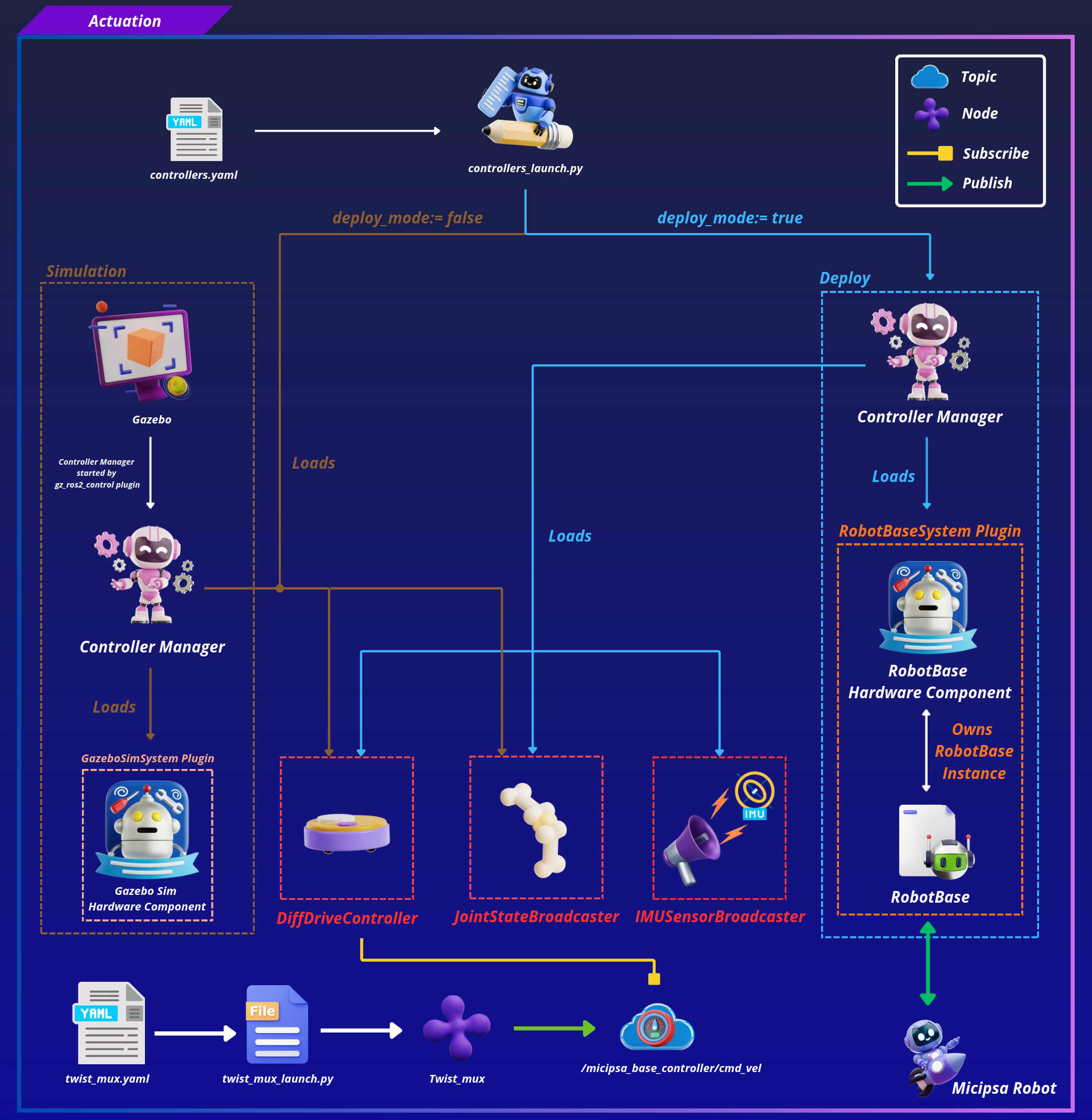
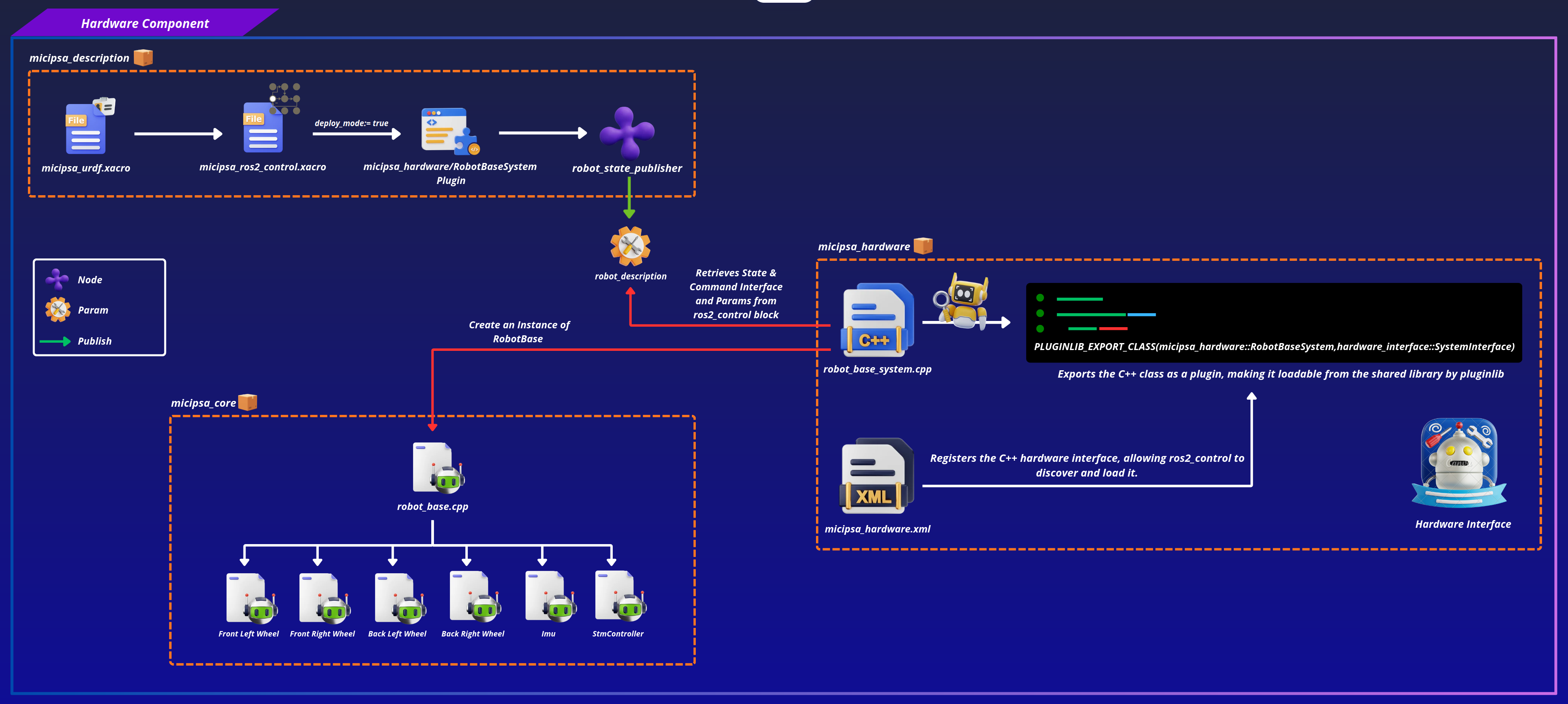
In deploy mode, the controller manager loads the RobotBaseSystem hardware component plugin defined in micipsa_hardware, discoverable at runtime via the ros2_control block in Micipsa URDF. In simulation, it loads the GazeboSimSystem plugin instead.
Twist Multiplexer#
The twist_mux_launch.py launch file will start the twist_mux node and using its configuration file will defines which velocity command topics the robot listens to and how conflicts and priority between them are resolved.
ROS 2 Interface#
Published Topics#
| Topic | Publisher | Type | QoS |
|---|---|---|---|
/joint_states |
joint_state_broadcaster |
sensor_msgs/msg/JointState |
RELIABLE / VOLATILE |
/micipsa_base_controller/odom |
micipsa_base_controller |
nav_msgs/msg/Odometry |
RELIABLE / VOLATILE |
/micipsa_base/imu/data |
imu_sensor_broadcaster |
sensor_msgs/msg/Imu |
RELIABLE / VOLATILE |
Subscribed Topics#
| Topic | Subscriber | Type | QoS |
|---|---|---|---|
/micipsa_base_controller/cmd_vel |
micipsa_base_controller |
geometry_msgs/msg/TwistStamped |
RELIABLE / VOLATILE |
Launch Arguments#
controllers_launch.py#
| Argument | Type | Default | Description |
|---|---|---|---|
deploy_mode |
bool |
false |
true to generate the hardware-targeted URDF; false for simulation |
use_sim_time |
bool |
true |
Use Gazebo /clock topic instead of wall time |
log_level |
string |
info |
Log verbosity for robot_state_publisher (debug, info, warn, error) |
ros2_control_controllers_config_file |
string |
controllers.yaml |
ros2_control controllers configuration file name or absolute path |
twist_mux_launch.py#
| Argument | Type | Default | Description |
|---|---|---|---|
deploy_mode |
bool |
false |
true to generate the hardware-targeted URDF; false for simulation |
use_sim_time |
bool |
true |
Use Gazebo /clock topic instead of wall time |
log_level |
string |
info |
Log verbosity for robot_state_publisher (debug, info, warn, error) |
twist_mux_config_file |
string |
twist_mux.yaml |
twist mux config file |
Installation#
Important
Micipsa can be run in two ways: natively on a ROS 2 host, or via Docker using pre-built containerized images. Choose your approach before proceeding:
- Native build the package directly in a ROS 2 workspace. Follow requirements and the Native Install steps below.
- Docker use the Micipsa container stack, no manual workspace setup required. skip requirements section and follow Docker section.
Requirements#
Important
If you intend to run in deploy mode (on real robot), note that micipsa_core depends on a patched version of wjwwood/serial, a third-party library not managed by rosdep. If it is not already present in your workspace, make sure to follow micipsa_core README before proceeding.
Source the ROS 2 environment:
First, make sure that the following packages are available in your workspace:
- micipsa_common
- micipsa_description (not required for building, needed in usage section)
If deploy only:
If simulation only:
- micipsa_simulation (not required for building, needed in usage section)
Install ROS dependencies from the workspace root:
Native Install#
Build the packages:
If deploy:
If simulation:
Now build micipsa_control package
Source the install overlay:
Tip
Add source /opt/ros/jazzy/setup.bash and source ~/ros2_ws/install/setup.bash to your ~/.bashrc to avoid repeating these steps in every new terminal.
Docker#
micipsa_control package is part of Micipsa Actuation Docker image.
Tip
Reading Micipsa Docker documentation (architecture, dockerfile, docker compose,...) is strongly recommended, it covers how the Dockerfiles are structured, how images are built, how containers are orchestrated, and much more.
To build and run Micipsa Actuation Docker image, follow Micipsa Dockerfile README Build Section.
Configuration#
For the complete list of supported launch arguments, see the Launch Arguments section.
Info
For configuration files, you can specify either the filename or the absolute path. See Package Standards for understanding config loading workflow.
Controllers#
All ros2_control controllers configuration lives in config/controllers.yaml. This file is the source of truth for which controllers are loaded and their tuning parameters, it is passed to the controller manager at launch time.
Simulation#
In simulation, deploy_mode defaults to false. The controller manager is started by Gazebo internally, so only the controller spawners are launched. The imu_sensor_broadcaster is not spawned in simulation since the Gazebo IMU sensor data is bridged separately.
Deploy#
In deploy mode, controllers_launch.py additionally starts the ros2_control_node (controller manager) and spawns the imu_sensor_broadcaster. The config file and all parameters are the same as in simulation. The only behavioral difference is controlled by the deploy_mode launch argument.
Note
in diff_drive_controller enable_odom_tf is set to false because the odom → base_footprint transform is published by the EKF localization node in micipsa_localization, not by the diff drive controller. Enabling it here would cause a TF conflict.
If you set enable_odom_tf to true make sure to stop the EKF localization node or any other node that might be publishing odom → base_footprint transform
Important
In deploy mode, the hardware interface needs to know which serial port the microcontroller is connected to. When using the full bringup launch workflow, this is configured via devices.yaml. If micipsa_bringup is not available, you can set the port directly in properties.xacro from micipsa_description, which serves as the fallback when no config file is provided.
Twist Multiplexer#
twist_mux configuration lives in config/twist_mux.yaml
The topic field identifies where velocity commands are received, timeout specifies how long a command source remains active after its last message (0.5 seconds in this case), and priority determines which source takes control when multiple sources are publishing simultaneously.
Here, autonomous navigation publishes on cmd_vel with priority 10, keyboard teleoperation publishes on cmd_vel_key with priority 90, and joystick teleoperation publishes on cmd_vel_joy with priority 100. Because higher numbers indicate higher priority, joystick commands override keyboard commands, and both override navigation commands whenever they are active.
The use_stamped: true setting indicates that the multiplexer expects timestamped velocity messages (TwistStamped).
Usage#
Controllers#
Simulation#
Launch the robot description:
Launch Gazebo:
Launch the controllers:
Deploy#
On the physical robot, launch the robot description with deploy mode enabled:
Then launch the controllers:
To override the default controller configuration with a custom file:
ros2 launch micipsa_control controllers_launch.py \
  deploy_mode:=true \
  use_sim_time:=false \
  ros2_control_controllers_config_file:=my_custom_controllers.yaml
Twist Multiplexer#
Validation#
Hardware Interfaces#
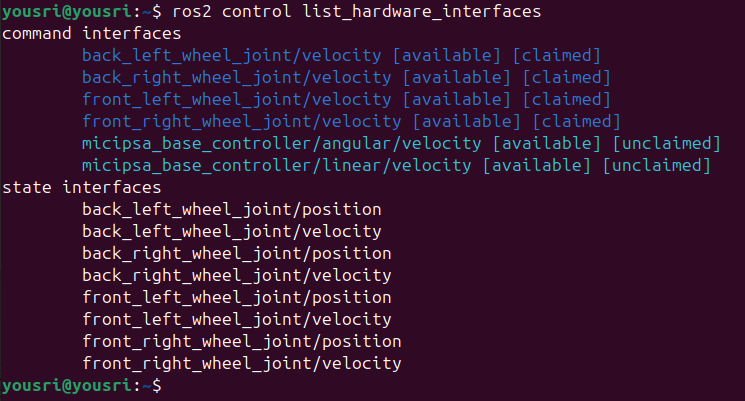
List all hardware interfaces and confirm they are available and claimed:
Active Controllers#
List all controllers and confirm they are in the active state:

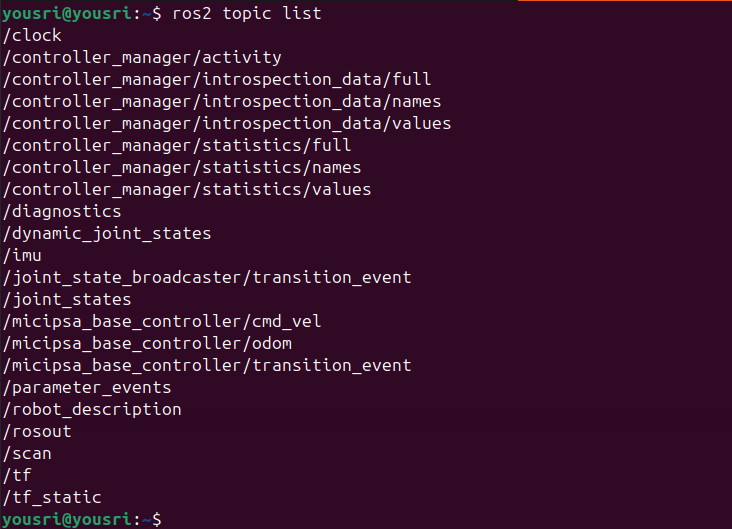
Controllers Topics#
Check that controller topics are being published:
Sending Velocity#
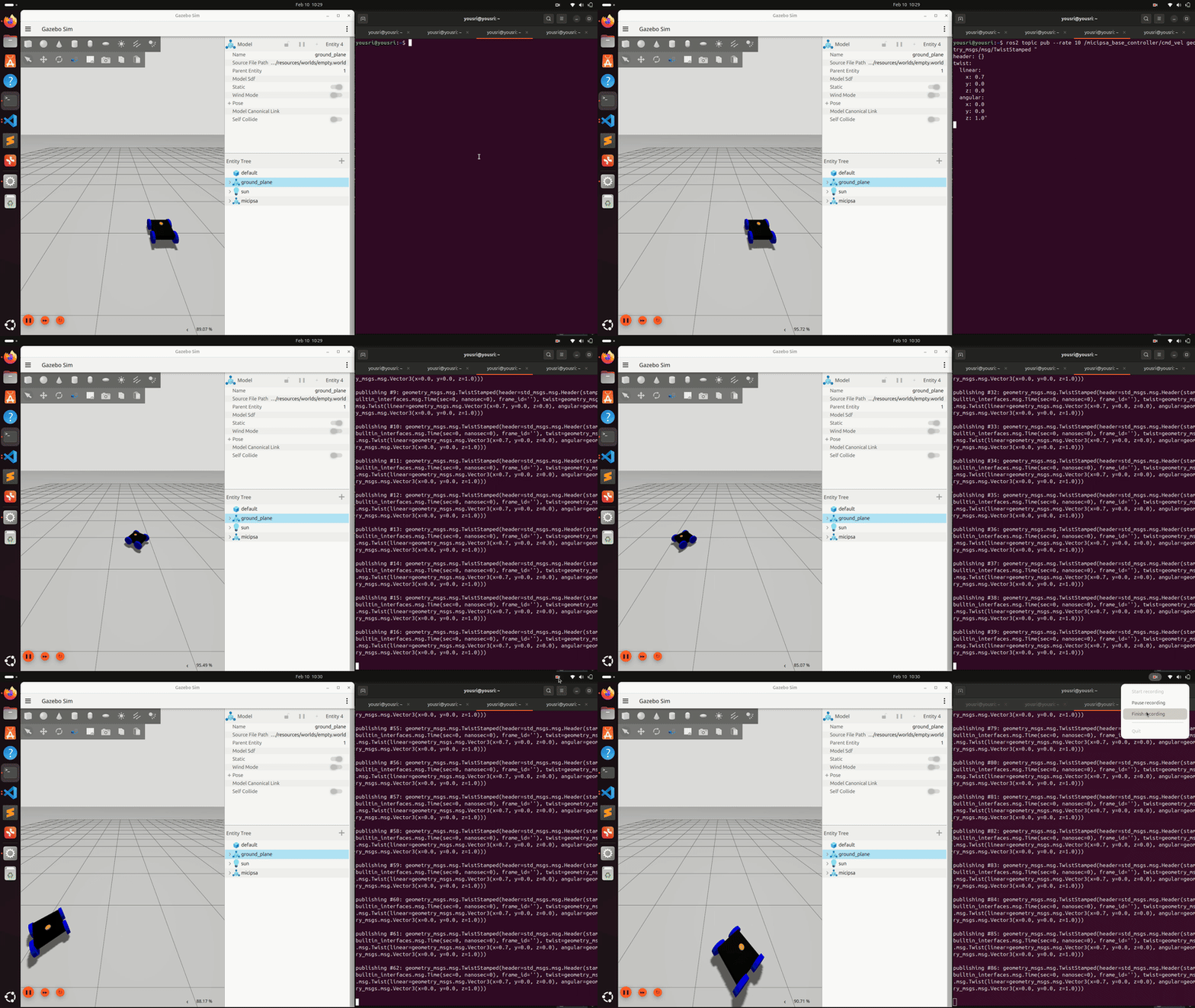
Send a test velocity command to confirm the robot responds (simulation or hardware):
Caution
When running on real hardware, always verify the robot is in a safe open area and wheels are clear before sending velocity commands. The robot will start moving immediately upon receiving the message.
ros2 topic pub --rate 10 /micipsa_base_controller/cmd_vel geometry_msgs/msg/TwistStamped "
header: {}
twist:
  linear:
    x: 0.2
    y: 0.0
    z: 0.0
  angular:
    x: 0.0
    y: 0.0
    z: 0.5"
Additional Information#
Dependencies#
Build Dependencies#
These dependencies are required when building the package.
| Package | Role |
|---|---|
ament_cmake |
Build system |
ament_cmake_python |
Python package installation support within a CMake package |
Runtime Dependencies#
These dependencies are not required to build the package but are required when running it.
| Package | Role |
|---|---|
ros2_control |
Controller manager and hardware interface framework |
ros2_controllers |
DiffDriveController, JointStateBroadcaster, IMUSensorBroadcaster |
twist_mux |
Velocity command multiplexer node |
Test Dependencies#
Used only when running the package test suite.
| Package | Role |
|---|---|
ament_lint_auto |
Runs the standard suite of linters configured for the workspace |
ament_lint_common |
Provides the common lint configurations used by ament_lint_auto |
ament_cmake_pytest |
Python test runner for colcon |
launch_testing_ament_cmake |
Launch test integration for colcon |
launch_testing |
Framework for launch-based integration tests |
launch |
Launch API used by test descriptions |
launch_ros |
ROS-specific launch actions used by tests |
ament_cmake_ros |
Provides run_test_isolated.py for isolated launch tests |
Micipsa Packages Dependencies#
The launch file and integration test require the following packages to be built and available at runtime:
| Package | Role |
|---|---|
micipsa_common |
Provides resolve_config_path() and utils.console_utils.warn(), imported directly by behavior_launch.py |
micipsa_description |
Provides the URDF with the <ros2_control> hardware block |
Deploy#
| Package | Role |
|---|---|
micipsa_hardware |
Provides the RobotBaseSystem plugin |
micipsa_core |
Provides the RobotBase class |
Simulation#
| Package | Role |
|---|---|
micipsa_simulation |
Provides Gazebo world, gazebo gz bridge config file and gazebo launch file |
Testing#
Note
The integration test runs in Gazebo headless mode and does not require physical hardware. It requires micipsa_description and micipsa_simulation to be built in the same workspace.
Launch Integration Tests#
test/test_controllers_integration_launch.py launches the full simulation control stack, micipsa_description, micipsa_simulation (headless), and micipsa_control and validates that:
- The
/controller_manager/list_controllersservice becomes available within 90 seconds joint_state_broadcasterreaches theactivestatemicipsa_base_controllerreaches theactivestate/micipsa_base_controller/cmd_veland/micipsa_base_controller/odomtopics are exposed
The test uses a polling loop with a 90-second timeout per controller to avoid flakiness from Gazebo and ros2_control startup timing.
Running Tests#
Run the integration tests:
colcon build --packages-select micipsa_control
colcon test --packages-select micipsa_control --ctest-args -L launch -V
colcon test-result --verbose
Run all tests:
colcon build --packages-select micipsa_control
colcon test --packages-select micipsa_control
colcon test-result --verbose
Clean test results between runs:
Troubleshooting#
Controllers fail to spawn controller manager not available#
Symptom: Controller spawners time out with Waiting for controller_manager or exit immediately with an error.
Cause:
In simulation, the controller manager has not yet been started by the Gazebo plugin. The plugin may still be loading, or Gazebo itself has not finished spawning the robot.
In deploy mode, the ros2_control_node may have failed to start, usually because the hardware interface could not load (serial port issue, URDF mismatch).
A controller is loaded but not active#
Symptom: ros2 control list_controllers shows a controller in inactive or configured state instead of active.
Cause: The controller was loaded successfully but activation failed. This usually means a joint or interface name in controllers.yaml does not match the interface names exported by the hardware interface.
Odometry is wrong despite correct wheel motion#
Symptom: /micipsa_base_controller/odom shows incorrect linear or angular displacement.
Cause: wheel_separation or wheel_radius in controllers.yaml do not match the physical robot dimensions or the values declared in the URDF.
Fix: Measure the actual wheel-to-wheel distance (center to center) and verify wheel_separation: 0.342 is accurate for your robot. Verify wheel_radius: 0.065 matches the value in micipsa_core.xacro and micipsa_ros2_control.xacro. Update controllers.yaml and relaunch.
Robot receives cmd_vel but does not move#
Symptom: The /micipsa_base_controller/cmd_vel topic shows messages arriving but the robot does not respond.
Cause: Either the micipsa_base_controller is not in active state, the command interface is not claimed, or in deploy mode the STM32 serial write is failing.
Fix: Confirm the controller is active with ros2 control list_controllers. Confirm the velocity command interfaces show [claimed] in ros2 control list_hardware_interfaces. In deploy mode, check the RobotBaseSystem log for Failed to send commands to STM MCU messages.
IMU data not published in simulation#
Symptom: /micipsa_base/imu/data is not present in ros2 topic list when running in simulation.
Cause: The imu_sensor_broadcaster is only spawned in deploy mode (deploy_mode:=true).
In simulation, IMU data is bridged from Gazebo through a separate topic bridge, not through this controller.
Fix: This is expected behavior in simulation. Check micipsa_simulation for the Gazebo IMU topic bridge configuration.