Docker Compose


Docker Compose Overlays#
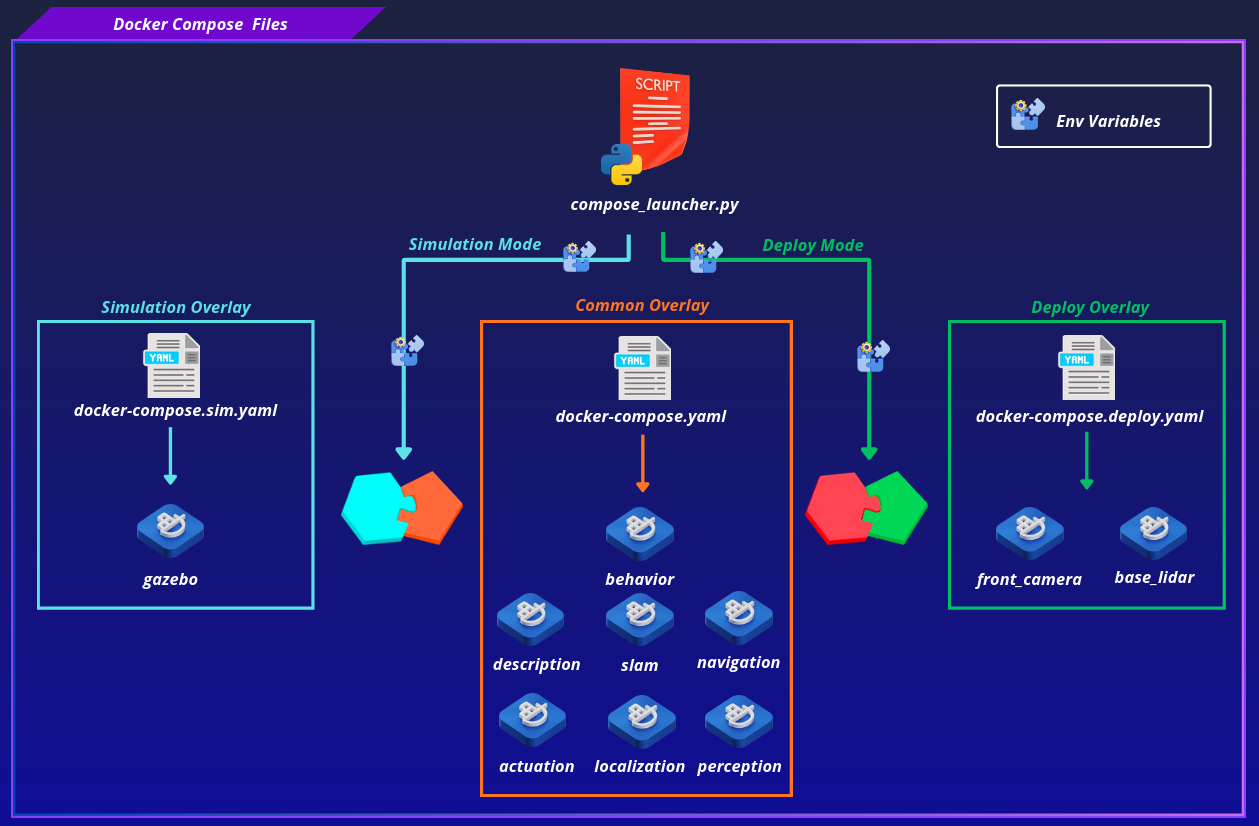
The stack is launched through a small Python toolchain instead of a raw docker compose call, so file selection, environment variables, and service profiles stay consistent across local, sim, and Jetson deployments. compose_launcher.py is the CLI entrypoint, it parses the requested mode and action, loads and validates the relevant configuration, resolves the Compose files and environment variables that apply, and constructs and runs the resulting docker compose command.
Note
More about Compose Launcher and how it works.
Common Overlay#
docker-compose.yaml: loaded in all modes, contains the core services regardless of whether the robot is running in simulation or deployed on real hardware
| Service | Container | Profile |
|---|---|---|
description |
description |
always |
actuation |
actuation |
always |
localization |
localization |
always |
slam |
slam |
mapping |
navigation |
navigation |
localization |
perception |
perception |
perception |
behavior |
behavior |
behavior |
Deploy Overlay#
docker-compose.deploy.yaml: merged on top of the common overlay when the stack is running on real hardware. It adds the hardware drivers and device mounts that are only relevant when physical sensors are connected.
| Service | Description |
|---|---|
front_camera |
Intel RealSense D435i depth camera driver |
base_lidar |
YDLIDAR X3 Pro 2D LiDAR driver |
Additionally, the actuation service is extended with the necessary device mounts to grant the container access to the microcontroller.
Simulation Overlay#
docker-compose.sim.yaml: merged on top of the common overlay when the stack is running in simulation. It adds the Gazebo simulator and applies the necessary service overrides to account for the differences in how the stack behaves in simulation versus on real hardware.
| Service | Description |
|---|---|
gazebo |
Gazebo simulator |
Docker Compose Files#
Privileges#
All Micipsa Docker Compose services run with privileged: false. Rather than granting containers full access to the host, each service is only given the specific capabilities and device access it actually needs (e.g. serial ports, cameras, GPU access).
This reduces the attack surface of each container, a compromised or misbehaving container cannot access host resources beyond what has been explicitly granted, unlike a privileged: true container which effectively has unrestricted access to the host.
Shared Configuration#
All containers inherit a common set of ROS and network settings from a shared YAML anchor x-ros-common defined at the top of each Compose file. This eliminates repetition and ensures every container runs with identical ROS middleware and network configuration.
x-ros-common: &ros-common
  environment:
    ROS_DOMAIN_ID: 0
    RMW_IMPLEMENTATION: rmw_cyclonedds_cpp
    CYCLONEDDS_URI: file://${DDS_INSTALL_DIR}/cyclonedds.xml
  volumes:
    - ${DDS_SOURCE_DIR}/cyclonedds.xml:${DDS_INSTALL_DIR}/cyclonedds.xml:ro
  network_mode: host
  restart: no
Each service opts into this anchor with <<: *ros-common. Individual services can override any of these values if needed.
Config File Injection#
ROS 2 launch files expect parameter files to be present at specific paths inside the container at startup. Rather than baking configuration into the image, Compose injects config files at runtime using the configs: mechanism. This keeps images generic and allows configuration to be changed without rebuilding.
Config sources are declared at the top level of the Compose file, each pointing to a file on the host resolved via environment variables:
configs:
  actuation_config:
    file: ${BRINGUP_CONFIG_SRC}/actuation/${MICIPSA_ROS2_CONTROL_CONTROLLERS_CONFIG_FILE}
  twist_mux_config:
    file: ${BRINGUP_CONFIG_SRC}/actuation/${MICIPSA_TWIST_MUX_CONFIG_FILE}
  ekf_config:
    file: ${BRINGUP_CONFIG_SRC}/localization/${MICIPSA_EKF_CONFIG_FILE}
  slam_toolbox_config:
    file: ${BRINGUP_CONFIG_SRC}/slam/${MICIPSA_SLAM_TOOLBOX_CONFIG_FILE}
  nav2_config:
    file: ${BRINGUP_CONFIG_SRC}/navigation/${MICIPSA_NAV2_CONFIG_FILE}
  front_camera_config:
    file: ${BRINGUP_CONFIG_SRC}/drivers/${MICIPSA_FRONT_CAMERA_CONFIG_FILE}
  base_lidar_config:
    file: ${BRINGUP_CONFIG_SRC}/drivers/${MICIPSA_BASE_LIDAR_CONFIG_FILE}
Each service then mounts its relevant config to the path the launch file expects inside the container:
actuation:
  configs:
    - source: actuation_config
      target: ${BRINGUP_CONFIG_DST}/actuation/${MICIPSA_ROS2_CONTROL_CONTROLLERS_CONFIG_FILE}
    - source: twist_mux_config
      target: ${BRINGUP_CONFIG_DST}/actuation/${MICIPSA_TWIST_MUX_CONFIG_FILE}
Device Passthrough#
Services that interact with physical hardware require access to host device nodes. Device paths are resolved from devices.yaml via MICIPSA_* environment variables injected at runtime by compose_launcher.py.
The RealSense camera exposes multiple video device nodes, depth and color streams each occupy several /dev/videoN entries. These are mapped to fixed paths inside the container:
front_camera_driver:
  devices:
    - ${MICIPSA_FRONT_CAMERA_PORTS_DEPTH_0}:/dev/video0
    - ${MICIPSA_FRONT_CAMERA_PORTS_DEPTH_1}:/dev/video1
    - ${MICIPSA_FRONT_CAMERA_PORTS_DEPTH_2}:/dev/video2
    - ${MICIPSA_FRONT_CAMERA_PORTS_DEPTH_3}:/dev/video3
    - ${MICIPSA_FRONT_CAMERA_PORTS_COLOR_0}:/dev/video4
    - ${MICIPSA_FRONT_CAMERA_PORTS_COLOR_1}:/dev/video5
The LiDAR and microcontroller board use a single serial device node each, passed through directly:
base_lidar_driver:
  devices:
    - ${MICIPSA_BASE_LIDAR_PORT}:${MICIPSA_BASE_LIDAR_PORT}

actuation:
  devices:
    - ${MICIPSA_STM_BOARD_PORT}:${MICIPSA_STM_BOARD_PORT}
Device passthrough is only present in the deploy overlay, simulation services require no hardware access.
Healthchecks#
Each service declares a healthcheck that Compose uses to determine when the service is ready. Dependent services will not start until their dependencies report a healthy status. This is what enforces the startup ordering of the stack not depends_on alone, but depends_on combined with condition: service_healthy.
healthcheck:
  test: [ "CMD", "bash", "-c", "pgrep -f ekf_filter_node > /dev/null" ]
  interval: 10s
  timeout: 10s
  retries: 5
  start_period: 30s
Dependency Ordering#
The stack starts in a strict sequence enforced by depends_on with condition: service_healthy. Each service waits for its upstream dependency to pass its healthcheck before starting.
# docker-compose.sim.yaml
actuation:
  depends_on:
    gazebo:
      condition: service_healthy
    description:
      condition: service_healthy
The driver containers (front_camera_driver, base_lidar_driver) start independently with no declared ordering between them or relative to the core stack.
CycloneDDS#
All containers use CycloneDDS as the ROS 2 middleware and run with network_mode: host, meaning they share the host network stack directly. The shared cyclonedds.xml configuration file is mounted read-only into every container via the x-ros-common anchor:
This ensures all containers and the host use an identical DDS configuration, which is required for reliable topic discovery across the robot and base station.
Note
It is strongly recommended to read Micipsa Network Documentation.
Build Stack#
Warning
The foundation image must be built first, every layer image depends on it. If you don't want to use it, you'll need to edit that layer's Dockerfile accordingly.
To build the foundation image see Dockerfile Documentation
Simulation Overlay#
cd ~/ros2_ws/src/micipsa/infra/docker/
docker compose \
  -f docker-compose.yaml \
  -f docker-compose.sim.yaml \
  build
Deploy Overlay#
cd ~/ros2_ws/src/micipsa/infra/docker/
docker compose \
  -f docker-compose.yaml \
  -f docker-compose.deploy.yaml \
  build
Run Stack#
python3 compose_launcher.py <up|down> [--mode sim|deploy] [--config-name FILENAME] [--compose-dir DIR] [--bringup-config-dir DIR] [--maps-dir DIR] [--dds-dir DIR] [--dry-run]
| Action | Description |
|---|---|
up |
Start the stack with the mode-specific overlay |
down |
Stop and remove all containers |
| Option | Description |
|---|---|
--mode |
sim or deploy (default sim) |
--config-name |
Bringup config file name (default bringup_config.yaml) |
--compose-dir |
Directory containing the Docker Compose files |
--bringup-config-dir |
Directory containing the bringup configuration |
--maps-dir |
Directory containing map files |
--dds-dir |
Directory containing DDS configuration files |
--dry-run |
Print the resolved command without executing it |
Any unrecognised arguments (like -d, --build) are passed through directly to docker compose.