Build Micipsa Stack



Build#
Important
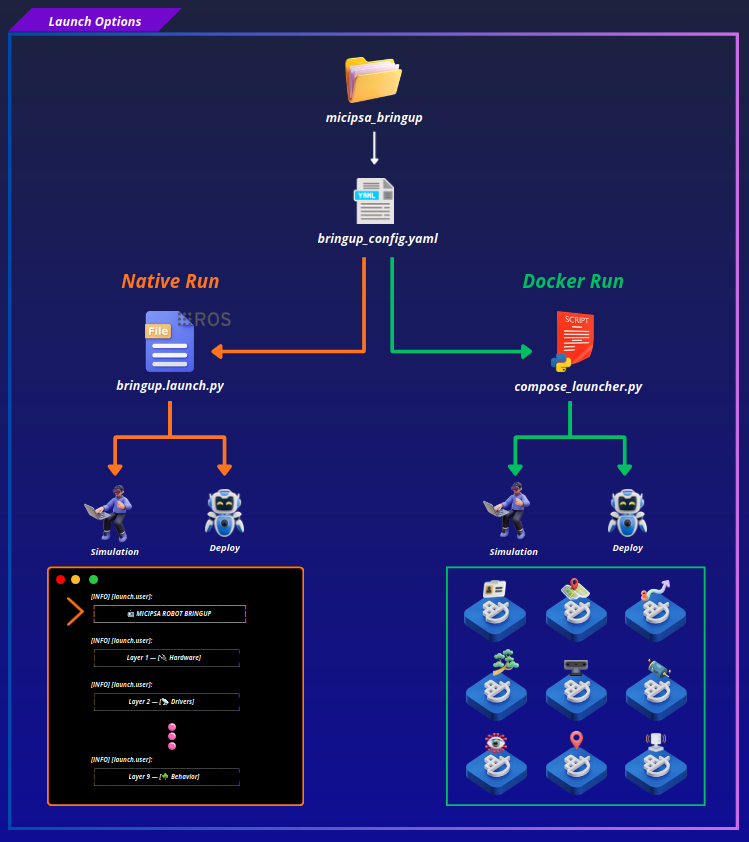
Micipsa can be built using either a native ROS 2 workspace or a Docker-based containerized stack.
Before continuing, choose the workflow that best fits your setup:
- Native: Build the packages directly in a ROS 2 workspace. Follow Native Section instructions.
- Docker (recommended): Build the software stack using Docker Compose. Follow Docker Section instructions.
Both workflows support simulation and deployment on the real robot.
Native#
Note
Deploy Mode Dependencies are only required for deployment on the supported hardware. You may skip this section if you intend to use simulation mode or different hardware.
Deploy Mode Dependencies
### Lidar SDK !!! note If you encounter any issues while installing the YDLidar SDK, please refer to the official installation guide: [YDLidar SDK Instructions](https://github.com/YDLIDAR/YDLidar-SDK/blob/master/doc/howto/how_to_build_and_install.md).sudo apt install cmake pkg-config
git clone https://github.com/YDLIDAR/YDLidar-SDK.git
cd YDLidar-SDK
mkdir build && cd build
cmake ..
make -j$(nproc)
sudo make install
sudo apt-get update && sudo apt-get upgrade
sudo apt-get install libssl-dev libusb-1.0-0-dev libudev-dev pkg-config libgtk-3-dev
sudo apt-get install git wget cmake build-essential
sudo apt-get install libglfw3-dev libgl1-mesa-dev libglu1-mesa-dev at
git clone https://github.com/realsenseai/librealsense.git
cd librealsense
./scripts/setup_udev_rules.sh
mkdir build && cd build
cmake ../ -DCMAKE_BUILD_TYPE=Release
sudo make uninstall && make clean && make && sudo make install
ROS2 Packages Dependencies#
mkdir -p ~/ros2_ws/src
cd ros2_ws/src/
git clone git@gitlab.com:yousriouartsi-group/micipsa/micipsa.git
cd ..
sudo apt-get update
rosdep update
rosdep install --from-paths . --ignore-src -r -y
Build#
Docker#
Note
Deploy Image Services are only required for deployment on the supported hardware. You may skip this section if you intend to use simulation mode or different hardware.
Foundation Image Build#
The foundation image is the base layer for every service image. Must be built first.
cd ~/ros2_ws/src/micipsa/
docker build \
  -f infra/docker/base/Dockerfile \
  -t micipsa/base:jazzy-v1.0.0 \
  .
Tag the image as follows before proceeding:
Simulation Image Services#
Builds the image services for the simulation stack
cd ~/ros2_ws/src/micipsa/infra/docker/
docker compose \
  -f docker-compose.yaml \
  -f docker-compose.sim.yaml \
  build
Deploy Image Services#
Builds the image services for the physical robot stack.
cd ~/ros2_ws/src/micipsa/infra/docker/
docker compose \
  -f docker-compose.yaml \
  -f docker-compose.deploy.yaml \
  build