DDS



DDS#
What is DDS ?#
DDS (Data Distribution Service) is the publish/subscribe middleware that ROS 2 uses under the hood to move messages between nodes. Every time a node publishes on /scan or subscribes to /cmd_vel, DDS is responsible for finding the other participants and delivering the data.
ROS 2 supports multiple DDS implementations, for Micipsa project CycloneDDS (rmw_cyclonedds_cpp) is used.
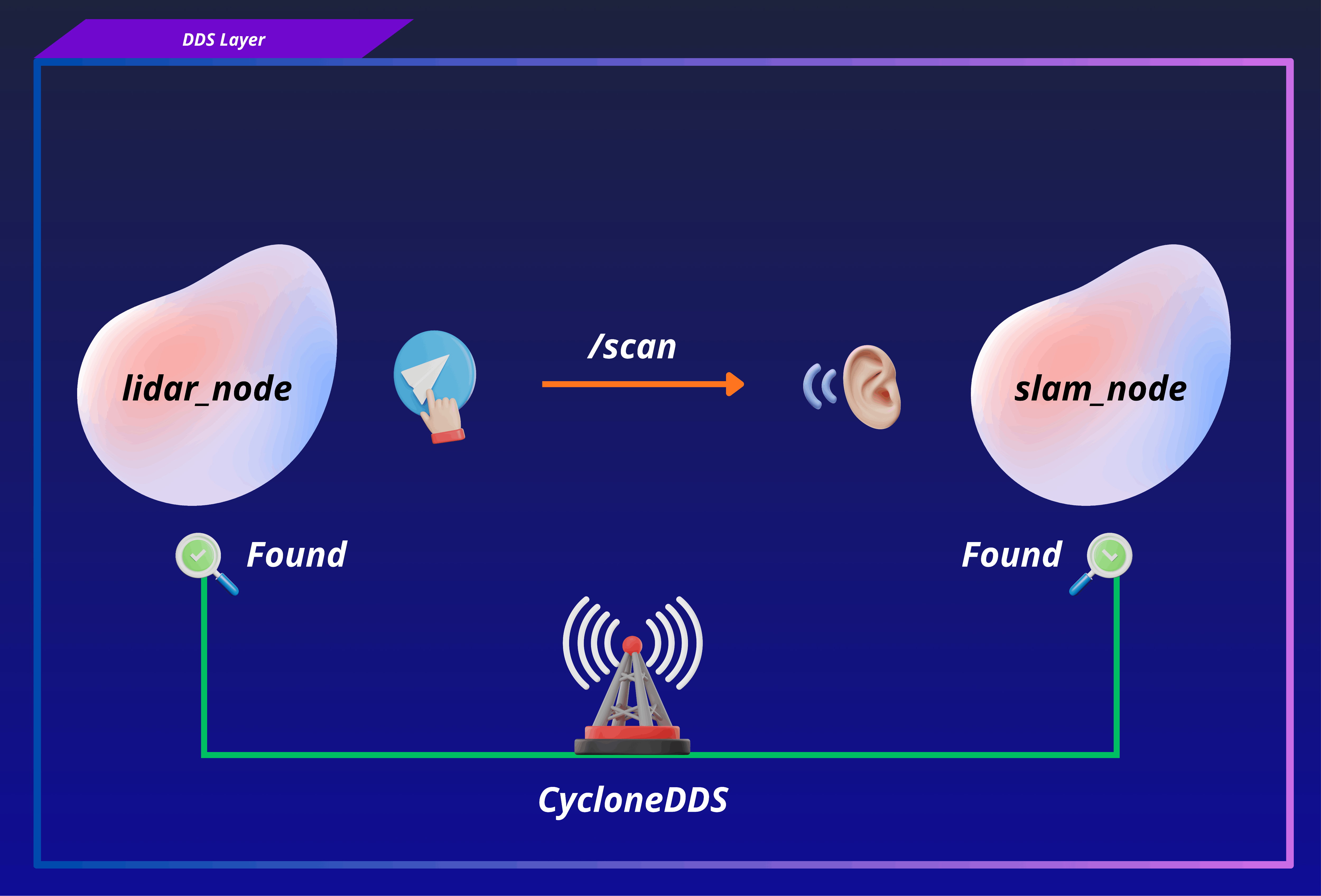
If DDS is misconfigured, nodes cannot find each other, topics appear and disappear, or data is silently dropped even if your ROS code is perfectly correct.
How DDS discovery works#
DDS uses a two-phase process to connect participants:
Phase 1: Participant Discovery (PDP)#
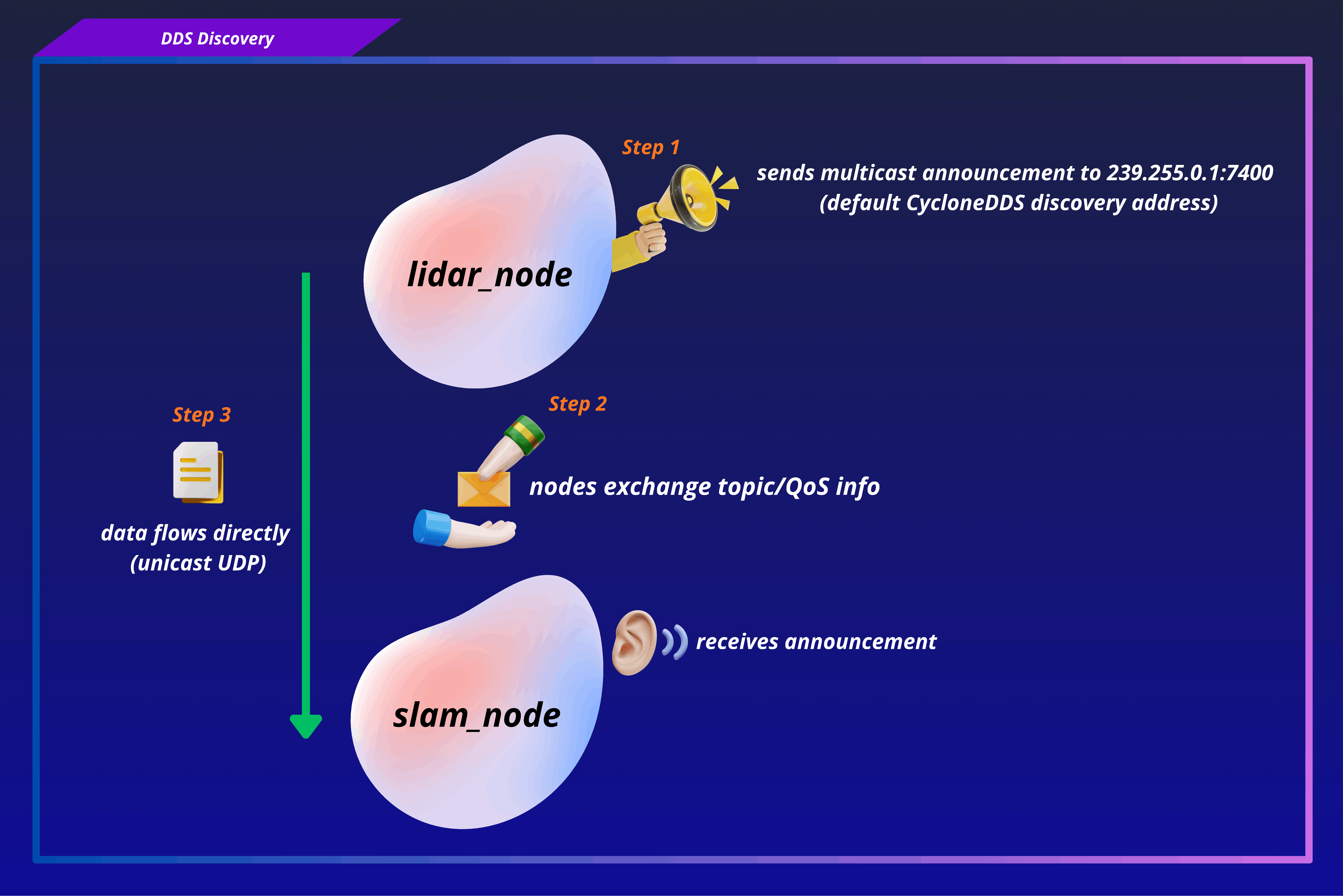
When a node starts, it announces itself to the network using multicast UDP packets. Other participants on the same domain receive this announcement and register the new participant.
Phase 2: Endpoint Discovery (EDP)#
Once participants know about each other, they exchange information about their publishers and subscribers (topics, QoS profiles). After this, data can flow directly between matched endpoints.
DDS Configuration#
Environment variables#
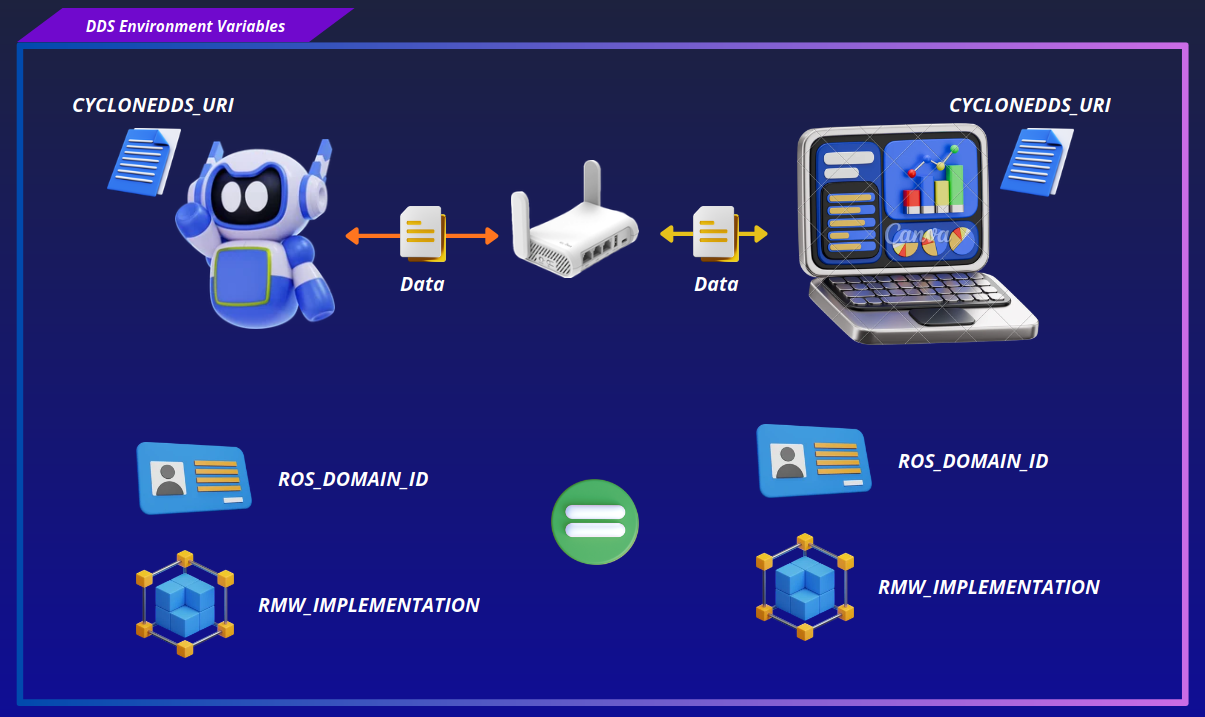
Three environment variables must be set consistently on every machine and container that needs to communicate:
| Variable | Purpose | Micipsa value |
|---|---|---|
ROS_DOMAIN_ID |
Isolates DDS traffic. Only participants using the same domain ID can discover and communicate with each other | 0 |
RMW_IMPLEMENTATION |
Selects the ROS 2 middleware (DDS) implementation. All communicating ROS 2 nodes should use the same implementation. | rmw_cyclonedds_cpp |
CYCLONEDDS_URI |
Specifies the location of the CycloneDDS XML configuration file used to configure networking and discovery. | file:///etc/micipsa/cyclonedds.xml |
What happens if they do not match?#
- Different ROS_DOMAIN_ID values: Nodes are placed in different DDS domains and will not discover each other at all.
- Different RMW_IMPLEMENTATION values: Nodes may fail to communicate because they are using different ROS 2 middleware implementations. While some DDS implementations may interoperate at the DDS level, ROS 2 does not guarantee interoperability across different RMW implementations.
Setting Environment Variables#
On Base Station#
Open a terminal and run the following:
echo "export ROS_DOMAIN_ID=0" >> ~/.bashrc
echo "export RMW_IMPLEMENTATION=rmw_cyclonedds_cpp" >> ~/.bashrc
echo "export CYCLONEDDS_URI=file:///etc/cyclonedds.xml" >> ~/.bashrc
source ~/.bashrc
Note: The value of
CYCLONEDDS_URImust point to the location of yourcyclonedds.xmlconfiguration file. If you move or rename the file, update theCYCLONEDDS_URIenvironment variable accordingly.
On Robot#
The values are defined in the Docker Compose file, specifically in the x-ros-common anchor:
x-ros-common: &ros-common
  environment:
    ROS_DOMAIN_ID: 0
    RMW_IMPLEMENTATION: rmw_cyclonedds_cpp
    CYCLONEDDS_URI: file:///etc/micipsa/cyclonedds.xml
Checking Environment Variables#
To confirm that you have the correct values, run in a terminal:
On the robot, if docker is used, you will need first to start the container and then run the commands:
CycloneDDS XML File#
The cyclonedds.xml file controls how CycloneDDS behaves, which network interface to use, how large its buffers are, and how it handles discovery.
Example Configuration#
<?xml version="1.0" encoding="UTF-8"?>
<CycloneDDS xmlns="https://cdds.io/config">
  <Domain>
    <General>
      <Interfaces>
        <NetworkInterface name="eth0" multicast="false"/>
      </Interfaces>
      <AllowMulticast>false</AllowMulticast>
    </General>
    <Discovery>
      <Peers>
        <Peer address="127.0.0.1"/>
        <Peer address="192.168.8.50"/>
      </Peers>
    </Discovery>
    <Internal>
      <SocketReceiveBufferSize min="64MB"/>
      <SocketSendBufferSize min="64MB"/>
      <Watermarks>
        <WhcHigh>500kB</WhcHigh>
      </Watermarks>
    </Internal>
  </Domain>
</CycloneDDS>
NetworkInterface#
This tells CycloneDDS exactly which network interface to send and receive DDS traffic on.
name must match the interface name as reported by ip addr show on that machine.
Look for an interface that is:
state UPactively connected- Has an
inet 192.168.x.xaddress on your LAN - Named
eth0,wlan0,wlp7s0,enp8s0, etc.
Important
⚠️ The interface name is machine-specific. eth0 on one machine may be wlp7s0 or enp8s0 on another. Always verify with ip addr show.
multicast="false" disables multicast on this interface, consistent with AllowMulticast being disabled at the domain level below. Only one interface is listed here, since discovery is now handled entirely through explicit unicast peers rather than through multicast advertisements from multiple interfaces.
AllowMulticast#
Disables multicast UDP for DDS participant discovery. Instead of relying on multicast announcements to find other participants, discovery falls back entirely to unicast, which requires knowing the IP addresses of all peers in advance, this is what the <Peers> list below provides.
Peers#
Since multicast discovery is disabled, the <Peers> list is now the sole discovery mechanism: CycloneDDS initiates unicast discovery directly with each address listed, rather than waiting for or relying on multicast advertisements.
127.0.0.1(loopback) allows discovery between containers running on the same machine, since containers share the host network stack vianetwork_mode: host.192.168.8.50(LAN address) allows discovery with the specific remote machine at that address (e.g. robot ↔ host, or host ↔ robot, depending on which machine this file is deployed on). This same<Peers>block should be present on both the robot and the host machine, each listing the other machine's LAN address (and its own loopback), so that both sides know how to reach each other directly.
SocketReceiveBufferSize and SocketSendBufferSize#
Note
See Buffer tuning to learn how to increase buffer sizes.
Sets the minimum OS-level socket buffer sizes CycloneDDS requests for receiving and sending DDS traffic. Larger buffers reduce the risk of dropped packets under bursty traffic (e.g. point cloud or image topics), at the cost of higher memory usage per socket.
The socket buffer minimums require matching OS-level net.core.rmem_max / net.core.wmem_max settings on both machines, CycloneDDS silently falls back to the OS-allowed maximum if these are lower.
WhcHigh#
The Writer History Cache (WHC) is a per-publisher in-memory buffer that holds messages that have been sent but not yet acknowledged by all subscribers. WhcHigh is the high watermark, when the cache reaches this size, the publisher starts applying backpressure (slowing down or dropping) to prevent unbounded memory growth.
500kB is appropriate for bursty sensors like LiDAR and cameras. If set too low, the publisher drops messages under burst conditions even when the network is healthy. If set too high, memory usage grows uncontrolled when a subscriber falls behind.
Docker Network Specifics#
Network Mode#
Every service in the Compose stack runs with network_mode: host, This is required both for CycloneDDS discovery (the eth0 reference above resolves correctly only under host networking) and for ROS 2 nodes across containers to communicate over the loopback interface.
CycloneDDS config#
All Docker containers mount the same cyclonedds.xml file:
This ensures every container uses identical DDS configuration. If you need to change the config, edit the file and restart the containers, you never need to rebuild images for DDS config changes.