Localization



Overview#
micipsa_localization is a ROS 2 package that provides continuous state estimation for Micipsa.
The package configures and launches two nodes:
robot_localizationExtended Kalman Filter (EKF), which fuses wheel odometry and IMU data into a smooth, continuous pose estimate published on/odometry/filteredand broadcast as theodom → base_footprintTF transform.imu_filter_madgwicknode, which computes IMU orientation from raw gyroscope and accelerometer readings on real hardware in deploy mode.
Architecture#
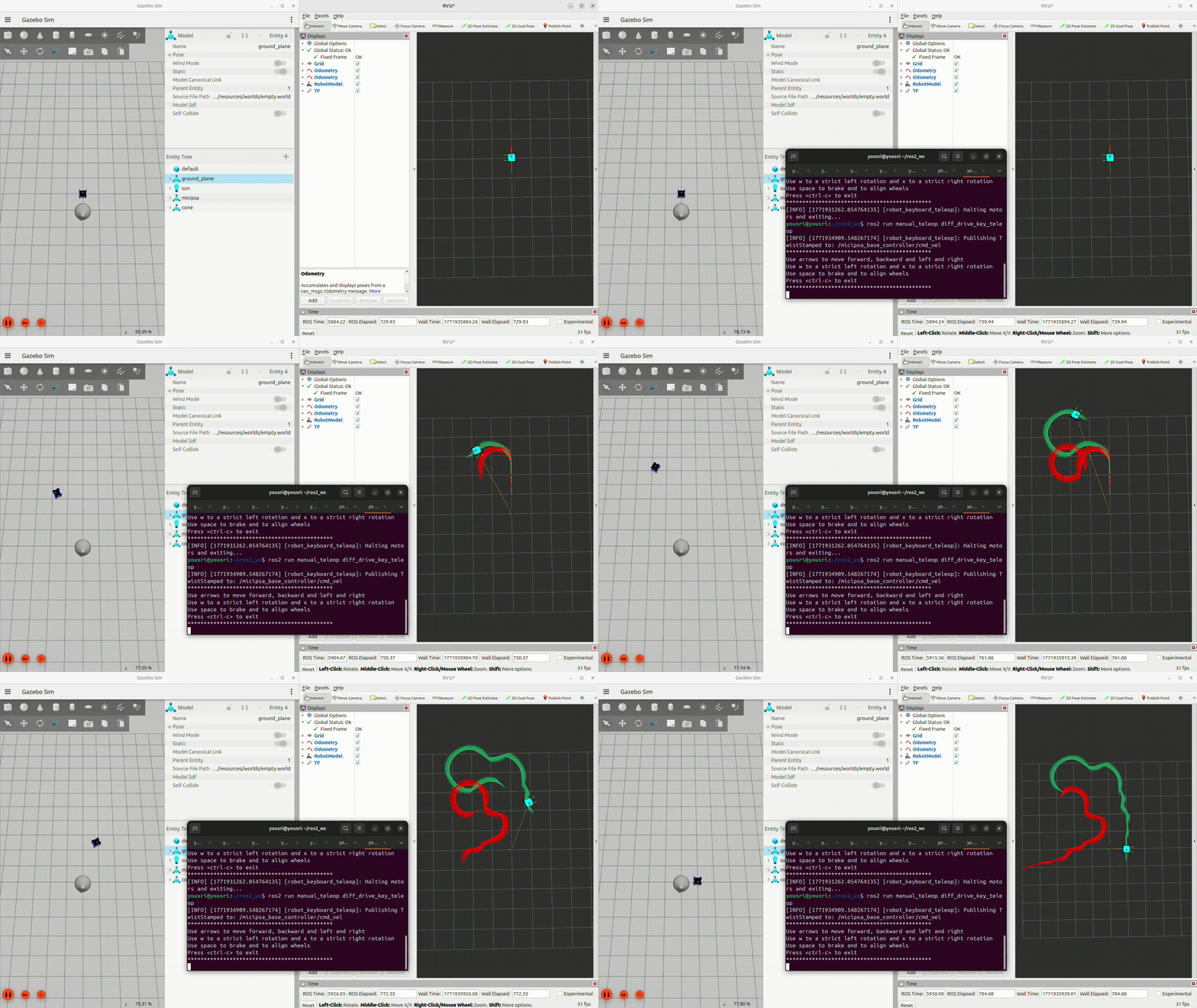
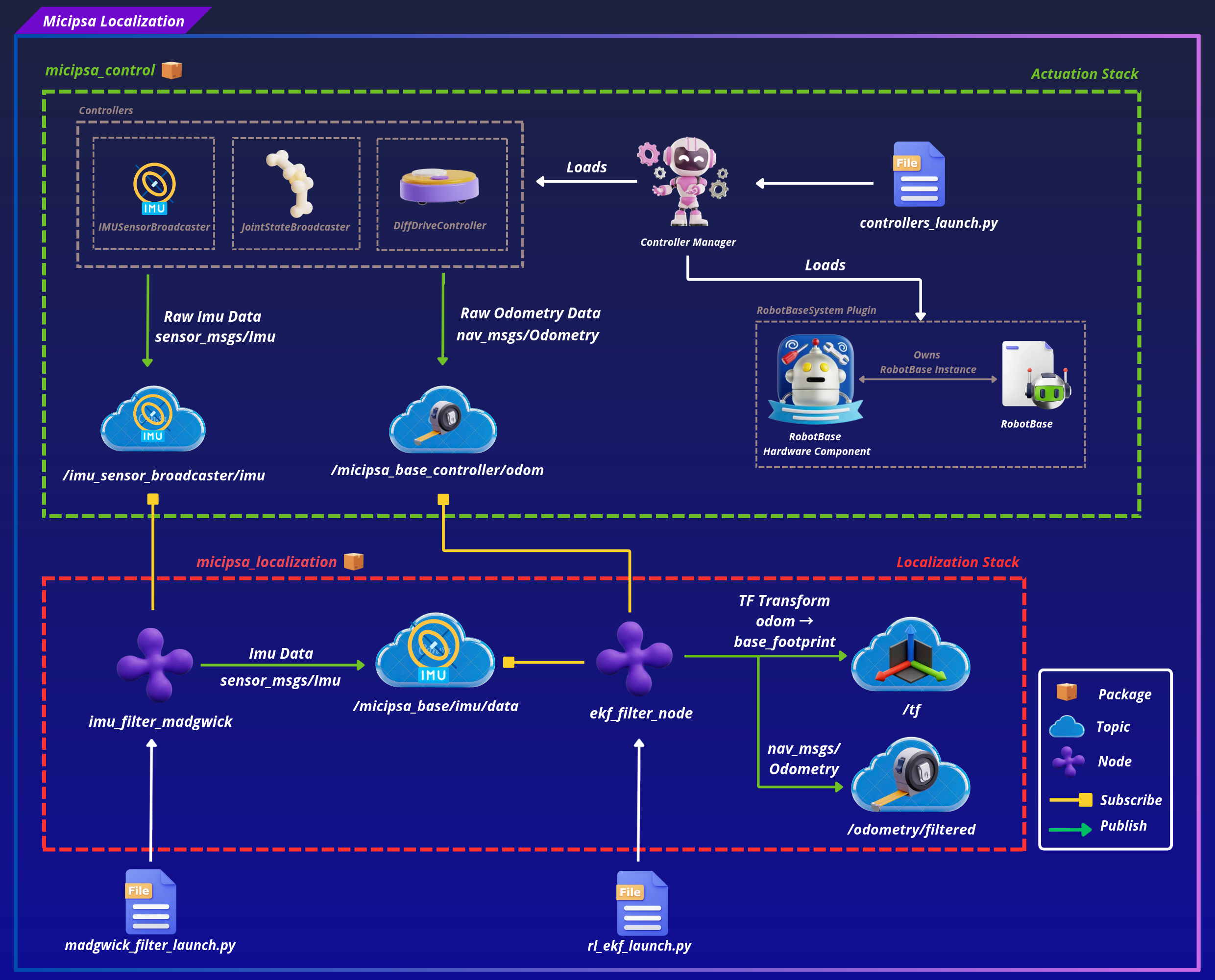
micipsa_localization sits between the actuation stack and the navigation stack.
On deploy mode and working with real hardware, the IMU only publishes raw accelerometer and gyroscope readings without orientation, so the Madgwick filter must run first to compute orientation from those readings before the EKF can fuse them.
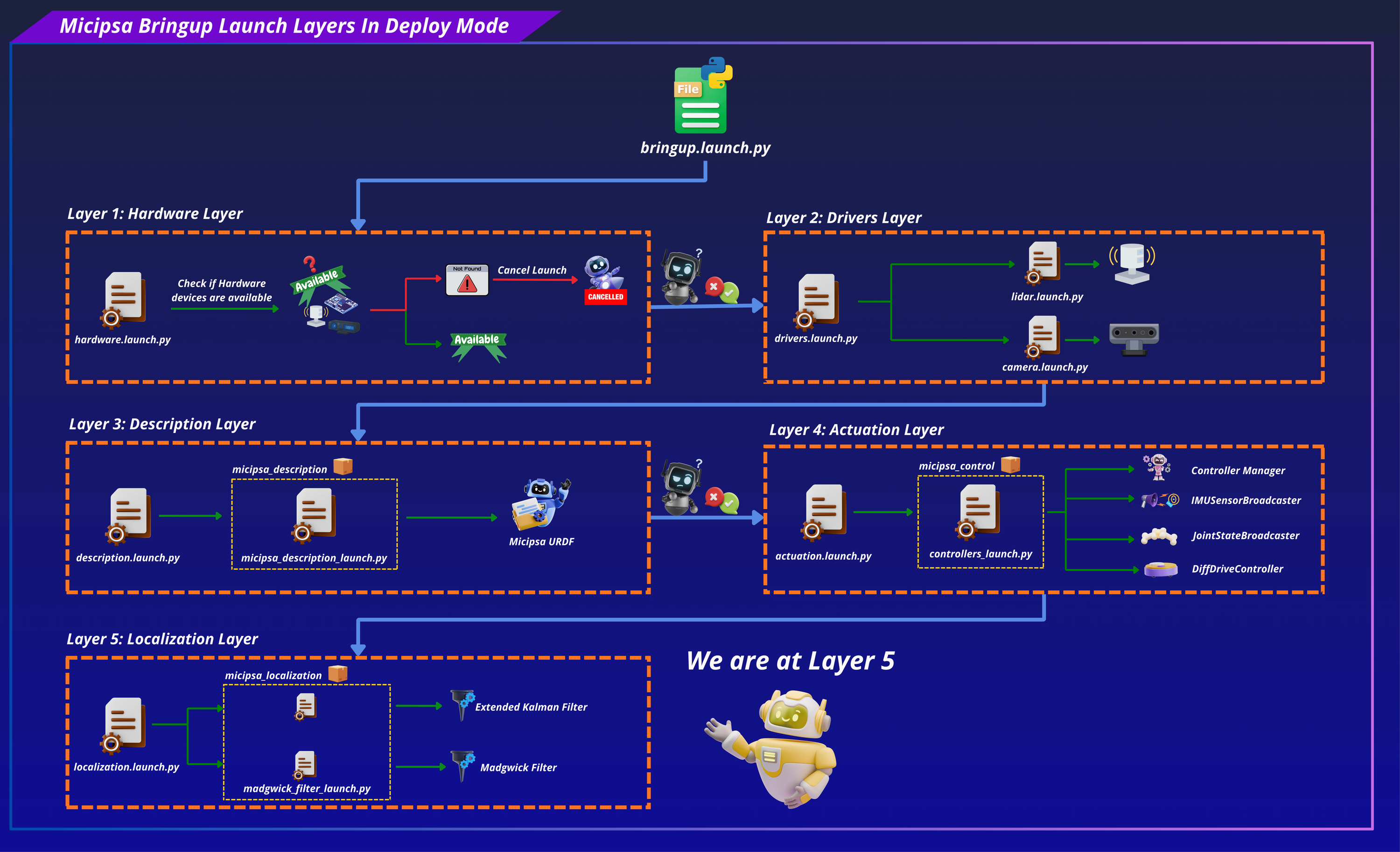
In simulation, Layer 5 behaves differently, the Madgwick filter is not launched because Gazebo publishes full IMU data including orientation directly, so the EKF can consume it as-is.
Layer 5 differs between simulation and hardware as follows (see layer X, layer 4 and layer 5):
The EKF node consumes raw odometry and IMU data and produces the fused state estimate and odom → base_footprint TF transform.
Sensor Fusion Strategy#
The EKF fuses two inputs with complementary strengths. Wheel odometry provides reliable short-term linear velocity estimates but its heading estimate degrades over time due to wheel slip, uneven terrain, and encoder quantization all of which cause the integrated yaw to drift. The IMU gyroscope measures angular velocity directly from the physical rotation of the chassis, entirely independently of the wheels, so its heading information is unaffected by slip. Fusing both allows the EKF to use odometry for velocity while relying on the IMU to keep heading drift in check. Only the variables each sensor is best suited to provide are enabled in the fusion masks
| Sensor | Fused variables | Rationale |
|---|---|---|
odom0 wheel odometry |
vx, vy, vyaw |
Velocity-only fusion, position is integrated by the EKF to avoid double-integration artifacts |
imu0, IMU |
yaw |
Heading correction only, imu0_relative: true removes gyro bias at startup |
ROS 2 Interface#
Published Topics#
| Topic | Publisher | Type | QoS |
|---|---|---|---|
/odometry/filtered |
ekf_filter_node |
nav_msgs/Odometry |
RELIABLE / VOLATILE |
/tf |
ekf_filter_node |
tf2_msgs/msg/TFMessage |
RELIABLE / VOLATILE |
/micipsa_base/imu/data |
imu_filter_madgwick_node or ros_gz_bridge |
sensor_msgs/msg/Imu |
RELIABLE / VOLATILE |
Subscribed Topics#
| Topic | Subscriber | Type | QoS |
|---|---|---|---|
/micipsa_base_controller/odom |
ekf_filter_node |
nav_msgs/Odometry |
BEST_EFFORT / VOLATILE |
/micipsa_base/imu/data |
ekf_filter_node |
sensor_msgs/Imu |
BEST_EFFORT / VOLATILE |
/imu_sensor_broadcaster/imu |
imu_filter_madgwick |
sensor_msgs/Imu |
BEST_EFFORT / VOLATILE |
Note
On hardware, imu_filter_madgwick remaps its:
- Input topic
/imu/data_rawto/imu_sensor_broadcaster/imu - Output topic
/imu/datato/micipsa_base/imu/data
so the EKF receives the same topic name in both simulation and hardware without any additional remapping.
TF Frames#
| Transform | Publisher | Type |
|---|---|---|
odom → base_footprint |
ekf_filter_node |
Dynamic (/tf) |
Installation#
Important
Micipsa can be run in two ways: natively on a ROS 2 host, or via Docker using pre-built containerized images. Choose your approach before proceeding:
- Native build the package directly in a ROS 2 workspace. Follow requirements and the Native Install steps below.
- Docker use the Micipsa container stack, no manual workspace setup required. skip requirements section and follow Docker section.
Requirements#
First, make sure that the following packages are available in your workspace:
- micipsa_common
- micipsa_control (not required for building, needed in usage section)
- micipsa_simulation (not required for building, needed in usage section)
Native Install#
Source the ROS 2 environment:
Install ROS dependencies from the workspace root:
Build the package:
Source the install overlay:
Tip
Add source /opt/ros/jazzy/setup.bash and source ~/ros2_ws/install/setup.bash to your ~/.bashrc to avoid repeating these steps in every new terminal.
Docker#
Tip
Reading Micipsa Docker documentation (architecture, dockerfile, docker compose,...) is strongly recommended, it covers how the Dockerfiles are structured, how images are built, how containers are orchestrated, and much more.
To build and run Micipsa Localization Docker image, follow Micipsa Dockerfile README Build Section.
Configuration#
Extended Kalman Filter#
All EKF configuration lives in config/rl_ekf.yaml.
| Parameter | Value | Description |
|---|---|---|
frequency |
50.0 Hz |
EKF prediction and publish rate |
two_d_mode |
true |
Constrains estimation to x, y, yaw, appropriate for flat-floor operation |
publish_tf |
true |
Publishes odom → base_footprint TF |
odom_frame |
odom |
Name of the odometry frame |
base_link_frame |
base_footprint |
Name of the robot base frame |
world_frame |
odom |
World reference frame (use map when AMCL or SLAM global localization is active) |
odom0 |
/micipsa_base_controller/odom |
Wheel odometry input topic |
imu0 |
/micipsa_base/imu/data |
IMU input topic |
imu0_relative |
true |
Treats first IMU measurement as zero reference, removing gyro bias at startup |
imu0_differential |
false |
Uses absolute IMU measurements, not differenced values |
The odom0_config and imu0_config arrays select which state variables each sensor contributes to the fusion. Variables are ordered as: [x, y, z, roll, pitch, yaw, vx, vy, vz, vroll, vpitch, vyaw, ax, ay, az].
odom0_config wheel odometry contributes linear and angular velocities only:
[false, false, false,   # x, y, z
 false, false, false,   # roll, pitch, yaw
 true,  true,  false,   # vx, vy, vz
 false, false, true,    # vroll, vpitch, vyaw
 false, false, false]   # ax, ay, az
imu0_config IMU contributes heading (yaw) only:
[false, false, false,   # x, y, z
 false, false, true,    # roll, pitch, yaw
 false, false, false,   # vx, vy, vz
 false, false, false,   # vroll, vpitch, vyaw
 false, false, false]   # ax, ay, az
Warning
The process_noise_covariance and initial_estimate_covariance matrices in rl_ekf.yaml are tuned for the current Micipsa hardware and environment. Changing wheel geometry, IMU mounting, or operating surface may require re-tuning these values. Poorly tuned covariances will produce sluggish or unstable state estimates.
Madgwick Filter#
The Madgwick filter is configured entirely via launch arguments, it has no YAML file of its own.
The Madgwick filter is used on real hardware only to compute IMU orientation from raw gyroscope and accelerometer data before it reaches the EKF. It is not needed in simulation because Gazebo provides full IMU data including orientation.
All Madgwick parameters are launch arguments with the following defaults:
| Launch argument | Default | Description |
|---|---|---|
madgwick_filter_use_mag |
false |
Disable magnetometer (ICM20948 mag data is not used) |
madgwick_filter_gain |
0.01 |
Filter convergence gain, lower values are smoother but slower to converge |
madgwick_filter_fixed_frame |
base_footprint |
Fixed reference frame |
madgwick_filter_world_frame |
enu |
World frame convention (enu, ned, or nwu) |
madgwick_filter_publish_tf |
false |
Do not publish TF from the filter, the EKF owns the TF |
Usage#
Simulation#
Launch the robot description:
Launch Gazebo:
Launch the controllers:
Launch the EKF:
Deploy#
On real hardware, the Madgwick filter must be launched before the EKF so that /micipsa_base/imu/data is available when the EKF starts.
Launch the controllers:
Launch the Madgwick filter first:
Then launch the EKF:
To use a custom EKF config file:
Validation#
Rviz#
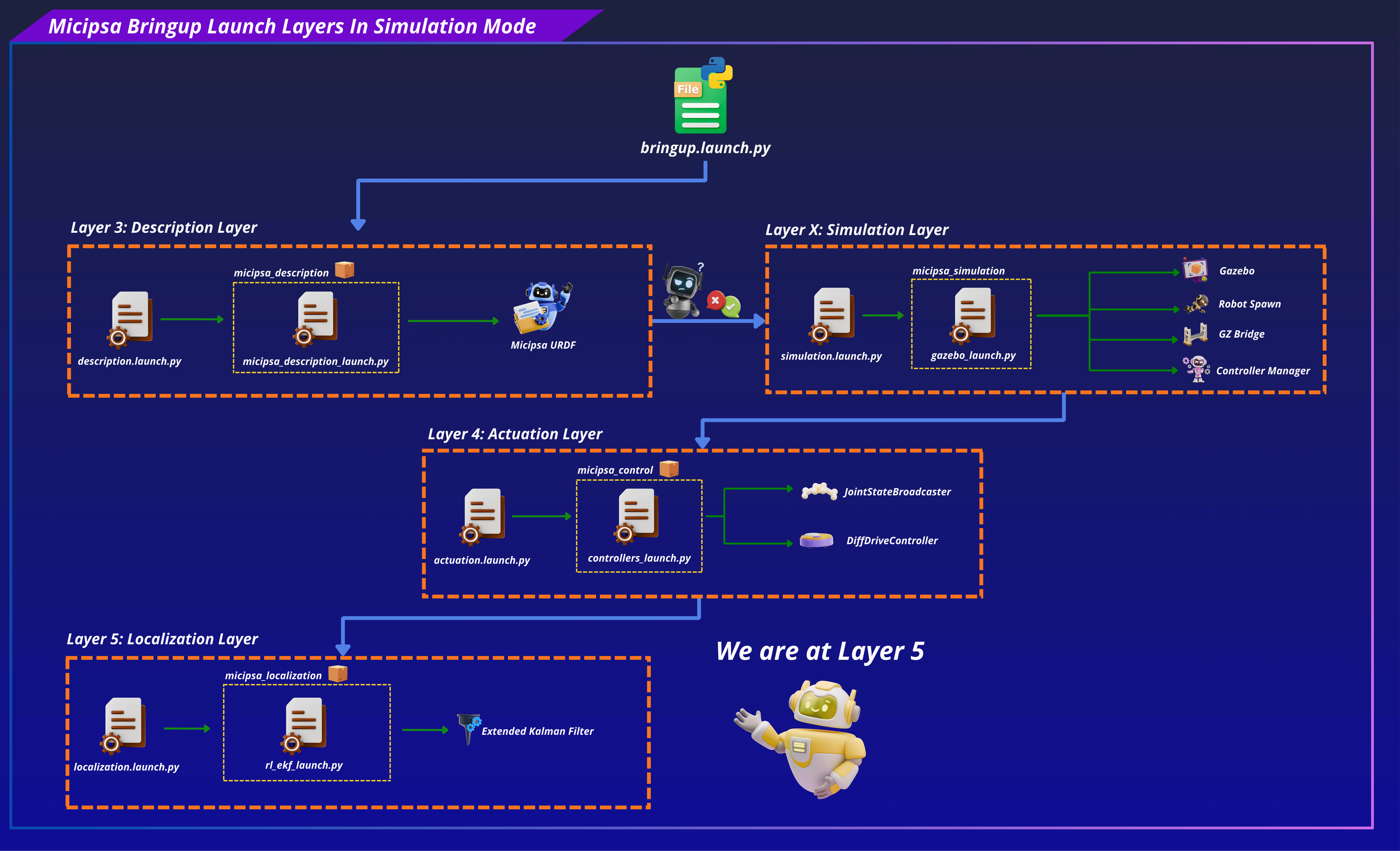
Open RViz and add the following displays:
- Fixed Frame:
odom - Odometry display subscribed to
/micipsa_base_controller/odom, shows raw wheel odometry (red arrows) - Odometry display subscribed to
/odometry/filteredshows EKF-fused estimate (green arrows) - TF display shows the live
odom → base_footprinttransform
Move the robot around to see the difference between raw odometry and filtered odometry.
Note
Red arrows show raw odometry computed from wheel encoders only. Green arrows show the EKF-filtered estimate incorporating IMU heading correction.
CLI#
Confirm filtered odometry is being published:
Confirm the odom → base_footprint TF is being broadcast:
Check that the EKF node is running and receiving inputs:
Additional Information#
Dependencies#
Build Dependencies#
These dependencies are required when building the package.
| Package | Role |
|---|---|
ament_cmake |
Build system |
ament_cmake_python |
Python package installation support within a CMake package |
Runtime Dependencies#
These dependencies are not required to build the package but are required when running it.
| Package | Role |
|---|---|
robot_localization |
Provides the ekf_node executable |
imu_filter_madgwick |
Provides the imu_filter_madgwick_node executable for hardware IMU orientation |
Test Dependencies#
Used only when running the package test suite.
| Package | Role |
|---|---|
ament_lint_auto |
Runs the standard suite of linters configured for the workspace |
ament_lint_common |
Provides the common lint configurations used by ament_lint_auto |
ament_cmake_pytest |
Python test runner for colcon |
launch_testing_ament_cmake |
Launch test integration for colcon |
launch_testing |
Framework for launch-based integration tests |
launch |
Launch API used by test descriptions |
launch_ros |
ROS-specific launch actions used by tests |
ament_cmake_ros |
Provides run_test_isolated.py for isolated launch tests |
Micipsa Packages Dependencies#
The following packages must be running before launching this package:
| Package | Role |
|---|---|
micipsa_control |
Must be running so that /micipsa_base_controller/odom is published |
micipsa_hardware or micipsa_simulation |
Must be running so that /micipsa_base/imu/data is published |
Testing#
Note
The integration test runs in Gazebo headless mode and does not require physical hardware. It requires micipsa_description, micipsa_simulation, and micipsa_control to be built in the same workspace.
Launch Integration Tests#
test/test_localization_integration_launch.py launches the full simulation localization stack, micipsa_description, micipsa_simulation (headless), micipsa_control, and micipsa_localization, and validates that:
/micipsa_base_controller/odomtopic becomes available within 90 seconds/odometry/filteredtopic becomes available within 90 seconds- A valid
nav_msgs/Odometrymessage is received on/odometry/filtered - The received message has non-empty
header.frame_idandchild_frame_idfields
The test uses polling loops with 90-second timeouts to account for Gazebo and controller startup timing.
Running Tests#
Run the integration tests:
colcon build --packages-select micipsa_localization
colcon test --packages-select micipsa_localization --ctest-args -L launch -V
colcon test-result --verbose
Run all tests:
colcon build --packages-select micipsa_localization
colcon test --packages-select micipsa_localization
colcon test-result --verbose
Clean test results between runs: