Core



Overview#
micipsa_core is a ROS-agnostic C++ library that implements the hardware abstraction layer for Micipsa. It provides all the logic needed to communicate with the microcontroller over serial, process wheel encoder counts and ingest raw IMU data without depending on any ROS 2 API. The library is designed to be linked into a ros2_control hardware component plugin (micipsa_hardware).
Architecture#
Important
The implementation of RobotBase and its components particularly the STM32 serial protocol framing in StmController, the absolute encoder count handling in DriveWheel, and the raw IMU data scaling in Imu is tightly coupled to the behavior of the Yahboom ROS development board firmware. The packet structure, function codes, checksum scheme, and data layout are all defined by how that board sends and receives data over serial. If the firmware or the underlying board changes, these classes must be reviewed and updated accordingly.
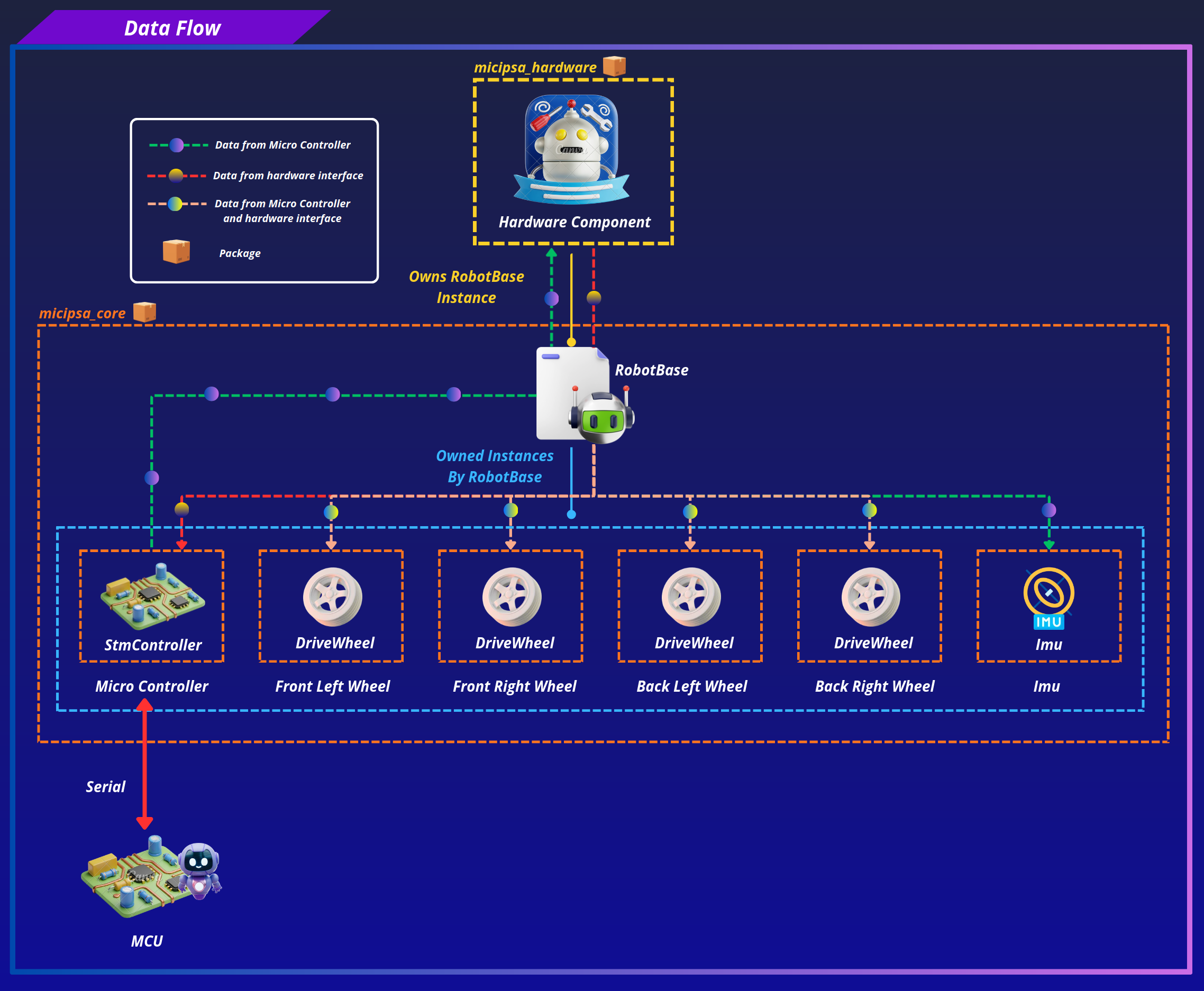
micipsa_core sits between the physical hardware and ROS 2 control.
The ros2_control hardware component plugin (from micipsa_hardware package) owns a RobotBase instance and is the only place where ROS 2 state/command interfaces are mapped onto the data structures defined here.
Update Cycle#
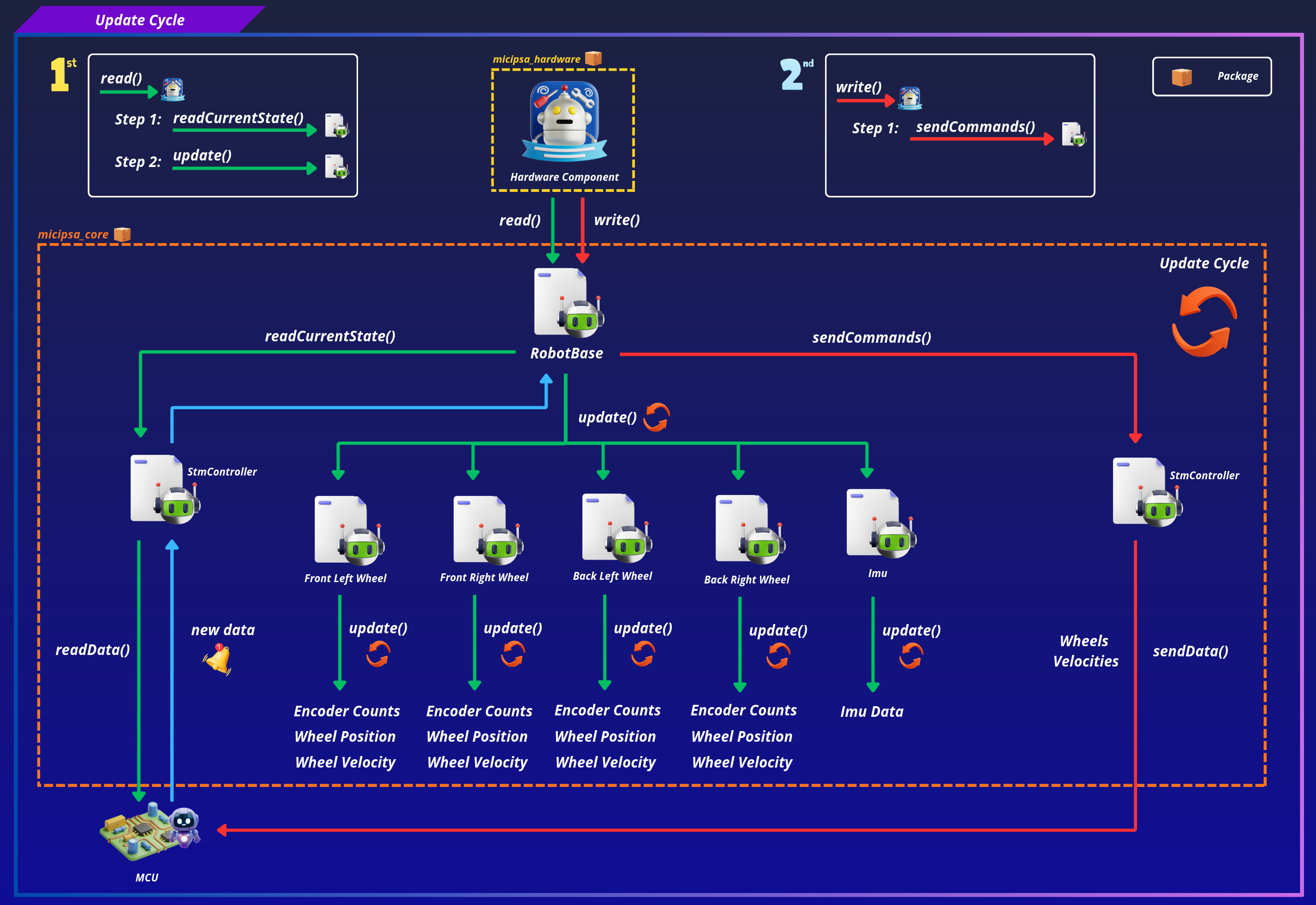
At every control loop, Micipsa Hardware Component calls the following sequence:
Read#
readCurrentState() → RobotBase asks StmController to read one packet from the serial port. The packet type field determines which component is updated:
FUNC_REPORT_ENCODERroutes to all fourDriveWheel::update()calls.FUNC_REPORT_ICM_RAWroutes toImu::update().
Write#
sendCommands() → RobotBase::prepareWheelCommands() clamps and mirrors each wheel's command velocity, then StmController::formatDriveWheelsData() encodes the four velocities as signed PWM bytes and writes the frame to the serial port.
Design Constraints#
This library enforces a strict no-ROS rule. Every class must be free of ROS headers and ROS-specific types. Any new hardware component added to this library must follow the same pattern: a self-contained class with an init() function, an update() function, and no ROS dependency.
Important
It is highly recommended to read micipsa_hardware README to understand better how the micipsa_core and micipsa_hardware packages relate to each other and how data flows to and from the robot.
ROS 2 Interface#
micipsa_core is a C++ library, it has no nodes, topics, services, or actions of its own.
Installation#
Important
Micipsa can be run in two ways: natively on a ROS 2 host, or via Docker using pre-built containerized images. Choose your approach before proceeding:
- Native build the package directly in a ROS 2 workspace. Follow requirements and the Native Install steps below.
- Docker use the Micipsa container stack, no manual workspace setup required. skip requirements section and follow Docker section.
Requirements#
Make sure that the following packages are available in your workspace:
Patching Serial Library#
Caution
If the patched serial library is already present in your workspace, skip the Patching Serial Library section. Note that the patch targets ROS 2 specifically and therefore without it the build will fail.
The wjwwood/serial library must be patched for ament before building. Clone it into your workspace:
Then follow the instructions in Patching the Serial Library to replace the catkin-based CMake and test configuration with ament-compatible equivalents.
Native Install#
Source the ROS 2 environment:
Install ROS dependencies from the workspace root:
Build the packages:
colcon build --packages-select micipsa_common
colcon build --packages-select serial
colcon build --packages-select micipsa_core
Source the install overlay:
Tip
Add source /opt/ros/jazzy/setup.bash and source ~/ros2_ws/install/setup.bash to your ~/.bashrc to avoid repeating these steps in every new terminal.
Docker#
micipsa_core package is part of Micipsa Actuation Docker image.
Tip
Reading Micipsa Docker documentation (architecture, dockerfile, docker compose,...) is strongly recommended, it covers how the Dockerfiles are structured, how images are built, how containers are orchestrated, and much more.
To build and run Micipsa Actuation Docker image, follow Micipsa Dockerfile README Build Section.
Configuration#
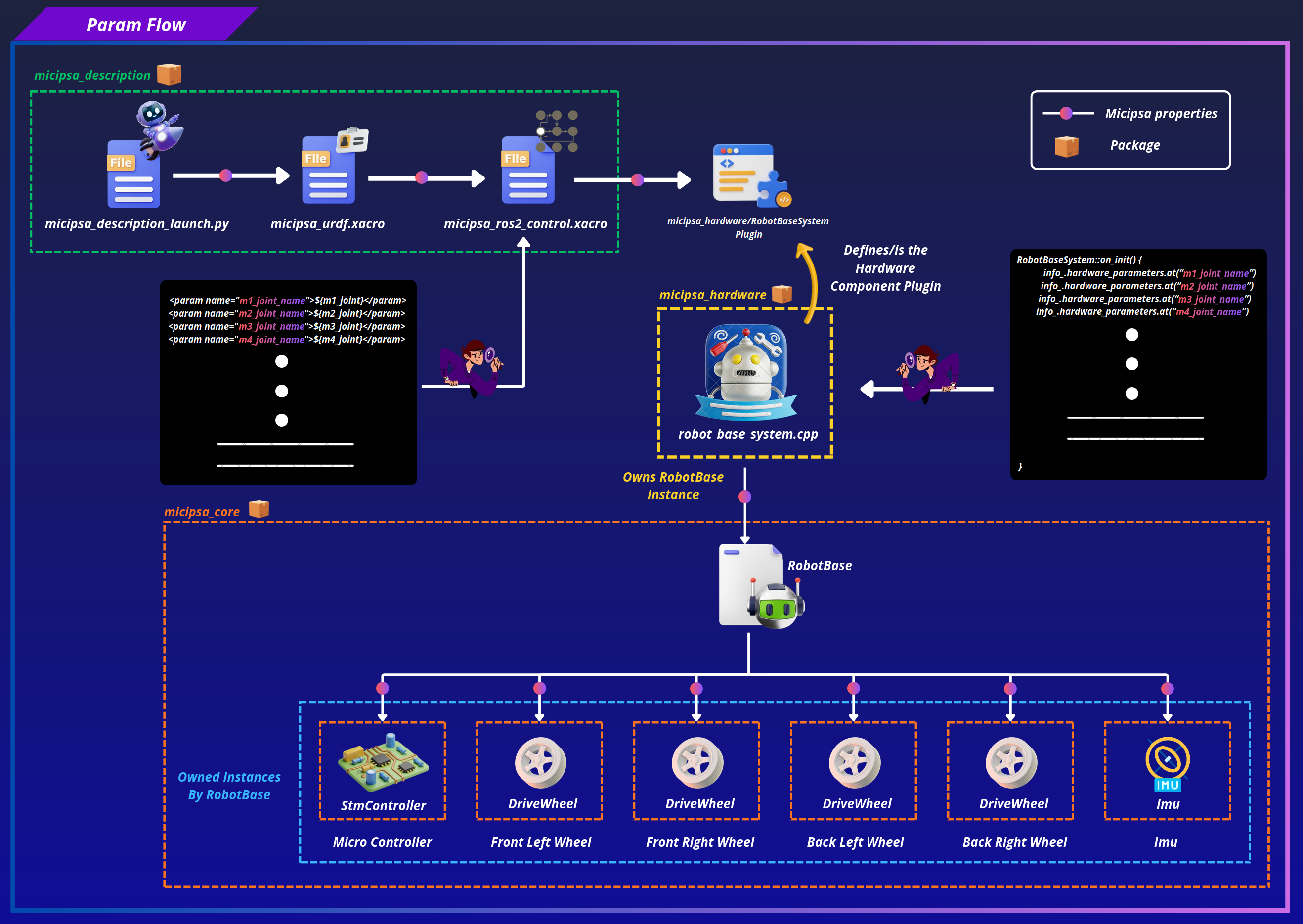
micipsa_core has no configuration files. All parameters are passed programmatically through the init() function of each class and ultimately sourced from the micipsa_hardware plugin, which reads them from the URDF ros2_control hardware component block defined in micipsa_description.
Additional Information#
Dependencies#
Build Dependencies#
These dependencies are required when building the package.
| Package | Role |
|---|---|
ament_cmake |
Build system |
ament_cmake_python |
Python package installation support within a CMake package |
Test Dependencies#
Used only when running the package test suite.
| Package | Role |
|---|---|
ament_lint_auto / ament_lint_common |
Code style and copyright linting |
Micipsa Packages Dependencies#
The launch file and integration test require the following packages to be built and available at runtime:
| Package | Role |
|---|---|
micipsa_common |
Utils files used across the Micipsa stack |
Third Party Dependencies#
| Library | Role | Source |
|---|---|---|
wjwwood/serial |
Low-level serial communication with the STM32 MCU | github.com/wjwwood/serial |
Warning
The upstream wjwwood/serial repository is catkin-based (ROS 1) and will not build with colcon out of the box. It must be patched before use. See Patching the Serial Library below.
Testing#
Note
All tests are hardware-independent. They validate protocol formatting, mathematical conversions, and state management without requiring a physical serial device or microcontroller connection. They run reliably in CI.
Unit Tests#
Each test file targets a single class. Test cases are documented directly in the source files with a description and explicit success criteria.
test_drive_wheel.cpp covers initialization to a known zero state, encoder-count-to-angle conversion, full kinematics update (position, angular velocity, linear velocity), inverted command mirroring, and command velocity clamping.
test_imu.cpp covers default state initialization (identity quaternion, zero vectors, correct covariance arrays), gyroscope and accelerometer ratio scaling via applyRatios(), Z-axis sign correction via correctAxisSigns(), orientation pass-through, and header field preservation.
test_stm_controller.cpp covers initialization and configuration storage, velocityToPWM() scaling and boundary values (including the zero max_angular_velocity safeguard), clearOutputData() frame structure and checksum, clearInputData() buffer reset, and formatDriveWheelsData() full motor frame encoding with correct headers, payload, length, and checksum.
test_robot_base.cpp covers unpack() signed 16-bit reconstruction from byte pairs, encoder report routing to all four wheels with correct kinematics, and IMU report routing with timestamp forwarding and value propagation.
Running Tests#
Build and run all unit tests:
colcon build --packages-select micipsa_core
colcon test --packages-select micipsa_core
colcon test-result --verbose
Clean test results between runs:
Tip
When adding a new class, register its test executable in CMakeLists.txt using ament_add_gtest and link it against ${PROJECT_NAME} and any class-specific dependencies, following the pattern used for test_drive_wheel and test_imu.