Bringup




Overview#
micipsa_bringup is the top-level orchestration package for the Micipsa autonomous mobile robot. It provides a single configurable entry point that sequentially brings up all robot subsystems, hardware checks, sensor drivers, robot description, actuation, localization, SLAM, navigation, perception, and behavior, as a layered, timer-sequenced launch system. The package sits at the top of the Micipsa stack and depends on every other subsystem package being available at runtime.
Architecture#
micipsa_bringup is the top-level orchestration package for the Micipsa stack. Its single entry point bringup.launch.py reads bringup_config.yaml, resolves all runtime flags, and emits a sequenced list of TimerAction wrapped GroupActions that bring up every subsystem in the correct order with the correct configs.
Deploy vs Simulation#
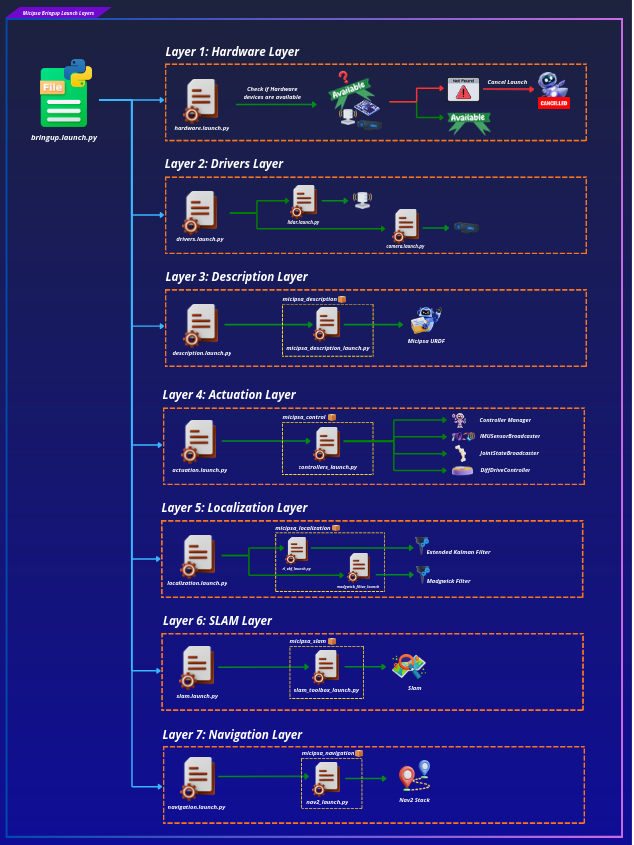
Deploy
System running on the real robot
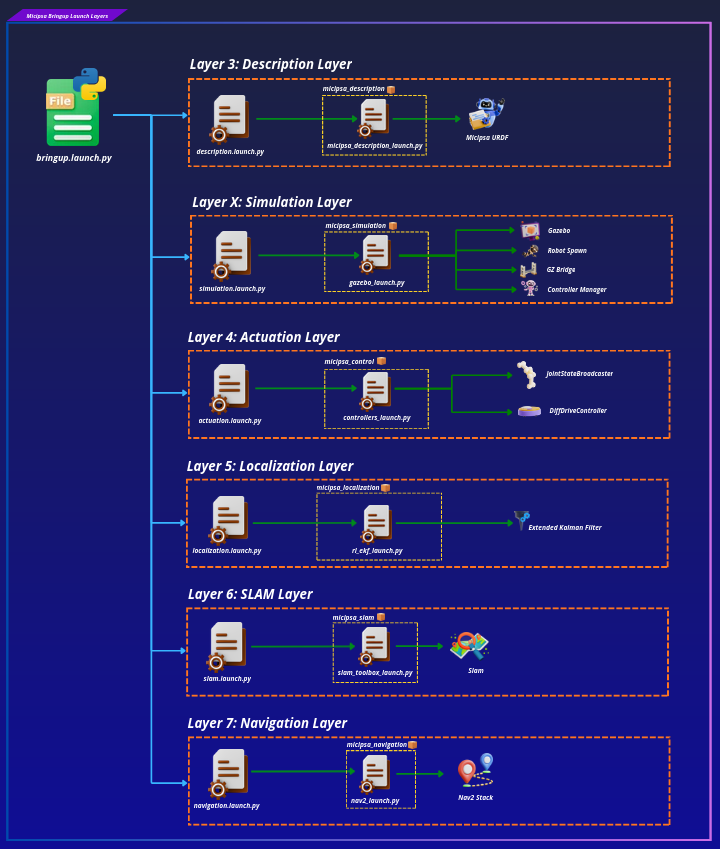
Simulation
System running in Gazebo
Launch pipeline#
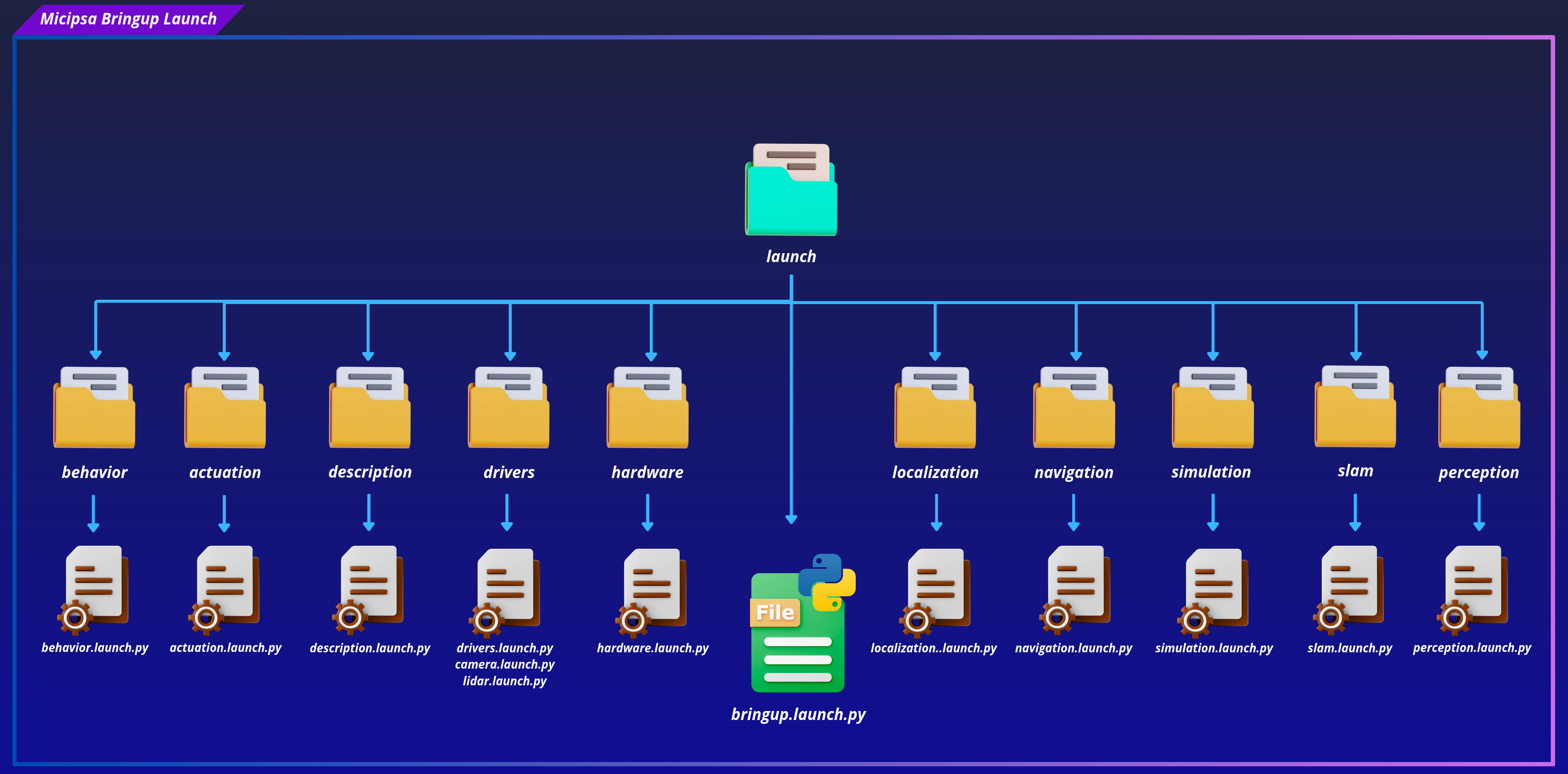
bringup.launch.py is structured around an OpaqueFunction (setup_launch) that executes at launch time, not at parse time. This gives it access to fully resolved LaunchContext values before any action is built, which is what makes runtime branching (deploy vs. simulation, mapping vs. localization) possible as plain Python conditionals rather than launch substitutions.
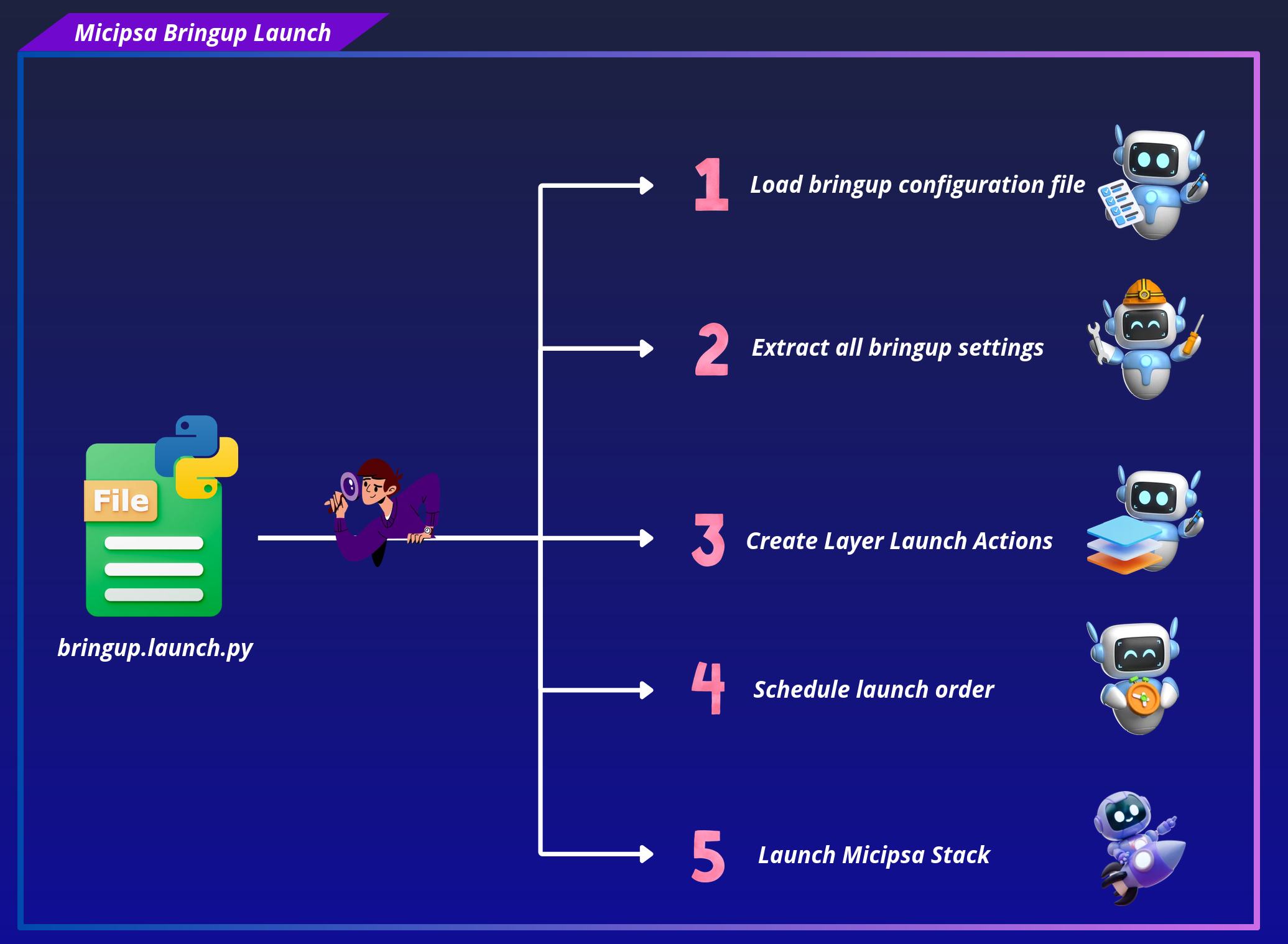
The function builds a flat list of Actions in three phases:
- Config loading — reads
bringup_config.yamlviaget_yaml_config_data()and extracts everysettingskey into typed Python variables. - Layer construction — builds one
GroupActionper layer, each carrying its ownIncludeLaunchDescriptionand aconditionwhere applicable. - Timer scheduling — wraps each
GroupActionin aTimerActionat a fixed offset and appends it to theactionslist returned toLaunchDescription.
Timer-based sequencing#
Layers are not event-driven startup order is enforced by fixed wall-clock offsets hardcoded in bringup.launch.py. Each layer fires after its predecessor has had enough time to complete initialization:
| Timer constant | Offset (s) | Layer |
|---|---|---|
T_HARDWARE |
0.0 | Layer 1 Hardware check |
T_DRIVERS |
2.0 | Layer 2 Sensor drivers |
T_DESCRIPTION |
4.0 | Layer 3 Robot description / RSP |
T_SIMULATION |
6.0 | Layer X Gazebo |
T_ACTUATION |
15.0 | Layer 4 ros2_control + twist_mux |
T_LOCALIZATION |
19.0 | Layer 5 EKF sensor fusion |
T_SLAM |
22.0 | Layer 6 SLAM Toolbox |
T_NAVIGATION |
26.0 | Layer 7 Nav2 stack |
T_PERCEPTION |
30.0 | Layer 8 AprilTag + pointcloud |
T_BEHAVIOR |
35.0 | Layer 9 Behavior tree |
The gaps are sized to the slowest-starting node in each layer. The largest gap (4 s → 15 s for actuation) covers Gazebo loading and the controller manager registering its hardware interface.
Note
This is intentionally a temporary solution. A future improvement would replace fixed offsets with lifecycle-managed nodes and event-driven sequencing via RegisterEventHandler / OnProcessStart.
Layer activation model#
Each layer has an activation condition governed by one or more runtime flags from bringup_config.yaml. The full set of conditions is:
| Layer | Condition | Controlled by |
|---|---|---|
| Layer 1 Hardware | deploy_mode=true |
deploy_mode |
| Layer 2 Drivers | deploy_mode=true |
deploy_mode |
| Layer 3 Description | Always | / |
| Layer X Simulation | deploy_mode=false |
deploy_mode |
| Layer 4 Actuation | Always | / |
| Layer 5 Localization | Always | / |
| Layer 6 SLAM | localization_mode=mapping |
localization_mode |
| Layer 7 Navigation | localization_mode=localization |
localization_mode |
| Layer 8 Perception | enable_perception=true |
enable_perception |
| Layer 9 Behavior | Always | / |
Conditions are implemented in two ways depending on the flag type:
deploy_mode: usesIfCondition/UnlessConditionon theGroupAction. These are evaluated by the launch framework at action execution time.localization_mode: evaluated insetup_launchas a plain Pythonif/else. The inactive layer becomes an emptyGroupAction(actions=[])it fires on schedule but does nothing. This avoids a doublemap→odomTF publisher conflict that would occur if both SLAM Toolbox and Nav2 AMCL ran simultaneously.enable_perception: usesIfConditionon theGroupAction, identical pattern todeploy_mode.
Config loading and forwarding#
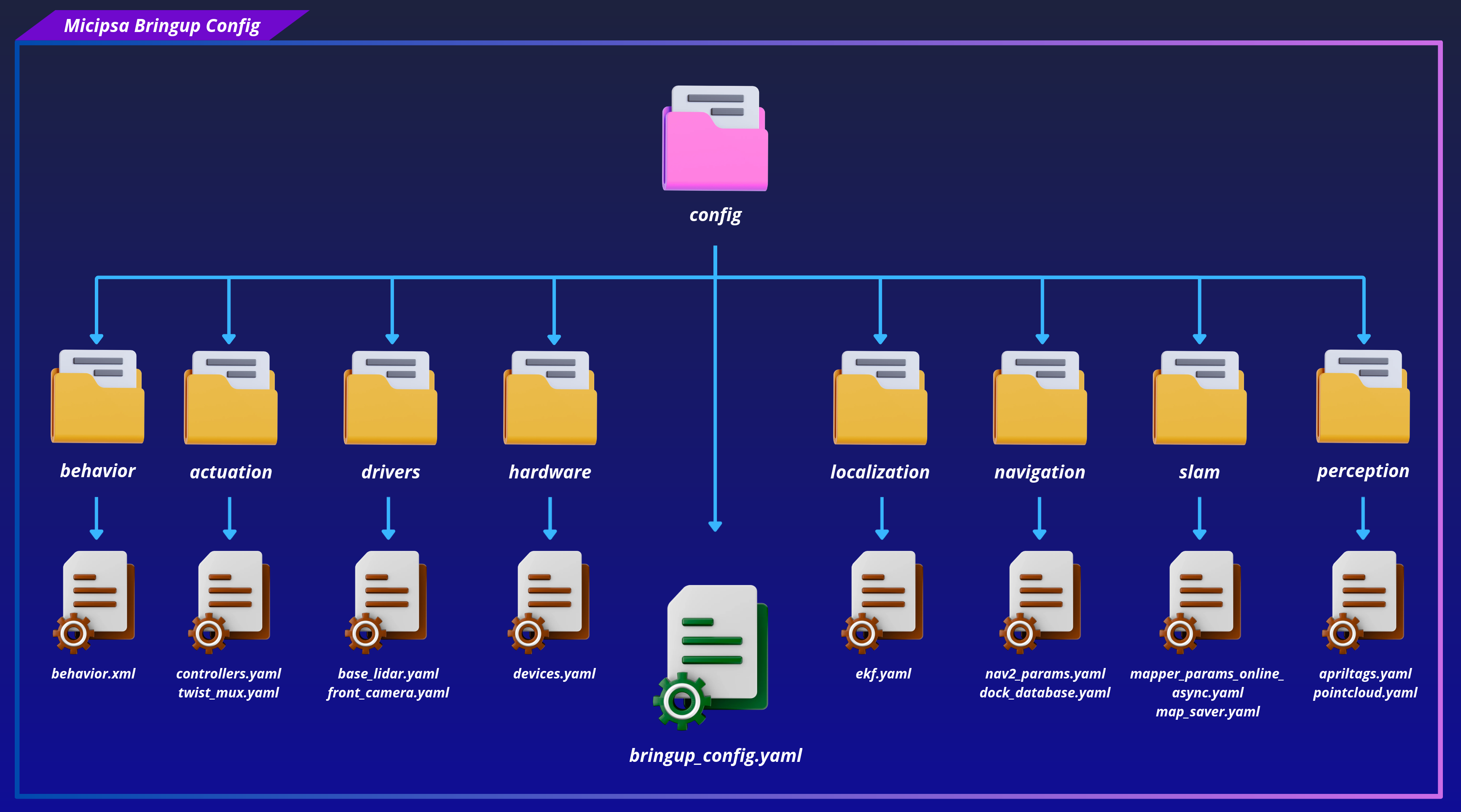
bringup.launch.py loads bringup_config.yaml directly from its own config/ directory via get_yaml_config_data(), extracts every filename from the settings block, and forwards them as launch_arguments to each layer.
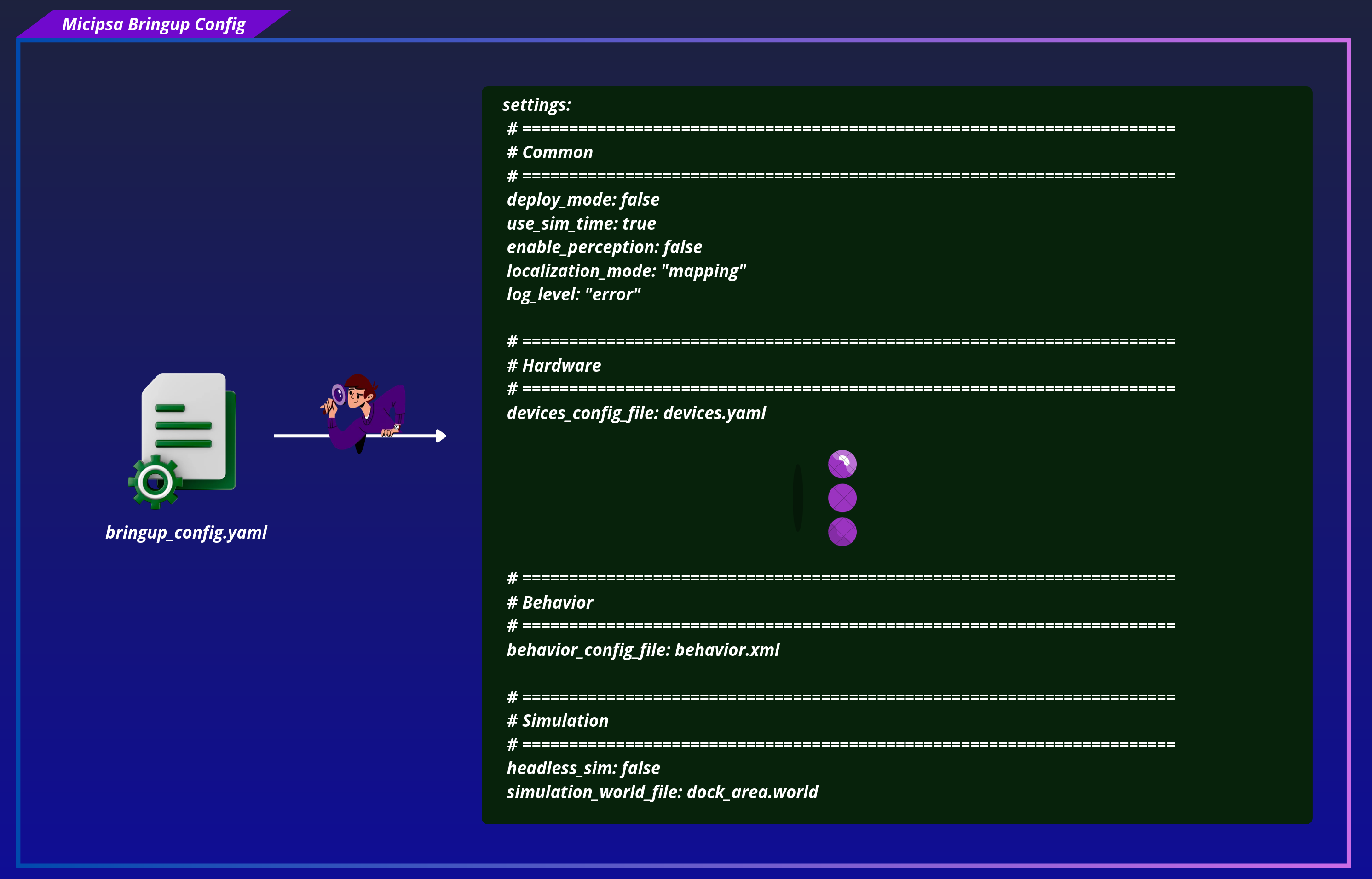
This separation means each subsystem remains independently launchable without micipsa_bringup present, and centralised config override (by placing files under micipsa_bringup/config/<subsystem>/) is still possible.
Tip
For a detailed walkthrough of how config files are resolved at runtime, refer to the Configuration section.
Micipsa Layers#
Info
Detailed specifications for each layer are located in their respective package README files.
Layer 1 | Hardware#
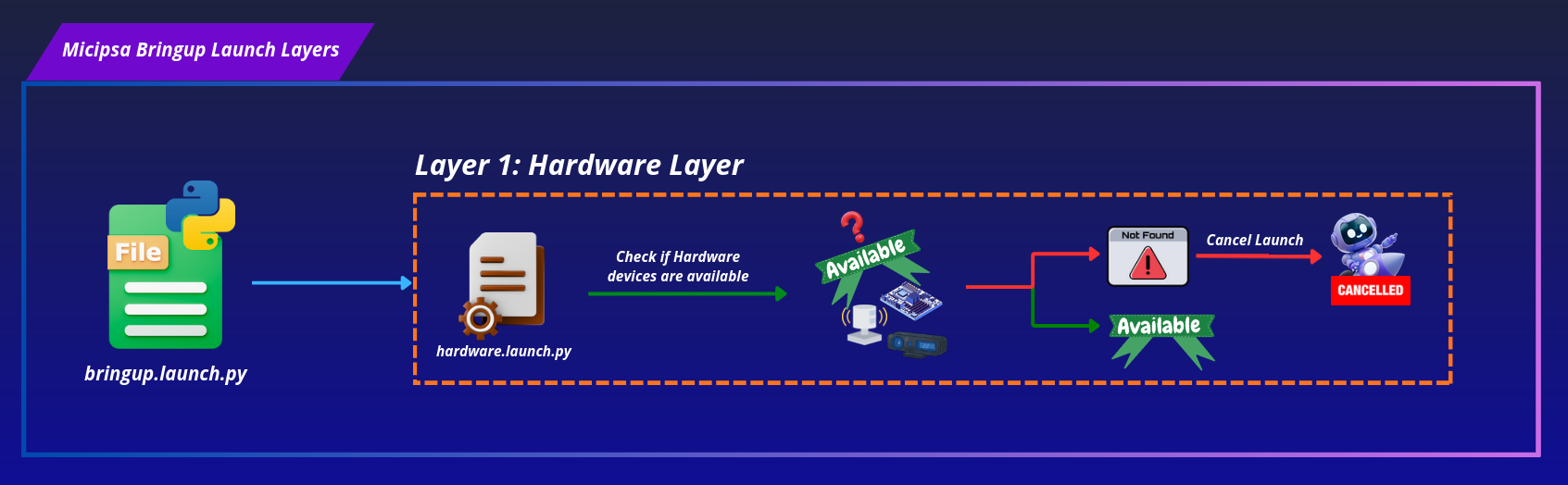
File: launch/hardware/hardware.launch.py
Condition: Runs only when deploy_mode=true.
Performs a pre-flight hardware check by iterating over every device defined in devices.yaml and verifying that its port path exists on the filesystem. Retries up to 3 times over a 30-second window before raising a fatal error. If any device is missing, the entire bringup process is aborted and the missing devices are listed in the error output.
| Parameter | Default | Description |
|---|---|---|
devices_config_file |
devices.yaml |
Config filename inside config/hardware/ |
Important
Ensure all USB and serial devices are physically connected and powered before launching. If the hardware check fails, no subsequent layers will start.
Layer 2 | Drivers#
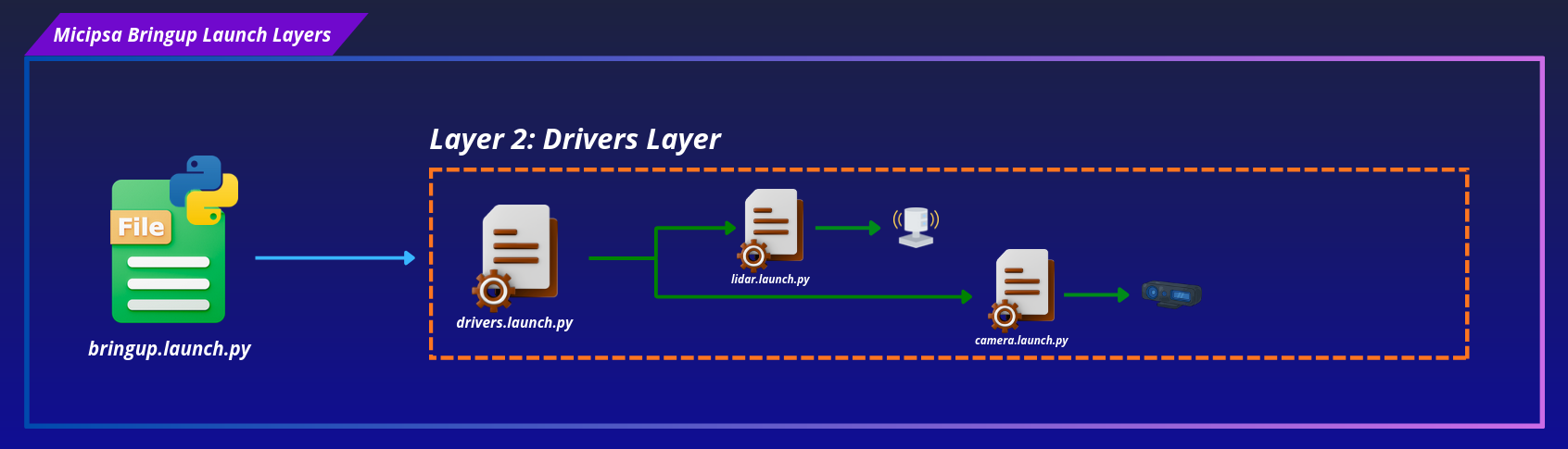
File: launch/drivers/drivers.launch.py
Condition: Runs only when deploy_mode=true.
Starts all sensor driver ROS 2 nodes. Each driver is wrapped in a GroupAction with a labeled log message for traceability. Currently includes:
- YDLIDAR base lidar via
lidar.launch.py - RealSense front camera via
camera.launch.py
| Parameter | Default | Description |
|---|---|---|
devices_config_file |
devices.yaml |
Hardware devices config file |
front_camera_config_file |
front_camera.yaml |
Camera config file |
front_camera_device_name |
front_camera |
Device name, should match name defined in devices.yaml |
base_lidar_config_file |
base_lidar.yaml |
Lidar driver config file |
base_lidar_device_name |
base_lidar |
Device name, should match name defined in devices.yaml |
Layer 3 | Description#
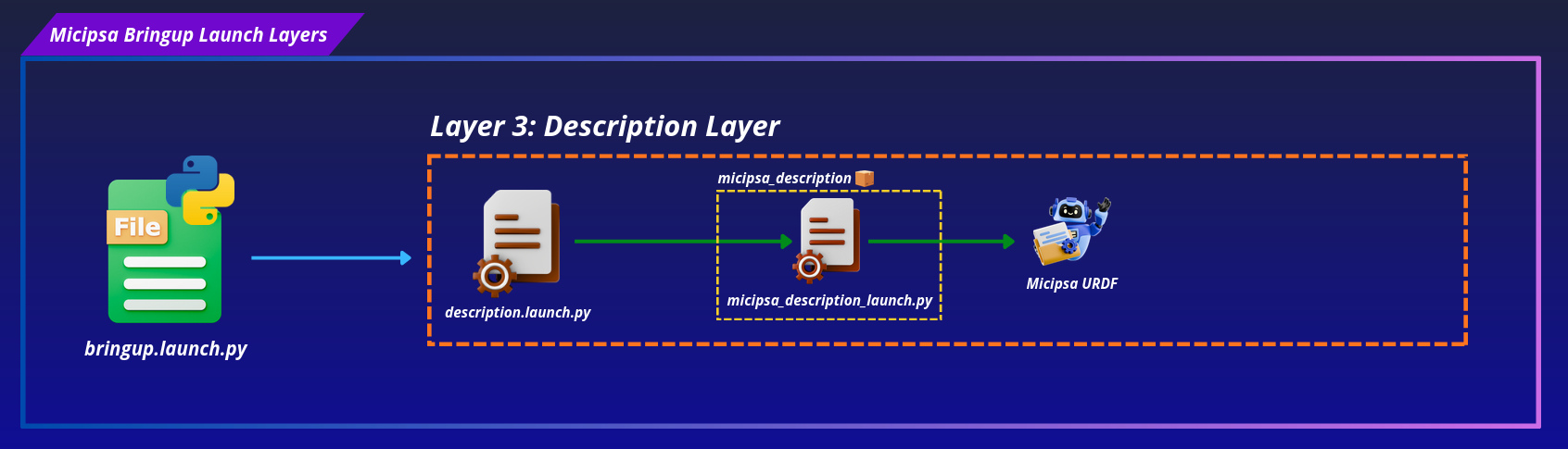
File: launch/description/description.launch.py
Condition: Always runs (simulation and deploy).
Reads the mcu.stm_board entry from devices.yaml to extract the serial port, baudrate, and timeout, then delegates to micipsa_description's launch file to start robot_state_publisher and pass the extracted config values to the deploy ros2_control hardware interface plugin Xacro block (RobotBaseSystem).
| Parameter | Default | Description |
|---|---|---|
deploy_mode |
false |
For using real robot, used to select the correct ros2_control xacro block |
use_sim_time |
true |
For using simulation time |
devices_config_file |
devices.yaml |
Hardware devices config file |
controllers_config_file |
controllers.yaml |
Forwarded to micipsa_description's launch file for the simulation Gazebo plugin |
Layer X | Simulation#
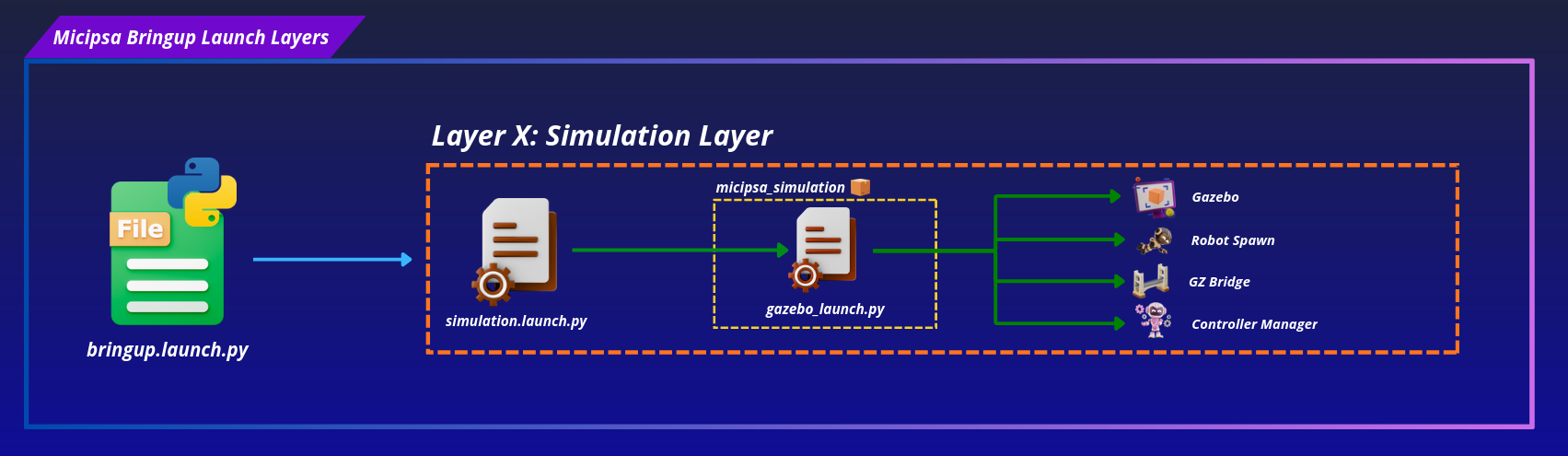
File: launch/simulation/simulation.launch.py
Condition: Runs only when deploy_mode=false.
Starts the Gazebo simulation environment. The headless flag suppresses the GUI when running on a headless machine.
Important
It will also start the controller manager as it loads the ros2_control GazeboSim hardware interface.
| Parameter | Default | Description |
|---|---|---|
headless |
false |
Starts Gazebo without the GUI when true, sourced from headless_sim in bringup_config.yaml |
simulation_world_file |
dock_area.world |
World file passed to micipsa_simulation |
Layer 4 | Actuation#
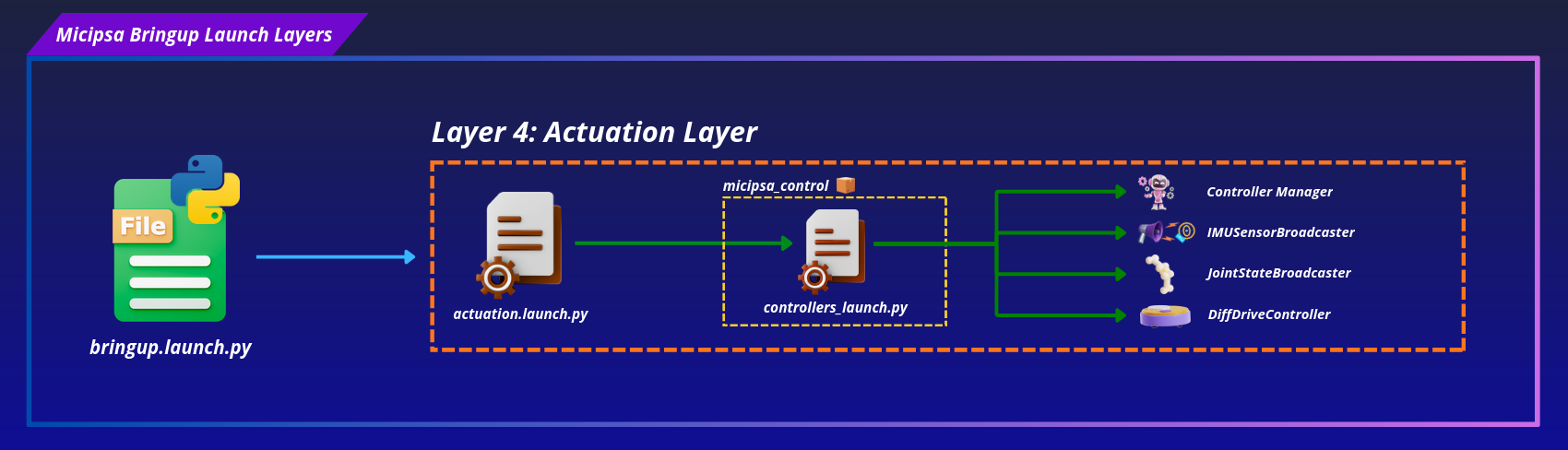
Deploy mode:
Sim mode:
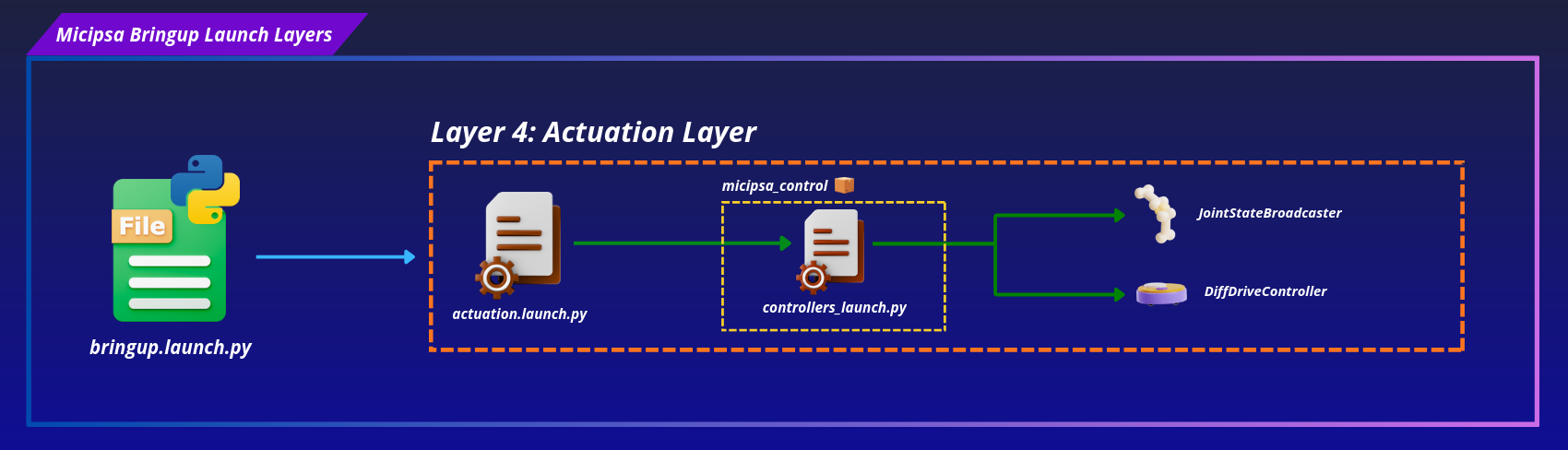
File: launch/actuation/actuation.launch.py
Condition: Always runs (simulation and hardware).
Delegates to micipsa_control's controllers_launch.py, starting the full ros2_control stack including hardware interfaces, controllers, and the twist_mux velocity multiplexer.
| Parameter | Default | Description |
|---|---|---|
deploy_mode |
false |
For using real robot, used to start or not the controller manager and IMU broadcaster |
use_sim_time |
true |
For using simulation time |
ros2_control_controllers_config_file |
controllers.yaml |
Controllers definitions and parameters |
twist_mux_config_file |
twist_mux.yaml |
Velocity command priority and source mapping |
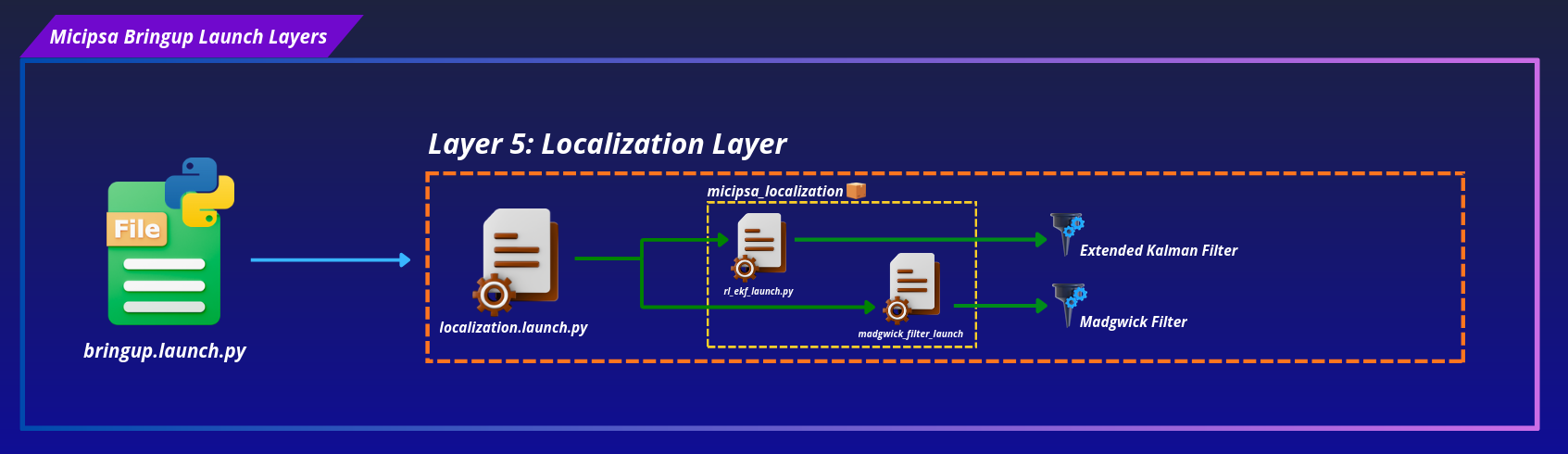
Layer 5 | Localization#
Deploy mode:
Sim mode:
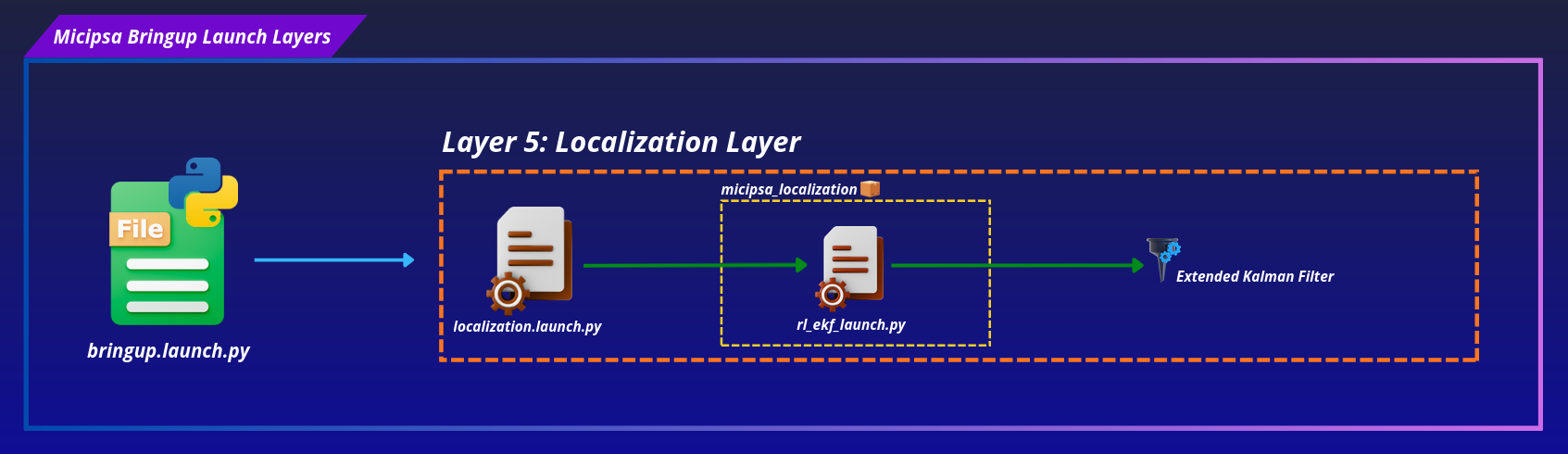
File: launch/localization/localization.launch.py
Condition: Always runs (simulation and hardware).
Starts the EKF sensor fusion node from the robot_localization package. Fuses IMU and wheel odometry data to produce a filtered odometry estimate on the odom frame.
| Parameter | Default | Description |
|---|---|---|
deploy_mode |
false |
For using real robot, used to start or not the Madgwick filter |
use_sim_time |
true |
For using simulation time |
ekf_config_file |
ekf.yaml |
EKF config file |
Layer 6 | SLAM#
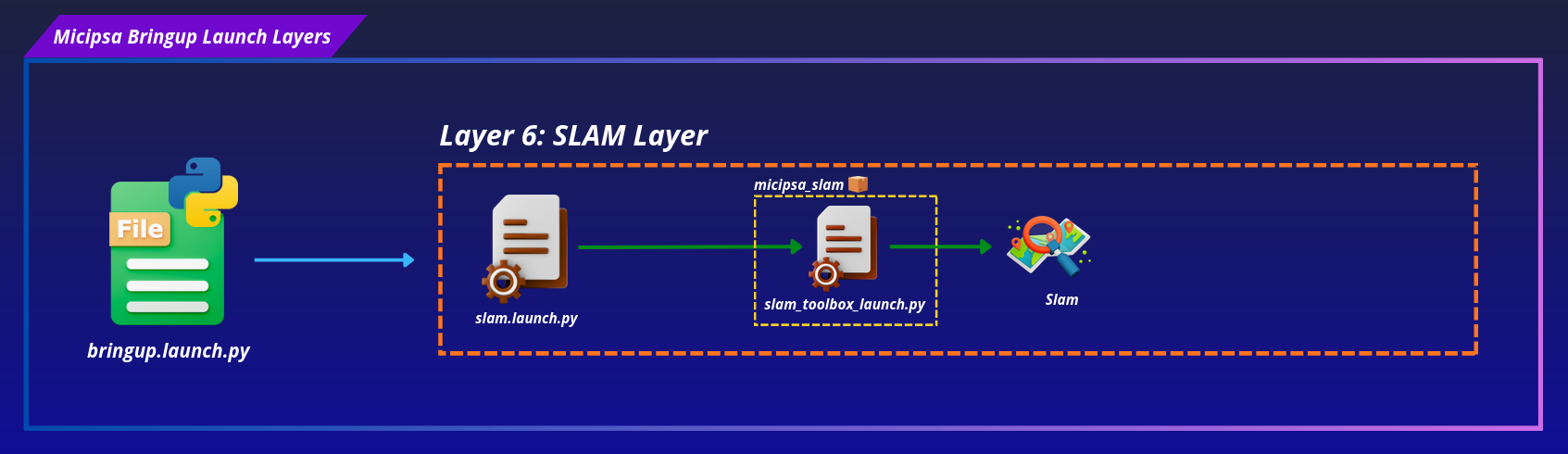
File: launch/slam/slam.launch.py
Condition: Runs only when localization_mode=mapping.
Starts SLAM Toolbox in online asynchronous mode. Subscribes to /scan and the TF tree to build and maintain an occupancy map, with map saving handled via map_saver_config_file.
| Parameter | Default | Description |
|---|---|---|
use_sim_time |
true |
For using simulation time |
slam_toolbox_config_file |
mapper_params_online_async.yaml |
SLAM Toolbox config file |
map_saver_config_file |
map_saver.yaml |
Config used by nav2_map_server's map saving node |
Layer 7 | Navigation#
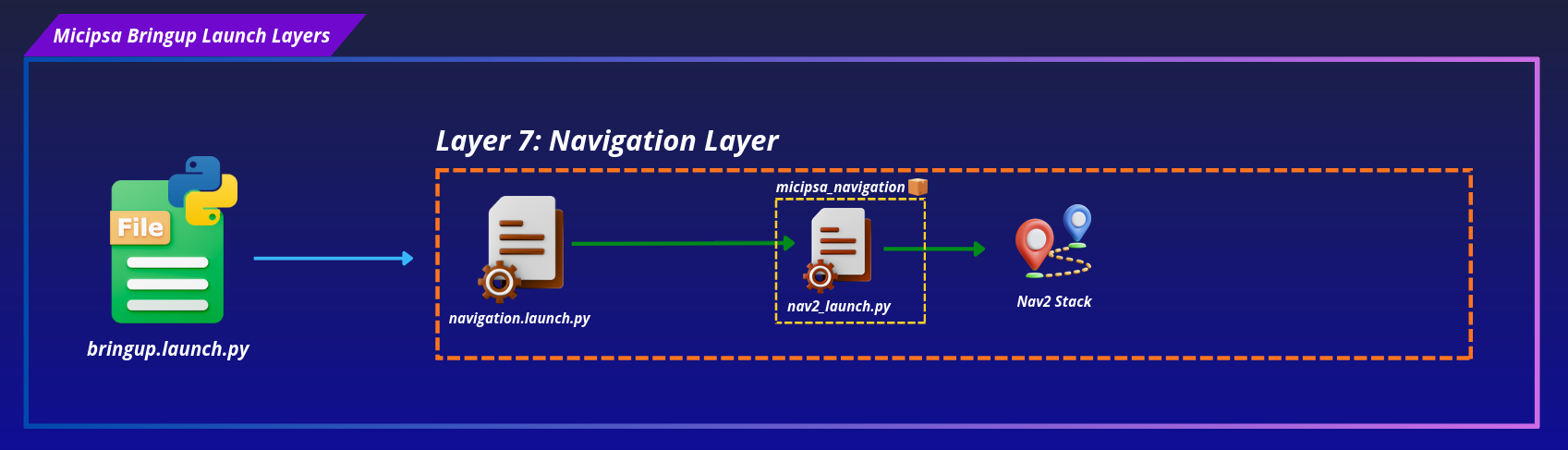
File: launch/navigation/navigation.launch.py
Condition: Runs only when localization_mode=localization.
Starts the Nav2 navigation stack against a saved map.
| Parameter | Default | Description |
|---|---|---|
use_sim_time |
true |
For using simulation time |
nav2_config_file |
nav2_params.yaml |
Nav2 stack config file |
map_file |
dock_area.yaml |
Saved occupancy map served by nav2_map_server, only meaningful in localization mode |
Important
Layers 6 and 7 are mutually exclusive. Setting localization_mode: mapping builds the SLAM GroupAction and leaves the Navigation GroupAction empty. Setting localization_mode: localization does the reverse. Running both simultaneously would cause a double map→odom TF publisher conflict, the layered structure prevents this by construction since only one of the two GroupActions is ever populated with actions.
Layer 8 | Perception#
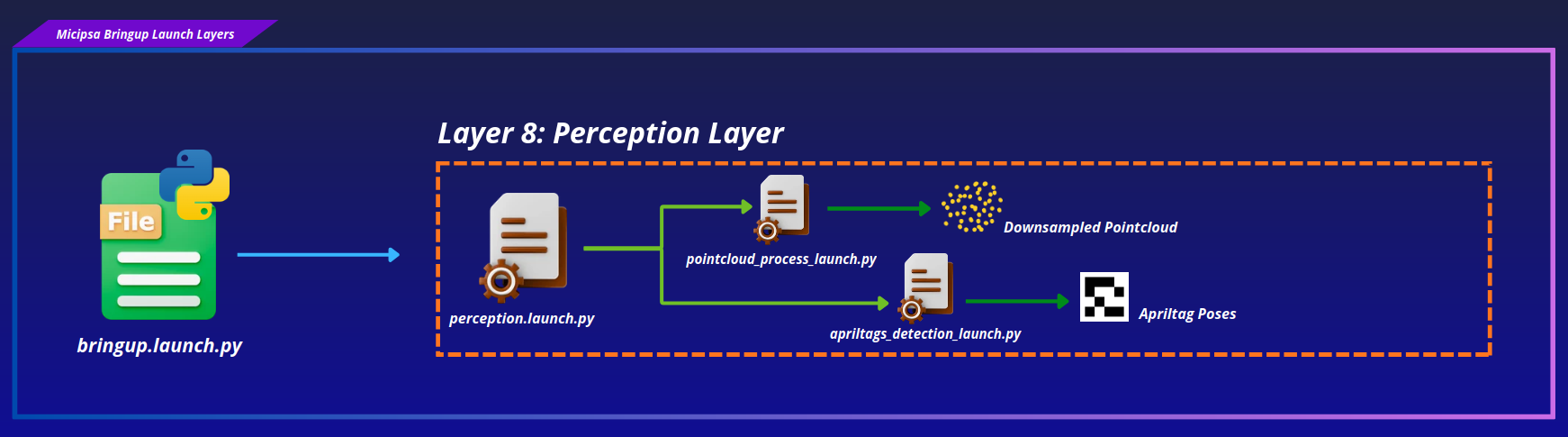
File: launch/perception/perception.launch.py
Condition: Runs only when enable_perception=true.
Delegates to micipsa_perception's launch files, starting the AprilTag detection pipeline and the pointcloud filtering pipeline.
| Parameter | Default | Description |
|---|---|---|
pointcloud_config_file |
pointcloud.yaml |
Pointcloud filtering pipeline config |
apriltags_config_file |
apriltags.yaml |
AprilTag detection and frame mapping config |
Note
enable_perception defaults to false in bringup_config.yaml. Perception is opt-in, unlike every other layer except Hardware/Drivers/Simulation, which are gated by deploy_mode rather than an independent flag.
Layer 9 | Behavior#
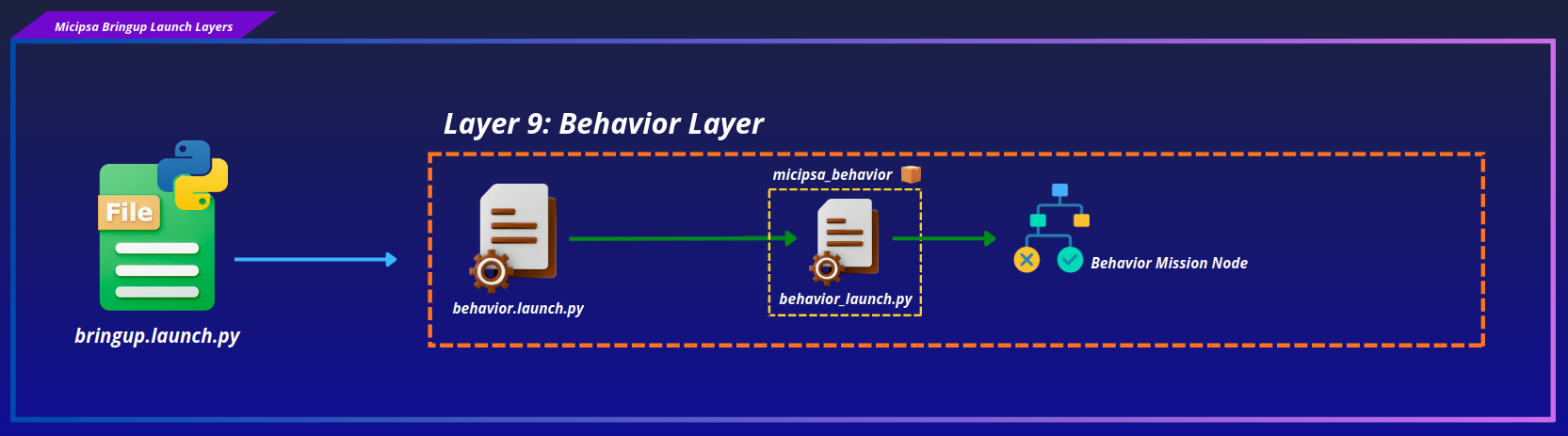
File: launch/behavior/behavior.launch.py
Condition: Always runs (simulation and hardware).
Delegates to micipsa_behavior's launch file, starting behavior_node with the configured behavior tree XML.
| Parameter | Default | Description |
|---|---|---|
use_sim_time |
true |
For using simulation time |
behavior_config_file |
behavior.xml |
Behavior tree XML file, see micipsa_behavior's README for the BT node reference |
Warning
Layer 9 is scheduled at T=35.0s and always runs, including when enable_perception=false. If the loaded behavior tree includes SelectDock/Dock/UnDock nodes that depend on the AprilTag docking pipeline's dock_pose_publisher node (started only in Layer 8), those BT nodes will fail at runtime when perception is disabled. Confirm enable_perception: true if the configured behavior_config_file relies on docking.
Installation#
Important
Micipsa can be run in two ways: natively on a ROS 2 host, or via Docker using pre-built containerized images. Choose your approach before proceeding:
- Native build the package directly in a ROS 2 workspace. Follow requirements and the Native Install steps below.
- Docker use the Micipsa container stack, no manual workspace setup required. Follow Docker Compose section.
Native Install#
Source the ROS 2 environment:
Install ROS 2 dependencies from the workspace root:
Build the packages:
Source the install overlay:
Tip
Add source /opt/ros/jazzy/setup.bash and source ~/ros2_ws/install/setup.bash to your ~/.bashrc to avoid repeating these steps in every new terminal.
Configuration#
The Micipsa stack is configured through a single file, micipsa_bringup/config/bringup_config.yaml.
Each subsystem resolves its own config file at launch time, independently, following a fixed two-step priority implemented in that subsystem's own launch file via resolve_config_path():
1. Look in micipsa_bringup/config/<subsystem>/ for the given filename
2. Fall back to <package>/config/ if not found in bringup
3. Warn and use the package default if neither is found
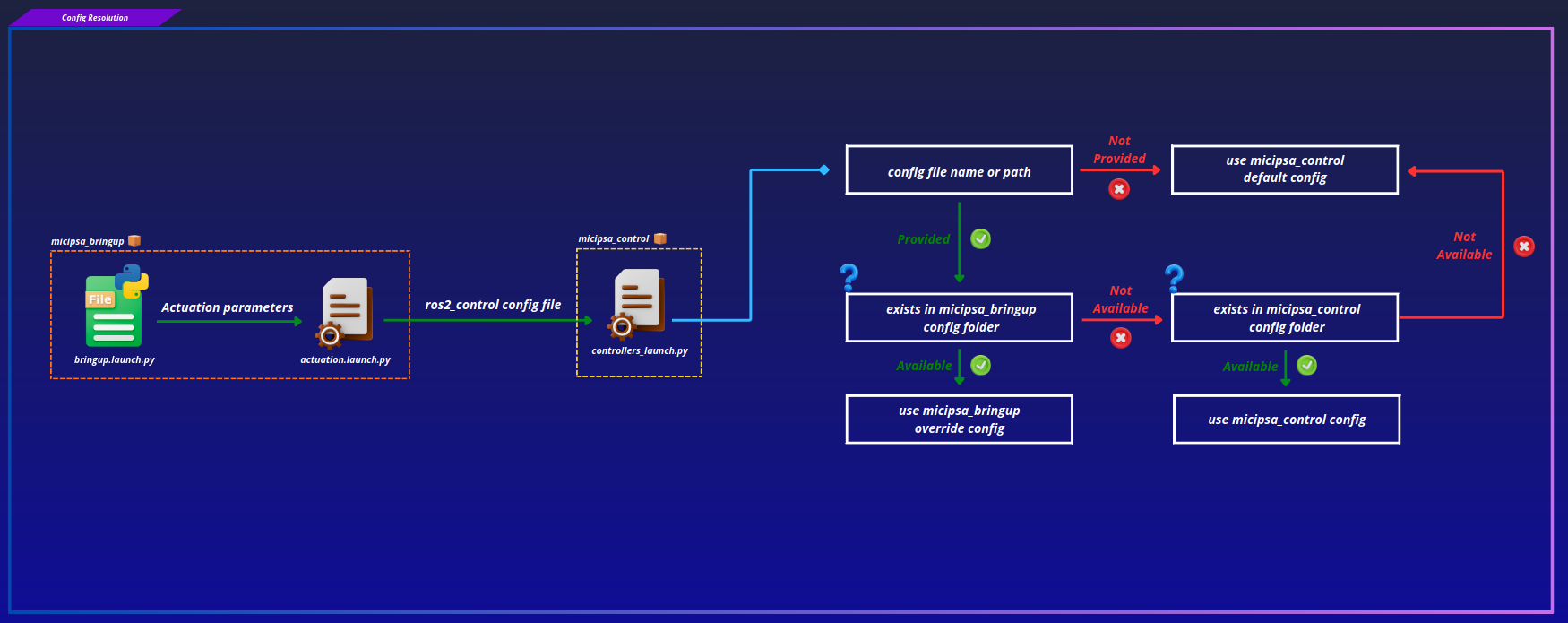
config_path = resolve_config_path(
    config_file,
    bringup_pkg_share,
    package_pkg_share,
    bringup_config_subdir="config/localization",
    calling_config_subdir="config",
)
if config_path is None:
    warn(f"Config not found, using default: '{DEFAULT_CONFIG_FILE_NAME}'")
    config_path = os.path.join(package_pkg_share, "config", DEFAULT_CONFIG_FILE_NAME)
Note
micipsa_bringup's own launch file (bringup.launch.py) does not call resolve_config_path() itself. It loads bringup_config.yaml directly via get_yaml_config_data() from this package's own config/ directory, then forwards the resolved filenames as launch arguments to each subsystem's launch file, which performs its own two-step resolution independently.
The fallback to each package's own config/ ensures every subsystem remains runnable without micipsa_bringup present.
Subsystem Configuration Files#
Each subsystem loads its parameters from a dedicated YAML (or XML, for the behavior tree) file. Filename or full path can be given and is declared in bringup_config.yaml.
settings:
  deploy_mode: false
  use_sim_time: true
  enable_perception: false
  localization_mode: "mapping" # Types: mapping, localization
  log_level: "error" # Types: info, warn, error

  devices_config_file: devices.yaml

  front_camera_config_file: front_camera.yaml
  front_camera_device_name: front_camera
  base_lidar_config_file: base_lidar.yaml
  base_lidar_device_name: base_lidar

  ros2_control_controllers_config_file: controllers.yaml
  twist_mux_config_file: twist_mux.yaml

  ekf_config_file: ekf.yaml

  slam_toolbox_config_file: mapper_params_online_async.yaml
  map_saver_config_file: map_saver.yaml

  nav2_config_file: nav2_params.yaml
  map_file: dock_area.yaml

  pointcloud_config_file: pointcloud.yaml
  apriltags_config_file: apriltags.yaml

  behavior_config_file: behavior.xml

  headless_sim: false
  simulation_world_file: dock_area.world
To use a different configuration for any subsystem, create the new file in the appropriate subdirectory of micipsa_bringup/config/ and update the corresponding entry above.
devices.yaml and Hardware Identity#
devices.yaml maps logical device names to their physical port paths:
devices:
  mcu:
    stm_board:
      port: /dev/micipsa/stm_mcu
      baudrate: 115200
      timeout: 2000

  lidars:
    base_lidar:
      port: /dev/micipsa/ydlidar_base_lidar

  cameras:
    front_camera:
      ports:
        depth:
          - /dev/micipsa/realsense_depth0
        color:
          - /dev/micipsa/realsense_color0
The paths under /dev/micipsa/ are stable symlinks created by udev rules, they do not change between reboots or USB re-plugs. Driver launch files never hardcode a port, they receive a logical device name (e.g. base_lidar) from bringup_config.yaml and resolve the actual port at runtime from devices.yaml.
Usage#
Simulation#
Set deploy_mode: false and use_sim_time: true in bringup_config.yaml, then:
To build a map, ensure localization_mode: mapping. Once the map is saved, switch to localization_mode: localization and relaunch for Nav2.
To also bring up the AprilTag and pointcloud pipelines, set enable_perception: true.
Deploy#
Warning
When deploy_mode: true, the hardware check runs first. All USB and serial devices must be connected and powered before launching. A failed hardware check aborts the entire bringup.
Set deploy_mode: true and use_sim_time: false in bringup_config.yaml, then:
Individual Subsystem Launch#
Each layer can be launched independently for development or debugging:
# Hardware check only
ros2 launch micipsa_bringup hardware.launch.py

# Drivers only
ros2 launch micipsa_bringup drivers.launch.py

# Description only
ros2 launch micipsa_bringup description.launch.py deploy_mode:=false use_sim_time:=true

# Simulation only
ros2 launch micipsa_bringup simulation.launch.py headless:=false

# Actuation only
ros2 launch micipsa_bringup actuation.launch.py deploy_mode:=false use_sim_time:=true

# Localization only
ros2 launch micipsa_bringup localization.launch.py use_sim_time:=true

# SLAM only
ros2 launch micipsa_bringup slam.launch.py use_sim_time:=true

# Navigation only
ros2 launch micipsa_bringup navigation.launch.py use_sim_time:=true

# Perception only
ros2 launch micipsa_bringup perception.launch.py use_sim_time:=true

# Behavior only
ros2 launch micipsa_bringup behavior.launch.py use_sim_time:=true
Additional Information#
Dependencies#
Build Dependencies#
These dependencies are required when building the package.
| Package | Role |
|---|---|
ament_cmake |
Build system |
ament_cmake_python |
Installs the utils Python package from ../../common/utils |
micipsa_common |
Provides resolve_config_path() and related launch utilities used across the stack, declared with <depend> |
Test Dependencies#
Used only when running the package test suite.
| Package | Role |
|---|---|
ament_lint_auto / ament_lint_common |
Code style and copyright linting |
Troubleshooting#
Hardware check fails at startup#
The hardware layer prints the missing devices and raises a RuntimeError, aborting the entire bringup.
Common causes:
- Device is not connected or not powered
- Device was assigned a different port than configured in
devices.yaml
If udev rules were applied:
Reload udev rules without rebooting:
Driver fails to start#
The device may have become unavailable between Layer 1 and Layer 2. Verify the device is still present with ls /dev/micipsa/. Also check that the driver ROS 2 package is installed:
Launch the driver in isolation to isolate the error:
A layer starts before its dependency is ready#
Symptom: A later layer (e.g. Actuation at T=15.0s) fails or behaves erratically on a fresh launch, but works fine when launched standalone after the rest of the stack is already up.
Cause: Layer timing in bringup.launch.py is fixed-delay, not readiness-based. If a dependency (most commonly Gazebo physics during Layer X) takes longer to initialize than the gap before the next layer fires, the next layer starts against a not-yet-ready system.
Fix: There is currently no readiness-based alternative, this is a known limitation noted directly in the source as a temporary solution. If this happens consistently on your hardware, consider widening the relevant T_* delay constants in bringup.launch.py for the affected transition.
Behavior layer fails when perception is disabled#
Symptom: behavior_node logs dock_pose_publisher parameter service unavailable shortly after Layer 9 starts.
Cause: The loaded behavior_config_file includes SelectDock/Dock/UnDock BT nodes that depend on the AprilTag docking pipeline's dock_pose_publisher node, which only starts when enable_perception: true. Layer 9 always runs regardless of enable_perception.
Fix: Set enable_perception: true in bringup_config.yaml if the configured behavior tree relies on docking, or switch behavior_config_file to a tree that doesn't require the perception pipeline.