Architecture
Systemd#
systemd is Linux's system and service manager. It is the first process started by the kernel at boot (PID 1), and it is responsible for starting, stopping, and supervising every other background process on the machine, including bringing up the network, mounting filesystems, and launching user-defined services.
Everything systemd manages is a unit. The two unit types relevant to Micipsa are:
- Service (
.service) defines how a single process is launched, restarted on failure, and supervised. A service specifies what to run and how to run it (as which user, with which working directory, with which restart policy, and so on). - Target (
.target) a synchronization point with no process of its own. A target groups related units together and lets other units depend on "this group being ready" without depending on each individual member. Targets are howsystemdexpresses milestones in the boot process (network-online.target,multi-user.target, etc.) rather than individual steps.
systemd starts units according to a dependency graph, not a fixed script. Each unit declares its own relationships to others:
Requires=a hard dependency; if the required unit fails, this one is not started.After=/Before=ordering only, with no implication of success or failure.Wants=a soft dependency, the wanted unit is started alongside this one, but its failure does not block this one from starting.
Micipsa's systemd Architecture#
Powering on the robot is all that is required to bring the entire Micipsa stack online. Once the system has been provisioned, the chain below runs automatically, with no manual intervention, every time the robot boots.
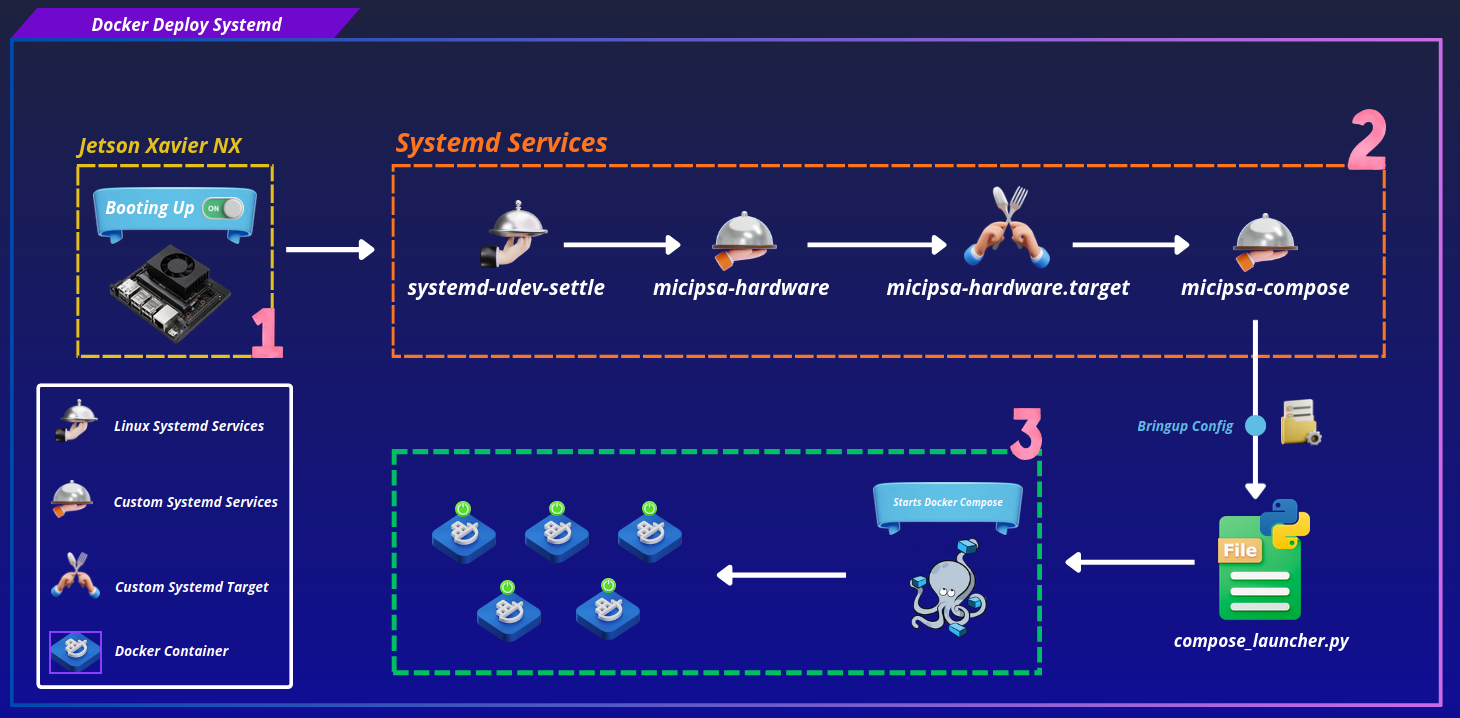
Three custom units make up this chain: micipsa-hardware.service, micipsa-hardware.target, and micipsa-compose-stack.service.
systemd-udev-settle.service#
A built-in Linux service that waits until the kernel has finished processing all hardware events, so that device nodes (such as /dev/ttyUSB0 or /dev/video0) are fully visible in the filesystem before anything else runs. Without this wait, a service starting immediately at boot could try to open a device the kernel hasn't finished registering yet, causing a spurious failure that would otherwise look like a hardware fault.
micipsa-hardware.service#
Runs Micipsa's own hardware validation, confirming that the LiDAR, camera, and microcontroller are actually present and responding, not just that their device nodes exist. If validation fails, this service exits with a non-zero code, and everything downstream is blocked.
micipsa-hardware.target#
An explicit synchronization point between hardware validation and stack startup, deliberately placed between micipsa-hardware.service and micipsa-compose-stack.service rather than chaining the two services directly together.
Using a target as an intermediary keeps the dependency relationship clean and makes it easy to add other services that must also wait for hardware to be ready, they simply depend on micipsa-hardware.target, without touching the existing chain.
micipsa-compose-stack.service#
Launches the full Docker Compose stack (Docker containers). It declares a hard dependency on micipsa-hardware.target, which in turn depends on micipsa-hardware.service so enabling this one service is enough to pull the entire chain in automatically.
Failure behavior#
If hardware validation fails, micipsa-hardware.service exits with a non-zero code. Because micipsa-compose-stack.service declares Requires=micipsa-hardware.target, systemd refuses to start the Docker stack and surfaces the failure directly in the journal (journalctl -u micipsa-hardware.service) the robot fails safe, with a clear diagnostic trail, rather than attempting to run navigation and control software against hardware that was never confirmed present.
Installation#
Important
Both installation methods are equivalent and produce the same result.
Script installer is the recommended approach
If you wish to know more about Micipsa's systemd units, see systemd services docmentation.
Script Installer#
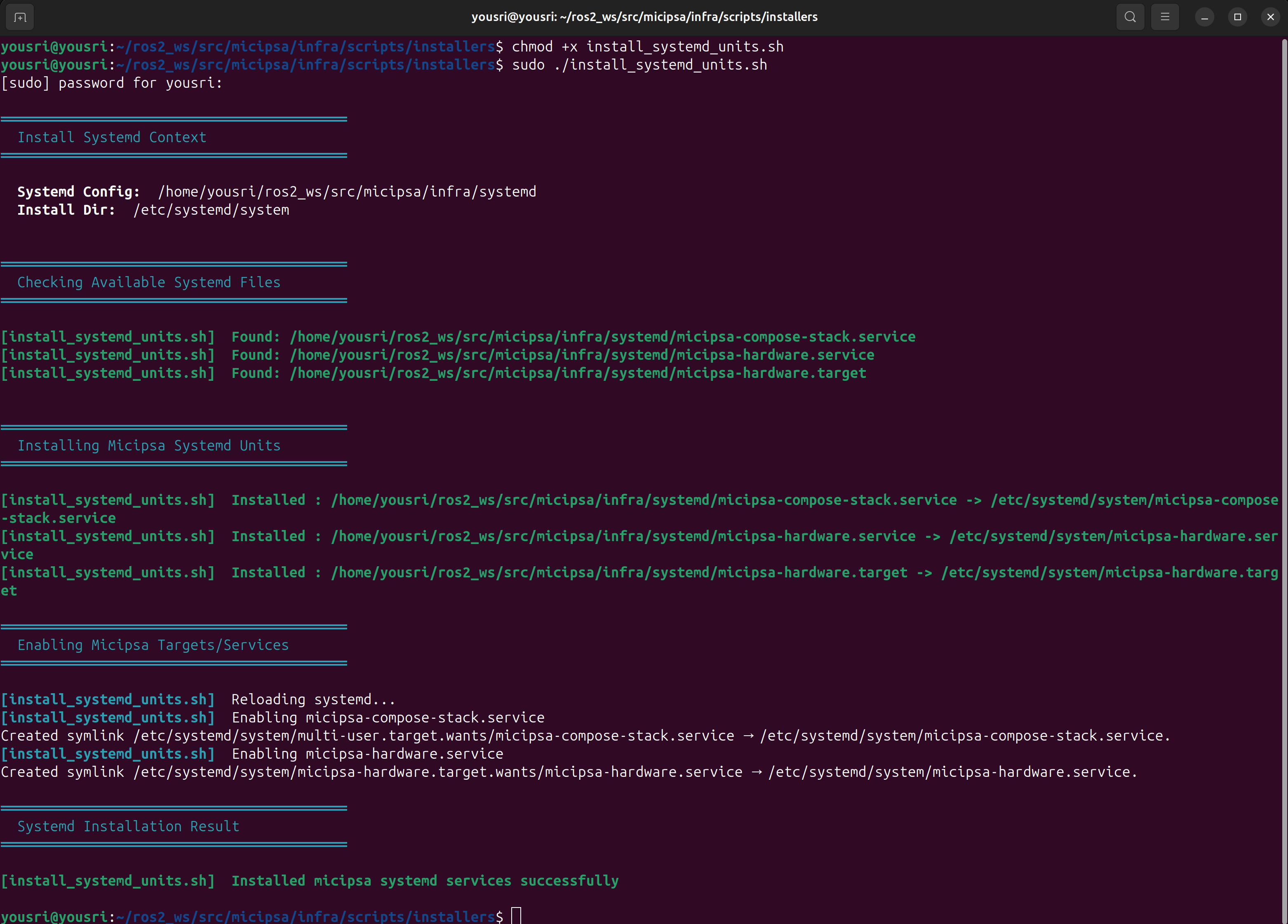
To automatically apply the provided systemd units, execute the installation script found in the infra/scripts/installers folder:
The script performs the following steps in order:
- Validates that the systemd source directory exists and contains
.service/.targetfiles - Installs each unit file to
/etc/systemd/system/with644permissions - Reloads the systemd daemon (
systemctl daemon-reload) - Enables all
.serviceunits found in the source directory
Manual Install#
# Install unit files
sudo install -m 644 systemd/micipsa-hardware.service  /etc/systemd/system/
sudo install -m 644 systemd/micipsa-hardware.target   /etc/systemd/system/
sudo install -m 644 systemd/micipsa-compose-stack.service    /etc/systemd/system/

# Reload and enable
sudo systemctl daemon-reload
sudo systemctl enable micipsa-hardware.service
sudo systemctl enable micipsa-compose-stack.service
Uninstall#
Script Uninstaller#
Note
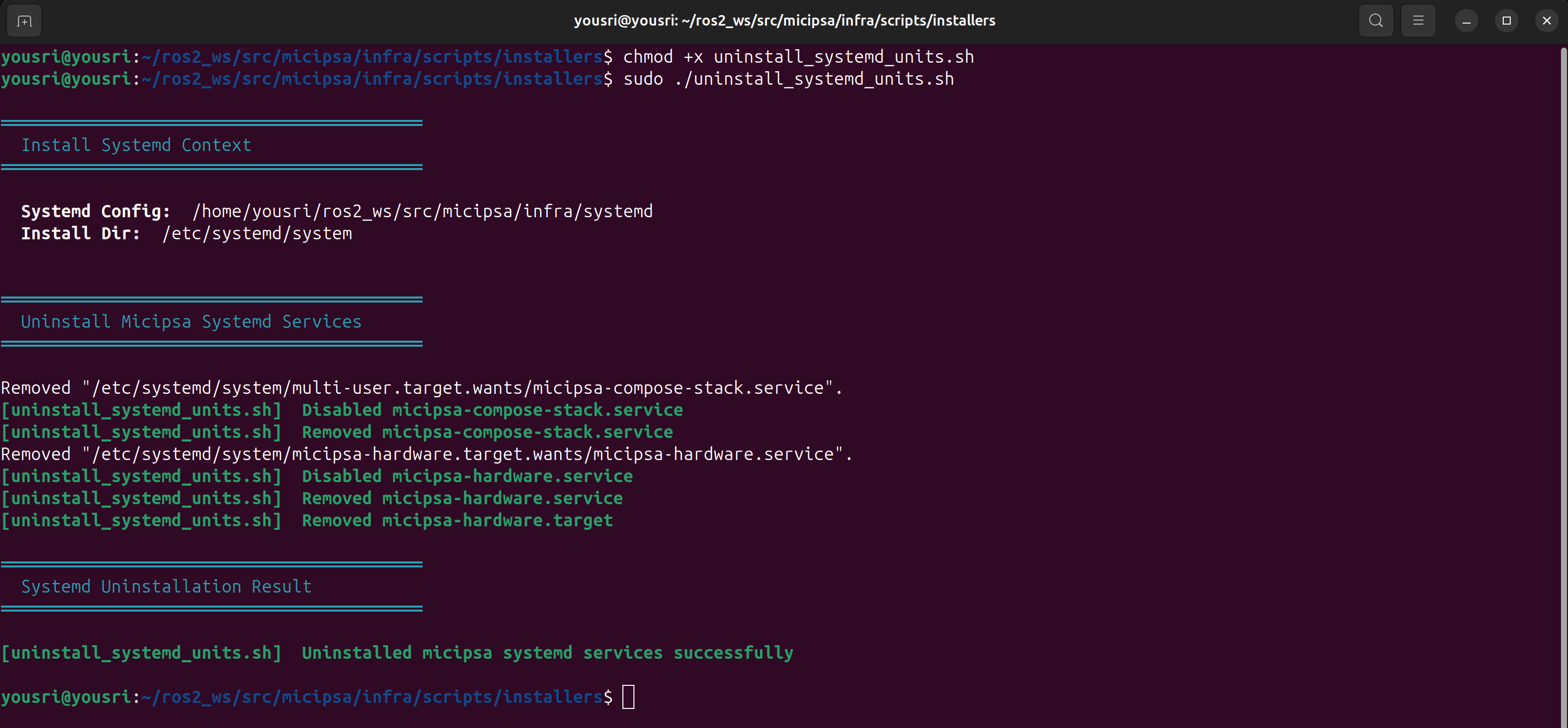
The uninstaller script reverts all changes made by the installer.
Using the uninstaller script is the recommended removal method.
Manual Uninstall#
# Stop and disable all units
sudo systemctl stop  micipsa-compose-stack.service micipsa-hardware.service
sudo systemctl disable micipsa-compose-stack.service micipsa-hardware.service

# Remove unit files and reload
sudo rm /etc/systemd/system/micipsa-hardware.service
sudo rm /etc/systemd/system/micipsa-hardware.target
sudo rm /etc/systemd/system/micipsa-compose-stack.service
sudo systemctl daemon-reload
sudo systemctl reset-failed