Overview


Robot Setup#
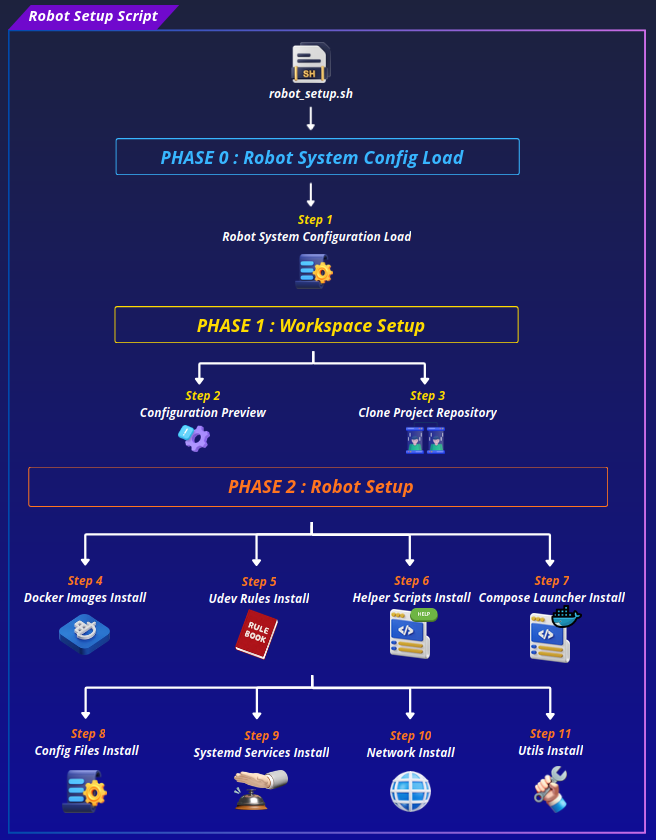
robot_setup.sh script is the top-level orchestrator for setting up a Micipsa robot from scratch on Ubuntu 24.04 or Jetson/JetPack. It starts by loading the robot's system config, then prints a full preview of all the settings it's about to use (paths, repo info, install directories, network buffer sizes, and so on) and asks for confirmation before doing anything.
Once confirmed, it clones the Micipsa repo into the ROS2 workspace, or updates it in place if it's already there, then runs through a sequence of sub-installer scripts that handle Docker images, udev rules, helper scripts, the Docker Compose launcher, config files, systemd services, network tuning, and utility files.
It requires root, and it accepts a --branch/-b flag to control which git ref gets cloned.
Prerequisites#
Before running the script, make sure the following are in place:
- The machine has a working internet connection
- You have an ssh key and can clone Git Repositories.
- You cloned Micipsa Git Repository
- Enough free space available for building docker images
Note
The script installs Docker itself if it is missing.
Quick Start#
Robot Setup#
Important
The script must be run as root (sudo)
If docker images need to be built from scratch
- Expected duration: 30-60 minutes
If docker images are already built:
- Expected duration: 5 - 10 secondes
First copy or download the robot setup script.
Make the script executable:
Execute robot setup script:
If you wish to clone a specific branch instead of the main branch: