Run Micipsa Stack
Run#
Important
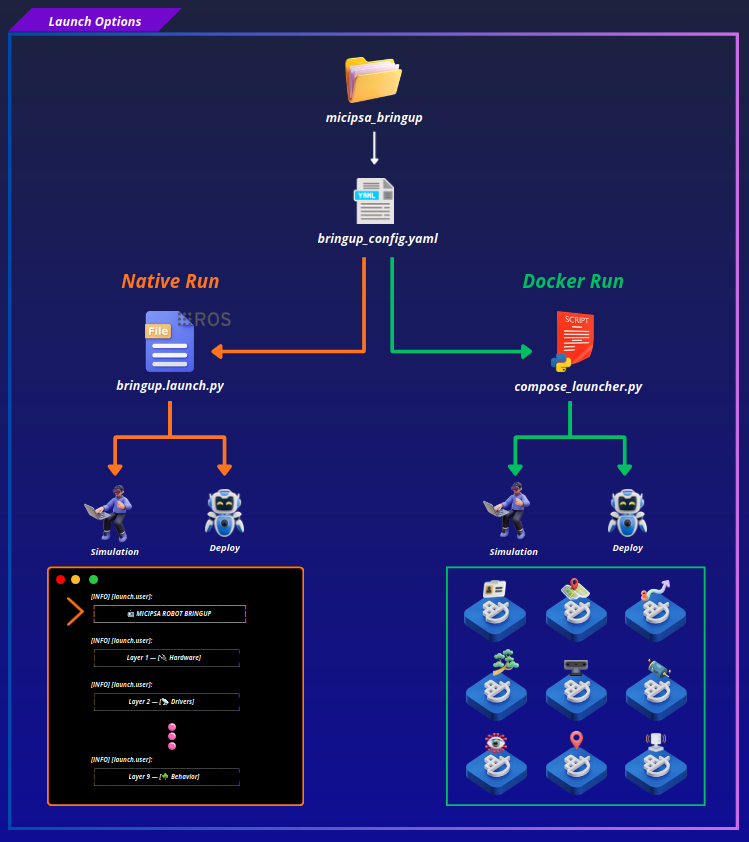
Micipsa can be run using either a native ROS 2 workspace or a Docker-based containerized stack.
Before continuing, choose the workflow that best fits your setup:
- Native: Run the packages directly in a ROS 2 workspace. Follow Native Section instructions.
- Docker (recommended): Run the software stack using Docker Compose. Follow Docker Section instructions.
Both workflows support simulation and deployment on the real robot.
Native#
Important
Before proceeding, ensure you have completed the Native build by following Micipsa Build Instructions.
Source the workspace:
Launch Micipsa Stack:
By default this launches in simulation and slam mode. To run on the real robot, you must edit the bringup config file deploy_mode and use_sim_time settings as follows:
For detailed information on configuring and modifying the robot settings, please refer to the Micipsa Bringup Configuration guide.
Docker#
Important
For details on compose_launcher.py, see the Compose Launcher Documentation.
For robot configuration, see the Micipsa Bringup Configuration guide.
Simulation#
Deploy#
Stop Docker Containers#